SKuma.49
Associate
October 30, 2023
Solved

STM32H747I-DISCO Board (MB1166-A09) unable to receive UART data on Tera Term or PuTTY

  • October 30, 2023
  • 2 replies
  • 3130 views

I have a STM32H747I-DISCO board and i have been trying to transmit some data via UART peripheral over the virtual com port of this board (Pins PA9 & PA10) for a couple of weeks now, but every effort failed. Initially i tried to write the code from scratch but i didn't get the output. So i downloaded an example code from git hub, from the below link (which looked almost identical to the code i created from scratch).

https://github.com/sh3r4zhassan/STM32H747I-DISCO_UART

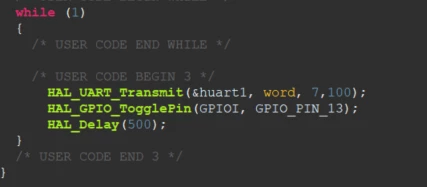
And corrected the Pins to PA9 and PA10 in msp.c file and verified the code several times, but still no text/data was displayed in Putty and Tera Term. I also tweaked the settings like baud rate (applied the same baud rate in tera term) and tried keeping pull mode to GPIO_NOPULL and also in GPIO_PULLUP modes but still there is no output on tera term and putty. In my code in Cortex M7 main.c file, there is a toggle LED function and it works perfectly. 
SKuma49_0-1698689078810.png

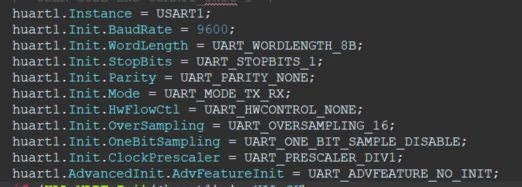
Below image shows my UART Initialization in main.c
SKuma49_1-1698689400763.png

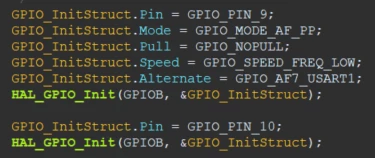
Below image shows the UART initialization in msp.c
SKuma49_2-1698689491305.png

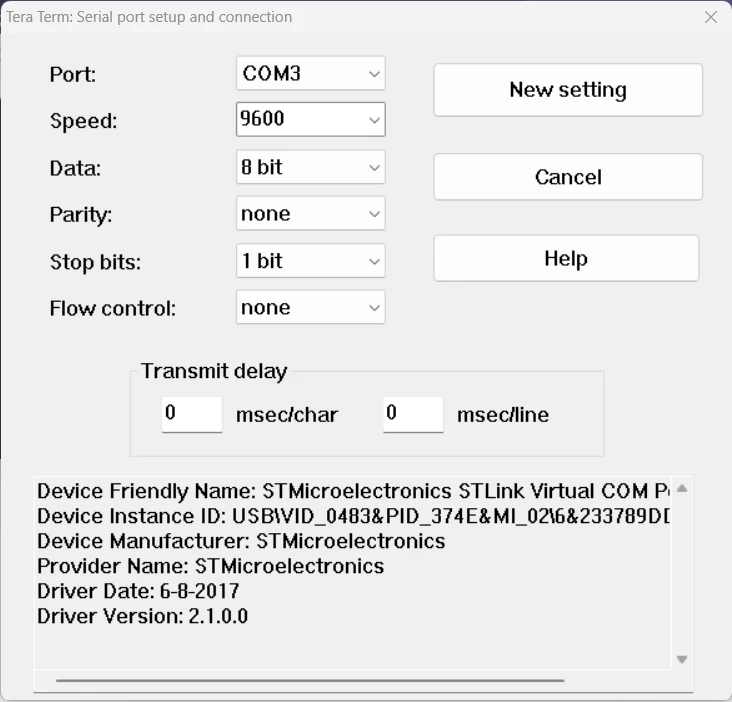
Below image shows the settings i made in Tera Term
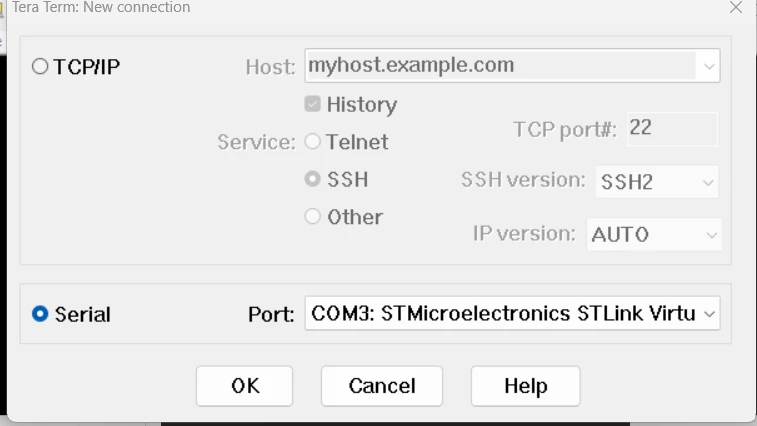
SKuma49_3-1698689598648.pngSKuma49_4-1698689629710.png

Below is the image of by board when executing the code.
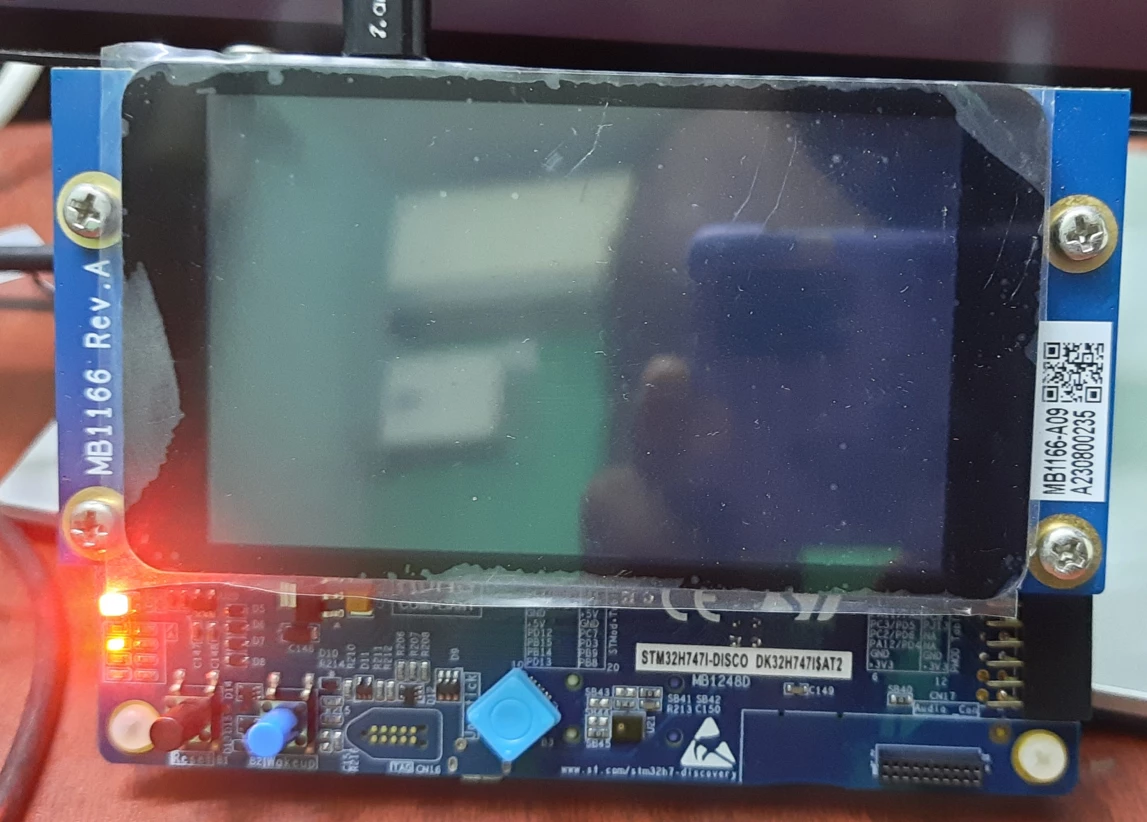
SKuma49_6-1698691379972.png

I have read almost all documents related to the above issue but couldn't find the solution. So I posted here for getting some help. Am i missing something or doing something wrong?

This topic has been closed for replies.
Best answer by Tesla DeLorean

The pins are on GPIOA not GPIOB

void OutString(char *s) // Use Subroutines
{
 HAL_UART_Transmit(&huart1, (uint8_t *)s, strlen(s), 100);
}

OutString("Testing...\r\n");

void HAL_UART_MspInit(UART_HandleTypeDef* huart) // Ensure right clocks, pins and peripheral
{
 GPIO_InitTypeDef GPIO_InitStruct = {0};
 RCC_PeriphCLKInitTypeDef PeriphClkInitStruct = {0};
 if(huart->Instance==USART1)
 {
 /* USER CODE BEGIN USART1_MspInit 0 */

 /* USER CODE END USART1_MspInit 0 */
 /** Initializes the peripherals clock
 */
 PeriphClkInitStruct.PeriphClockSelection = RCC_PERIPHCLK_USART1;
 PeriphClkInitStruct.Usart16ClockSelection = RCC_USART16CLKSOURCE_D2PCLK2;
 if (HAL_RCCEx_PeriphCLKConfig(&PeriphClkInitStruct) != HAL_OK)
 {
 Error_Handler();
 }

 /* Peripheral clock enable */
 __HAL_RCC_USART1_CLK_ENABLE();
 __HAL_RCC_GPIOA_CLK_ENABLE();
 /**USART1 GPIO Configuration
 PA9 ------> USART1_TX
 PA10 ------> USART1_RX
 */
 GPIO_InitStruct.Pin = GPIO_PIN_9|GPIO_PIN_10;
 GPIO_InitStruct.Mode = GPIO_MODE_AF_PP;
 GPIO_InitStruct.Pull = GPIO_NOPULL;
 GPIO_InitStruct.Speed = GPIO_SPEED_FREQ_LOW;
 GPIO_InitStruct.Alternate = GPIO_AF7_USART1;
 HAL_GPIO_Init(GPIOA, &GPIO_InitStruct);

 /* USER CODE BEGIN USART1_MspInit 1 */

 /* USER CODE END USART1_MspInit 1 */
 }
}

2 replies

Tesla DeLorean
Tesla DeLoreanBest answer
Guru
October 30, 2023

The pins are on GPIOA not GPIOB

void OutString(char *s) // Use Subroutines
{
 HAL_UART_Transmit(&huart1, (uint8_t *)s, strlen(s), 100);
}

OutString("Testing...\r\n");

void HAL_UART_MspInit(UART_HandleTypeDef* huart) // Ensure right clocks, pins and peripheral
{
 GPIO_InitTypeDef GPIO_InitStruct = {0};
 RCC_PeriphCLKInitTypeDef PeriphClkInitStruct = {0};
 if(huart->Instance==USART1)
 {
 /* USER CODE BEGIN USART1_MspInit 0 */

 /* USER CODE END USART1_MspInit 0 */
 /** Initializes the peripherals clock
 */
 PeriphClkInitStruct.PeriphClockSelection = RCC_PERIPHCLK_USART1;
 PeriphClkInitStruct.Usart16ClockSelection = RCC_USART16CLKSOURCE_D2PCLK2;
 if (HAL_RCCEx_PeriphCLKConfig(&PeriphClkInitStruct) != HAL_OK)
 {
 Error_Handler();
 }

 /* Peripheral clock enable */
 __HAL_RCC_USART1_CLK_ENABLE();
 __HAL_RCC_GPIOA_CLK_ENABLE();
 /**USART1 GPIO Configuration
 PA9 ------> USART1_TX
 PA10 ------> USART1_RX
 */
 GPIO_InitStruct.Pin = GPIO_PIN_9|GPIO_PIN_10;
 GPIO_InitStruct.Mode = GPIO_MODE_AF_PP;
 GPIO_InitStruct.Pull = GPIO_NOPULL;
 GPIO_InitStruct.Speed = GPIO_SPEED_FREQ_LOW;
 GPIO_InitStruct.Alternate = GPIO_AF7_USART1;
 HAL_GPIO_Init(GPIOA, &GPIO_InitStruct);

 /* USER CODE BEGIN USART1_MspInit 1 */

 /* USER CODE END USART1_MspInit 1 */
 }
}
Tips, Buy me a coffee, or three.. PayPal Venmo (See Profile) Up vote any posts that you find helpful, it shows what's working..
SKuma.49
SKuma.49Author
Associate
October 31, 2023

It Works!!!

Thank you, Tesla DeLorean,

I changed the port to GPIOA in all places related to UART as per your above code and now I am able to receive the data in putty.