

STM32H747 LPTIM4 PWM output in system STOP mode not working
Hi everyone, we have a problem using LPTIM4 PWM output on STM32H747I-DISCO when system enters STOP mode.
In this project, I need two independent PWM outputs with fixed frequency to work, while system goes to STOP mode to save power. LPTIM1_OUT & LPTIM4_OUT are used for this purpose.
■ The issue is:
1.In RUN mode, both LPTIM PWM works as expected.
2. After system enters STOP mode, LPTIM1_OUT keeps PWM output, as expected.
But LPTIM4_OUT PWM stopped.
3. When system wakes up from STOP mode, LPTIM4 starts PWM generation again automatically. This behavior seems like normal timer, not low-power timer.
■ The waveform shown below helps to demonstrate the issue:
Red - LPTIM1_OUT
Yellow - LPTIM4_OUT
Green - MCU current consumption
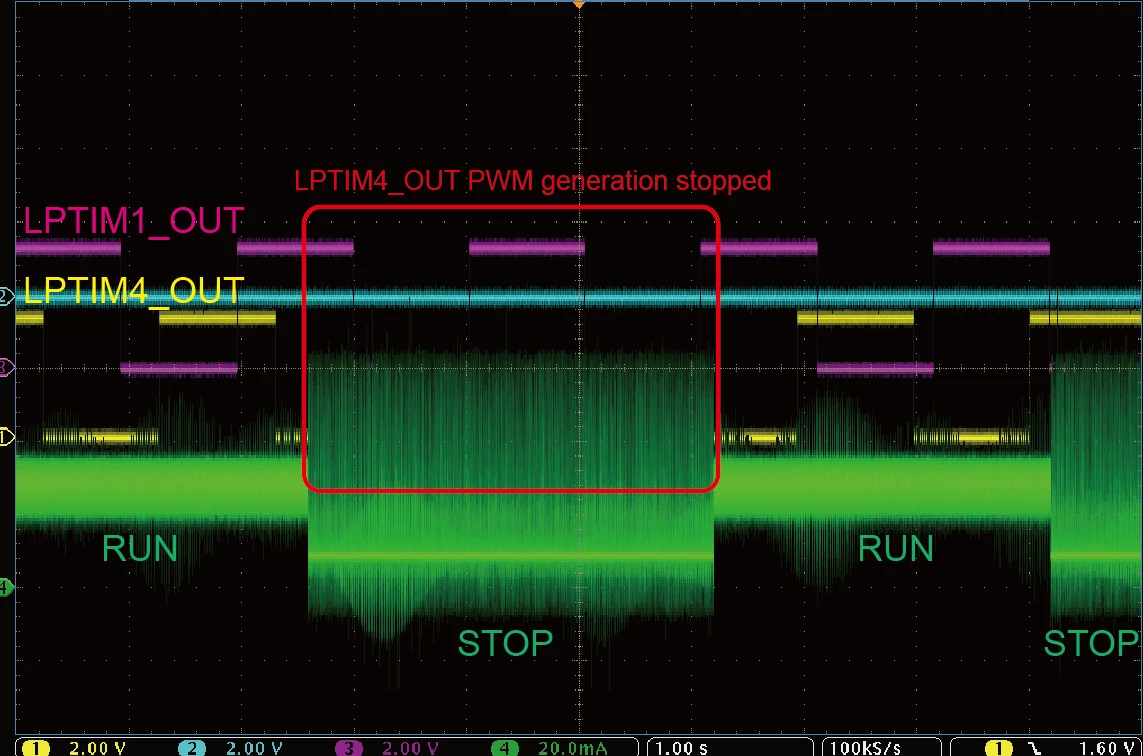 ■ Configuration codes are generated by STM32CubeIDE.
Some code excerpts:
A. Clock Source of LPTIM1 & LPTIM4 are LSE:
PeriphClkInitStruct.Lptim1ClockSelection = RCC_LPTIM1CLKSOURCE_LSE;
PeriphClkInitStruct.Lptim345ClockSelection = RCC_LPTIM345CLKSOURCE_LSE;
B. LPTIM init Functions
// ------------------------ LPTIM Init Functions ----------------------------
static void MX_LPTIM1_Init(void)
{
 hlptim1.Instance = LPTIM1;
 hlptim1.Init.Clock.Source = LPTIM_CLOCKSOURCE_APBCLOCK_LPOSC;
 hlptim1.Init.Clock.Prescaler = LPTIM_PRESCALER_DIV1;
 hlptim1.Init.Trigger.Source = LPTIM_TRIGSOURCE_SOFTWARE;
 hlptim1.Init.OutputPolarity = LPTIM_OUTPUTPOLARITY_LOW;
 hlptim1.Init.UpdateMode = LPTIM_UPDATE_IMMEDIATE;
 hlptim1.Init.CounterSource = LPTIM_COUNTERSOURCE_INTERNAL;
 hlptim1.Init.Input1Source = LPTIM_INPUT1SOURCE_GPIO;
 hlptim1.Init.Input2Source = LPTIM_INPUT2SOURCE_GPIO;
 if (HAL_LPTIM_Init(&hlptim1) != HAL_OK)
 {
 Error_Handler();
 }
}

static void MX_LPTIM4_Init(void)
{
 hlptim4.Instance = LPTIM4;
 hlptim4.Init.Clock.Source = LPTIM_CLOCKSOURCE_APBCLOCK_LPOSC;
 hlptim4.Init.Clock.Prescaler = LPTIM_PRESCALER_DIV1;
 hlptim4.Init.Trigger.Source = LPTIM_TRIGSOURCE_SOFTWARE;
 hlptim4.Init.OutputPolarity = LPTIM_OUTPUTPOLARITY_LOW;
 hlptim4.Init.UpdateMode = LPTIM_UPDATE_IMMEDIATE;
 hlptim4.Init.CounterSource = LPTIM_COUNTERSOURCE_INTERNAL;
 if (HAL_LPTIM_Init(&hlptim4) != HAL_OK)
 {
 Error_Handler();
 }
}
C. Start PWM generation:
HAL_LPTIM_PWM_Start(&hlptim1, 32767, 16383);
HAL_LPTIM_PWM_Start(&hlptim4, 32767, 16383);
D. To enter system STOP mode:
HAL_PWREx_ConfigD3Domain(PWR_D3_DOMAIN_STOP);
HAL_PWREx_EnterSTOPMode( PWR_MAINREGULATOR_ON, PWR_STOPENTRY_WFI, PWR_D3_DOMAIN);
HAL_PWREx_EnterSTOPMode( PWR_LOWPOWERREGULATOR_ON, PWR_STOPENTRY_WFI, PWR_D1_DOMAIN);
