Associate
February 6, 2024
Solved

STM32G474E EVAL1 Demo SD Card issue

  • February 6, 2024
  • 18 replies
  • 9481 views

Hello,

I tried to execute the demo for the STM32G474E EVAL1 explained in this document : STM32CubeG4 STM32G474E-EVAL demonstration firmware - User manual.

But, I have an error when the board tries to display the pictures which are on the SD card.

I got " Error popup resource file missing please update sd card content".

I checked the SD card and my files are well in the right directory.

I tried with two different SD cards and I have the same issue.

When I checked with the debugger, I have the impression that is a problem during the initialization of the SD card during the call of SD_GoIdleState()

But now I have no idea to go further in my investigation.

So I search some help to solve my issue

This topic has been closed for replies.
Best answer by mƎALLEm

Not easy to recover a broken SDcard slot. May be you need to clean it but it's risky.

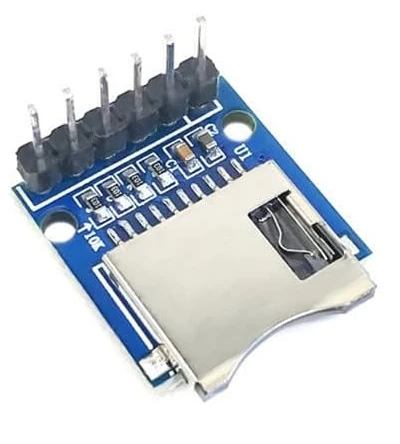
Or buy add an external SDcard slot module like this one and wire it yourself:

SofLit_0-1707987668117.png

PS: take care of the pull up resistors mounted on the module (see the image).

18 replies

mƎALLEm
ST Technical Moderator
February 6, 2024

Hello,


@twinest wrote:

Hello,

I tried to execute the demo for the STM32G474E EVAL1 explained in this document : STM32CubeG4 STM32G474E-EVAL demonstration firmware - User manual.

But, I have an error when the board tries to display the pictures which are on the SD card.


Which example you are running?

Which files you have stored on the SDcard?

To give better visibility on the answered topics, please click "Best answer" on the reply which solved your issue or answered your question.
twinestAuthor
Associate
February 7, 2024

Hello,

I run the example "Demo" when I choose my MCU in STM32CubeIDE in the tab "Example Selector" when I create a new project.

And I use the SD card provided with the evaluation kit and I checked, the files needed for this demo are well in the SD card.

The file system of the SD card is :

STFILES (with the bmp images used by the demo)

USER 

STM32.TXT

mƎALLEm
mƎALLEmBest answer
ST Technical Moderator
February 15, 2024

Not easy to recover a broken SDcard slot. May be you need to clean it but it's risky.

Or buy add an external SDcard slot module like this one and wire it yourself:

SofLit_0-1707987668117.png

PS: take care of the pull up resistors mounted on the module (see the image).

To give better visibility on the answered topics, please click "Best answer" on the reply which solved your issue or answered your question.
twinestAuthor
Associate
February 15, 2024

Ok thanks