PPate.1
Associate III
March 5, 2025
Solved

STM32G0B1 Timer 6 - program crash when timer started with interrupt

  • March 5, 2025
  • 7 replies
  • 2204 views

Hi,

I am using STM32G0B1VET6 on my custom board. I want a delay of 0.2 and 0.3us. Hence I have used timer 6 to achieve this delay. But my program leads to crash when API - HAL_TIM_Base_Start_IT(&htim6) is executed.

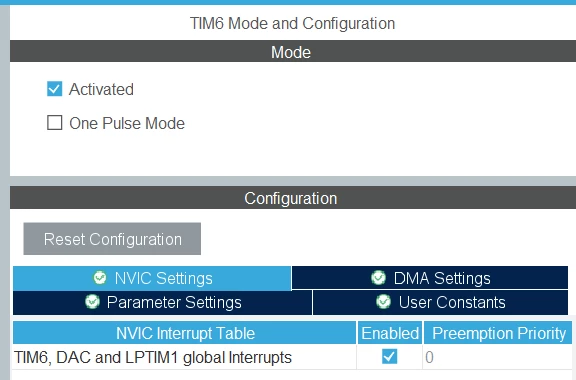
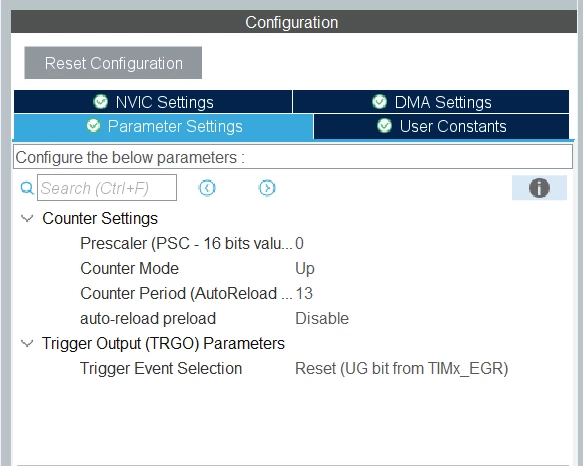
My settings for Timer 6 are as follows:
PPate1_0-1741181859622.png

PPate1_2-1741182082811.png


My clock configuration is as given below:
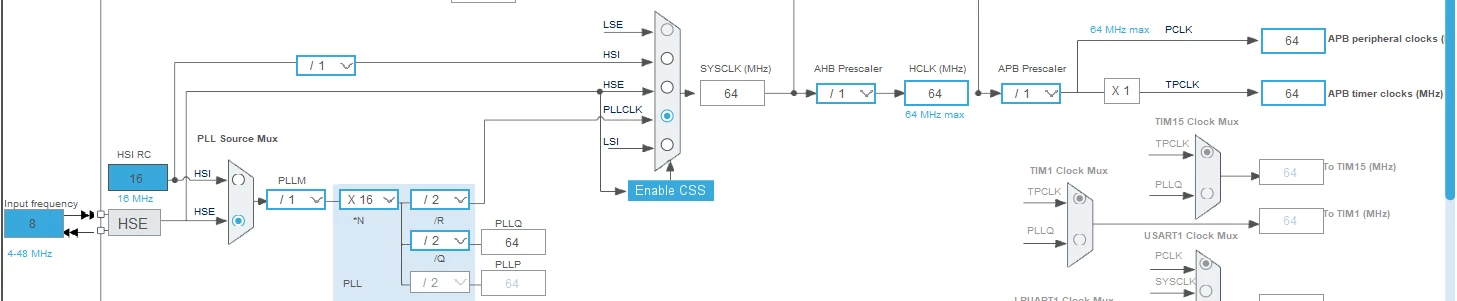
PPate1_1-1741182015801.png

Generated code:

static void MX_TIM6_Init(void)

{


/* USER CODE BEGIN TIM6_Init 0 */


/* USER CODE END TIM6_Init 0 */


TIM_MasterConfigTypeDef sMasterConfig = {0};


/* USER CODE BEGIN TIM6_Init 1 */


/* USER CODE END TIM6_Init 1 */

htim6.Instance = TIM6;

htim6.Init.Prescaler = 0;

htim6.Init.CounterMode = TIM_COUNTERMODE_UP;

htim6.Init.Period = 13;

htim6.Init.AutoReloadPreload = TIM_AUTORELOAD_PRELOAD_DISABLE;

if (HAL_TIM_Base_Init(&htim6) != HAL_OK)

{

Error_Handler();

}

sMasterConfig.MasterOutputTrigger = TIM_TRGO_RESET;

sMasterConfig.MasterSlaveMode = TIM_MASTERSLAVEMODE_DISABLE;

if (HAL_TIMEx_MasterConfigSynchronization(&htim6, &sMasterConfig) != HAL_OK)

{

Error_Handler();

}

/* USER CODE BEGIN TIM6_Init 2 */


/* USER CODE END TIM6_Init 2 */


}


void TIM6_DAC_LPTIM1_IRQHandler(void)

{

/* USER CODE BEGIN TIM6_DAC_LPTIM1_IRQn 0 */


/* USER CODE END TIM6_DAC_LPTIM1_IRQn 0 */

HAL_TIM_IRQHandler(&htim6);

/* USER CODE BEGIN TIM6_DAC_LPTIM1_IRQn 1 */

delay_flag = true;

/* USER CODE END TIM6_DAC_LPTIM1_IRQn 1 */

}

My code for delay function:

void delay_us(uint16_t delay)

{

delay_flag = false;

htim6.Init.Period = delay;

if (HAL_TIM_Base_Start_IT(&htim6) != HAL_OK) //this function crash here

return;


while(!delay_flag);

}


Please guide.

Thanks,

pradeep
This topic has been closed for replies.
Best answer by PPate.1

I referred following video:

https://www.youtube.com/watch?v=SqC0IhLKJ9o

I did modifications as explained in this video which resolved my issue.

delay function is updated as below:

void delay_us(uint16_t delay)

{

__HAL_TIM_SET_COUNTER(&htim6,0);

while(__HAL_TIM_GET_COUNTER(&htim6) < delay);

}

In main function, timer 6 was started.

HAL_TIM_Base_Start(&htim6);


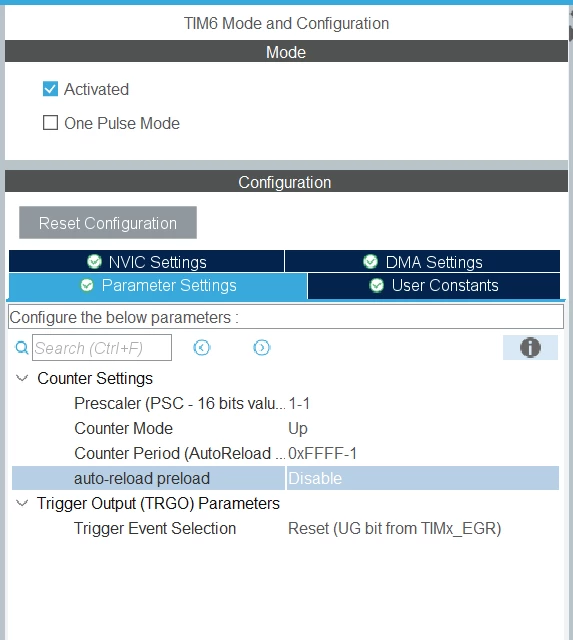
Timer configuration was done as below:

PPate1_0-1741261212432.png


7 replies

TDK
March 5, 2025

What does HAL_TIM_Base_Start_IT return?


You're going to have a tough time getting a 0.3 us delay with HAL IT functions. Lots of overhead in there that are going to add up to more than 0.3 us of time.

"If you feel a post has answered your question, please click ""Accept as Solution""."
PPate.1
PPate.1Author
Associate III
March 5, 2025

Program crash and hangup. There is no return value I can check.

I am ok with timing becomes 0.3us to 0.5us.

TDK
March 5, 2025

What does "program crash and hangup" mean? Are you getting an error message? Show it in full.

Since this is a custom board, consider showing your schematic. Ensure decoupling caps are present and rails are steady.

"If you feel a post has answered your question, please click ""Accept as Solution""."
TDK
March 5, 2025

You are not allowed to return from main(). Put a "while (1);" loop at the end.

> ...and if F6 - step over is done then debug cursor (green highlight over function name) gets lost. No error message and screen just remains at that point till I suspend debugging. 

Hit the "pause" icon to stop the code where it's at.

"If you feel a post has answered your question, please click ""Accept as Solution""."
PPate.1
PPate.1Author
Associate III
March 6, 2025

After putting while(1); in the code, observations remains same i.e. debug cursor gets lost in delay_us() function.  Hitting "pause" icon lead to stop somewhere in interrupt service handlers. Every time in different handlers and at different statements of code which is auto generated by tool.

PPate1_0-1741248296142.png

I also tried following but behavior remains same

1. using timer16 instead of timer 6.

2. merging code of delay_us() function directly in main() function

3. Increasing minimum stack size from 0x400 to 0x800

4. Replacing Test_Display() function by another code which writes to GPIO pin

But if I use HAL_Delay(1)  function then it works. But 1ms delay is too much for my application.

Please suggest.

PPate.1
PPate.1AuthorBest answer
Associate III
March 6, 2025

I referred following video:

https://www.youtube.com/watch?v=SqC0IhLKJ9o

I did modifications as explained in this video which resolved my issue.

delay function is updated as below:

void delay_us(uint16_t delay)

{

__HAL_TIM_SET_COUNTER(&htim6,0);

while(__HAL_TIM_GET_COUNTER(&htim6) < delay);

}

In main function, timer 6 was started.

HAL_TIM_Base_Start(&htim6);


Timer configuration was done as below:

PPate1_0-1741261212432.png