BGee
Associate
September 24, 2018
Solved

STM32F767 stuck in hardware reset loop

  • September 24, 2018
  • 15 replies
  • 7350 views

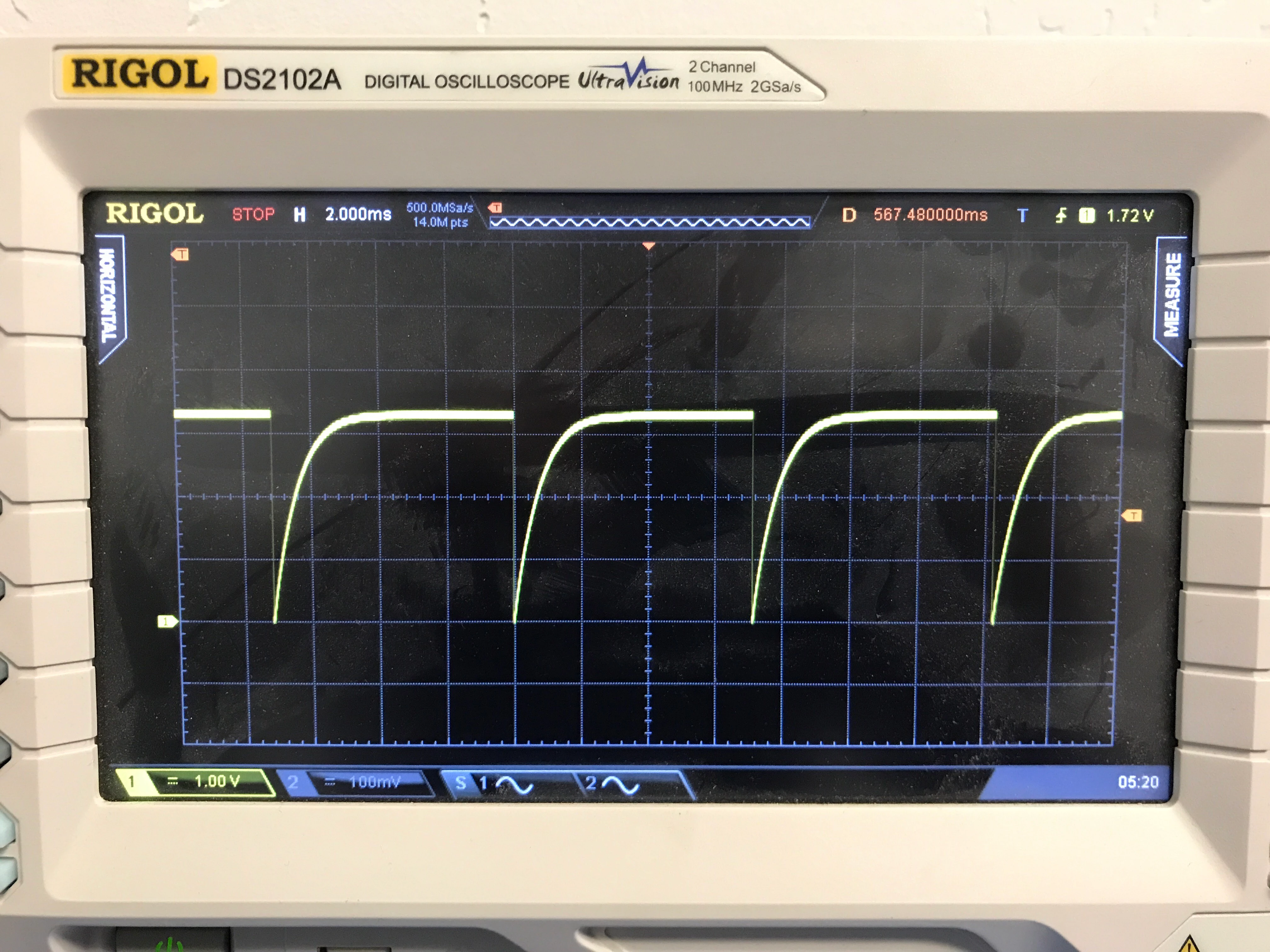
I can connect with JTAG via SWD and load a simple program but after load the system won't run to main. The chip seems to be stuck in some hardware system reset loop. Attached is an image of the nRST pin. I've gone through AN4661 many times and can't figure it out. Power rail looks good and I have BOOT0 strapped low, PDR_ON strapped high. Any ideas?

0690X000006C4ghQAC.jpg

    This topic has been closed for replies.
    Best answer by Bob S

    As AvaTar mentioned before - run the debugger on that bootloader code (or LED toggle code) and see what happens. You will need to figure out how to tell your IDE to NOT "run to main" but instead allow you to single-step from the reset vector.

    Also, check the option bytes using whatever programmer you are using, specifically the "user configuration" bytes. Is it possible that when programming the custom bootloader that somehow the option bytes got changed to enable one or more watchdog timers? Or change the boot selection options? I don't THINK this is your problem because the reset period looks the same as your first scope screen shot. But these are (or should be) easy things to check.

    Also check the brown-out reset voltage in the option bytes and make sure it matches whatever power supply voltage you are using.

    Otherwise, double-check for some kind of power supply issue. Is the 2.2uF cap you added/changed still attached with good solder joints?


    15 replies

    BGee
    BGeeAuthor
    Associate
    October 2, 2018

    After changing VCAP to 2.2uF I was able to successfully load a simple LED test using Keil and JLINK and get the LEDs to blink. After verifying I am able to load code, I loaded a custom bootloader and the boards goes into this infinite reset state. I tried to erase the flash and reload the simple LED test to set the device back to a normal state but that doesn't work anymore. It's as if the bootloader is write protecting the flash or something like that. Any way to get the device back to factory state?

    Even with BOOT0 set high the system stays in this infinite reset loop. I'm leaning towards an issue with the bootloader but the error seems unrecoverable.

    Here is an image of the reset pin right from power applied. Instantly goes into this state.

    0690X000006C7J2QAK.jpg

    BGee
    BGeeAuthor
    Associate
    October 2, 2018

    REPOST

    Even with BOOT0 set high the system stays in this infinite reset loop. I'm leaning towards an issue with the bootloader but the error seems unrecoverable.

    Bob S
    Bob SBest answer
    Super User
    October 2, 2018

    As AvaTar mentioned before - run the debugger on that bootloader code (or LED toggle code) and see what happens. You will need to figure out how to tell your IDE to NOT "run to main" but instead allow you to single-step from the reset vector.

    Also, check the option bytes using whatever programmer you are using, specifically the "user configuration" bytes. Is it possible that when programming the custom bootloader that somehow the option bytes got changed to enable one or more watchdog timers? Or change the boot selection options? I don't THINK this is your problem because the reset period looks the same as your first scope screen shot. But these are (or should be) easy things to check.

    Also check the brown-out reset voltage in the option bytes and make sure it matches whatever power supply voltage you are using.

    Otherwise, double-check for some kind of power supply issue. Is the 2.2uF cap you added/changed still attached with good solder joints?

    Tesla DeLorean
    Guru
    October 2, 2018

    Perhaps talk to your FAE, and get the circuit reviewed. Tilting at windmills here.

    Tips, Buy me a coffee, or three.. PayPal Venmo (See Profile) Up vote any posts that you find helpful, it shows what's working..
    BGee
    BGeeAuthor
    Associate
    October 3, 2018

    The problem was with the option bytes. As Bob and AvaTar suggested I stepped through the code and noticed that the bad bards were loading address 0x1FF00210 which is the STM32 bootloader. This led me down the path to check the boot option bytes (Thanks Bobs for the suggestion). I was able to use the STLINK to compare the two boards and found that the custom bootloader was changing the option bytes. I reset them back to normal and the board was recovered.