

Tran Minh Cong
Associate III
April 2, 2018
Question

STM32F746BGT6 LCD TFT 7'' flickering

  • April 2, 2018
  • 6 replies
  • 7347 views
Posted on April 02, 2018 at 08:50

Dear every body,

I are using

LCD TFT 7 inch 800x480 

/external-link.jspa?url=https%3A%2F%2Fwww.buydisplay.com%2Fdefault%2F7-tft-lcd-touch-screen-display-module-800x480-for-mp4-gps-tablet-pc

  in our design with STM32F746BTG6 processor working at  200 MHz frequency.

We are using STemWin Library on RTOS operating system

/external-link.jspa?url=https%3A%2F%2Fwww.freertos.org%2F

  with LTDC support.

GUIBuilder.exe software will generate gui data.

I are statically storing the required ARGB format in external SDRAM.

The data is loaded from SDRAM to LTDC (STM32F7 LCD Controller)

using DMA2D and FMC interface

(Flexible Memory Controller – Working at 200/2 MHz).

Timing LCD TFT 7 inch from datasheet:

/external-link.jspa?url=http%3A%2F%2Fwww.buydisplay.com%2Fdownload%2Fic%2FOTA7001A.pdf
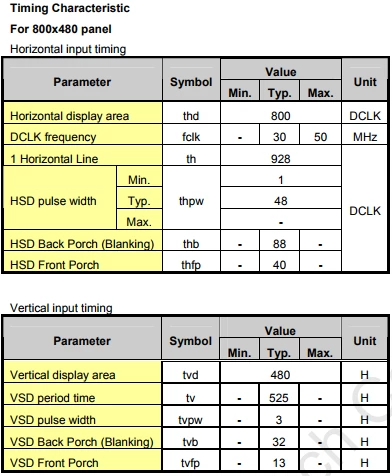
 0690X0000060AMkQAM.png

 About frequency in system:

- SDRAM: 100MHz, use same bus data 16bit with other device. Examples:nor flash.

/* Timing configuration for 100Mhz as SD clock frequency (System clock is up to 200Mhz) */

Timing.LoadToActiveDelay = 2;

Timing.ExitSelfRefreshDelay = 7;

Timing.SelfRefreshTime = 4;

Timing.RowCycleDelay = 7;

Timing.WriteRecoveryTime = 2;

Timing.RPDelay = 2;

Timing.RCDDelay = 2;

sdramHandle.Init.SDBank = FMC_SDRAM_BANK1;

sdramHandle.Init.ColumnBitsNumber = FMC_SDRAM_COLUMN_BITS_NUM_9;

sdramHandle.Init.RowBitsNumber = FMC_SDRAM_ROW_BITS_NUM_13;

sdramHandle.Init.MemoryDataWidth = SDRAM_MEMORY_WIDTH;

sdramHandle.Init.InternalBankNumber = FMC_SDRAM_INTERN_BANKS_NUM_4;

sdramHandle.Init.CASLatency = FMC_SDRAM_CAS_LATENCY_2;

sdramHandle.Init.WriteProtection = FMC_SDRAM_WRITE_PROTECTION_DISABLE;

sdramHandle.Init.SDClockPeriod = SDCLOCK_PERIOD;

sdramHandle.Init.ReadBurst = FMC_SDRAM_RBURST_ENABLE;

sdramHandle.Init.ReadPipeDelay = FMC_SDRAM_RPIPE_DELAY_0;

- LTDC: 19.2 MHz.

PeriphClkInitStruct.PeriphClockSelection = RCC_PERIPHCLK_LTDC;

PeriphClkInitStruct.PLLSAI.PLLSAIN = 192;

PeriphClkInitStruct.PLLSAI.PLLSAIR = 5;

PeriphClkInitStruct.PLLSAIDivR = 2;

HAL_RCCEx_PeriphCLKConfig(&PeriphClkInitStruct);

While I'm getting data in norflash, LCD have prolems is flickering.

I know that LTDC will gennerate data to LCD automatically after SDRAM refresh, isn't it?

What is solution to hold data on LTDC while other device use bus data of SDRAM (16 bit data)?

Can you tell me solutions to fix that bug, please?

Thank you so much!

null

    This topic has been closed for replies.

    6 replies

    Tran Minh Cong
    Associate III
    April 2, 2018
    Posted on April 02, 2018 at 08:51

    Dear everybody,

    Beside, I want ask about FPU.

    How to enable to use FPU in STM32F746BGT6?

    How is configure FPU accuracy and MCU can run faster?

    AvaTar
    Senior III
    April 4, 2018
    Posted on April 04, 2018 at 10:09

    How to enable to use FPU in STM32F746BGT6?

    Which toolchain you are using ?

    Some IDEs automatically add the appropriate code if you select 'use FPU' during project creation.

    How is configure FPU accuracy ...

    Single precision (float), not configurable.

    ... and MCU can run faster?

    Proper core clock and Flash settings, and enabling caches.

    Tran Minh Cong
    Associate III
    April 4, 2018
    Posted on April 04, 2018 at 10:24

    Thanks

    meyer.frank

    .

    Toolol chain: MDK-ARM standard version 5.

    I enabled FPU:

    0690X0000060AQ8QAM.png

    Technical Moderator
    April 2, 2018

    Posted on April 02, 2018 at 11:58

    Hellocong.tran_minh ,

    To check if the problem here seems related to the hardware environment, you can exclude the two layers and display ONLY a bluebackgroundwith Layers disabled, the idea for that test is to exclude any wrong LTDC layer settings.

     Also, It’s recommended to disable the FMC bank1 if not used, and configure correctly the MPU for the SDRAM as well…

    Please have a look to the AN4861 and follow the recommendation in the section ' 

    4.6 Special recommendations for Cortex®-M7 (STM32F7 Series)', exactly about 'Disable FMC bank1 if not used' and 'Configure the memory protection unit (MPU)'. Thismay help you on to prevent graphical performance issues related to the Cortex-M7 speculative read accesses and cache maintenance.

    You can enable FIFO underrun interrupt for determining the display size compatibility, this will help you to detect display issue (In the https://www.st.com/content/ccc/resource/technical/document/application_note/group0/25/ca/f9/b4/ae/fc/4e/1e/DM00287603/files/DM00287603.pdf/jcr:content/translations/en.DM00287603.pdf)

    see Section 4.2.2 Checking display compatibility considering the memory bandwidth requirements).

    Best Regards,

    Imen

    In order to give better visibility on the answered topics, please click on 'Best answer' on the reply which solved your issue or answered your question. Thanks
    Tran Minh Cong
    Associate III
    April 3, 2018
    Posted on April 03, 2018 at 12:03

    Dear

    DAHMEN.IMEN

    ,

    Memory of SDRAM which i'm using is: 32Mbytes.

    https://www.micron.com/parts/dram/sdram/mt48lc16m16a2p-6a

    #define REFRESH_COUNT ((uint32_t)0x0603)/* SDRAM refresh counter (100Mhz SD clock) */

    My code config MPU:

    static void MPU_Config(void)

    {

    MPU_Region_InitTypeDef MPU_InitStruct;

    /* Disable the MPU */

    HAL_MPU_Disable();

    MPU_InitStruct.Enable = MPU_REGION_ENABLE;

    MPU_InitStruct.BaseAddress = 0x60000000;

    MPU_InitStruct.Size = MPU_REGION_SIZE_256KB;

    //-> What is caculate that memory region? LCD TFT: 800x480xbit per pixel?

    http://www.st.com/content/ccc/resource/technical/document/application_note/group0/bc/2d/f7/bd/fb/3f/48/47/DM00272912/files/DM002729pdf/jcr:content/translations/en.DM002729pdf

    3 Example for setting up the MPU with cube HAL

    MPU_InitStruct.AccessPermission = MPU_REGION_FULL_ACCESS;

    MPU_InitStruct.IsBufferable = MPU_ACCESS_NOT_BUFFERABLE;

    MPU_InitStruct.IsCacheable = MPU_ACCESS_NOT_CACHEABLE;

    MPU_InitStruct.IsShareable = MPU_ACCESS_NOT_SHAREABLE;

    MPU_InitStruct.Number = MPU_REGION_NUMBER1;

    MPU_InitStruct.TypeExtField = MPU_TEX_LEVEL0;

    MPU_InitStruct.SubRegionDisable = 0x00;

    MPU_InitStruct.DisableExec = MPU_INSTRUCTION_ACCESS_DISABLE;

    HAL_MPU_ConfigRegion(&MPU_InitStruct);

    /* Enable the MPU */

    HAL_MPU_Enable(MPU_PRIVILEGED_DEFAULT);

    }

    uint8_t BSP_SDRAM_Init(void)

    {

    static uint8_t sdramstatus = SDRAM_ERROR;

    /* SDRAM device configuration */

    sdramHandle.Instance = FMC_SDRAM_DEVICE;

    /* Timing configuration for 100Mhz as SD clock frequency (System clock is up to 200Mhz) */

    Timing.LoadToActiveDelay = 2;

    Timing.ExitSelfRefreshDelay = 7;

    Timing.SelfRefreshTime = 4;

    Timing.RowCycleDelay = 7;

    Timing.WriteRecoveryTime = 2;

    Timing.RPDelay = 2;

    Timing.RCDDelay = 2;

    sdramHandle.Init.SDBank = FMC_SDRAM_BANK1;

    sdramHandle.Init.ColumnBitsNumber = FMC_SDRAM_COLUMN_BITS_NUM_9;

    sdramHandle.Init.RowBitsNumber = FMC_SDRAM_ROW_BITS_NUM_13;

    sdramHandle.Init.MemoryDataWidth = SDRAM_MEMORY_WIDTH;

    sdramHandle.Init.InternalBankNumber = FMC_SDRAM_INTERN_BANKS_NUM_4;

    sdramHandle.Init.CASLatency = FMC_SDRAM_CAS_LATENCY_2;

    sdramHandle.Init.WriteProtection = FMC_SDRAM_WRITE_PROTECTION_DISABLE;

    sdramHandle.Init.SDClockPeriod = SDCLOCK_PERIOD;

    sdramHandle.Init.ReadBurst = FMC_SDRAM_RBURST_ENABLE;

    sdramHandle.Init.ReadPipeDelay = FMC_SDRAM_RPIPE_DELAY_0;

    /* SDRAM controller initialization */

    BSP_SDRAM_MspInit(&sdramHandle, NULL); /* __weak function can be rewritten by the application */

    if(HAL_SDRAM_Init(&sdramHandle, &Timing) != HAL_OK)

    {

    sdramstatus = SDRAM_ERROR;

    }

    else

    {

    sdramstatus = SDRAM_OK;

    }

    /* SDRAM initialization sequence */

    BSP_SDRAM_Initialization_sequence(REFRESH_COUNT);

    return sdramstatus;

    }

    Can you check that code help me, please? Is it correctly?

    Thank you!

    T J
    Senior III
    April 2, 2018
    Posted on April 02, 2018 at 14:43

    You should check that your power supply is not drooping,

    that would give you 50/60Hz flicker.

    Tran Minh Cong
    Associate III
    April 3, 2018
    Posted on April 03, 2018 at 04:01

    Dear

    DAHMEN.IMEN

    ,

    Marsh.Nick

    I'll checkinfomations.

    Thank you.

    Cora Dias
    Visitor II
    April 4, 2018
    Posted on April 04, 2018 at 19:59

    Hi..as per my knowledge you should disable the FMC bank1 if not used, and configure correctly the MPU for the SDRAM.

    Please have a look to the AN4861 application note and  disable FMC bank1 if not used and configure the memory protection unit.

    Tran Minh Cong
    Associate III
    April 6, 2018
    Posted on April 06, 2018 at 05:10

    Thanks

    coradias

    .

    Currently in my project:

    SDRAMusing bank 5 (0xC0000000).

    Norflash using bank 1 (0x60000000).

    I'll try to change bank 1 to other bank.After that, disable bank 1.

    Denis Zinchenko
    Visitor II
    April 5, 2018
    Posted on April 05, 2018 at 12:33

    Hi. I has same problem,also use that memory. In my opinion, the reason was a small data bus wight. STemWin library need external buffer for multibufer operation. I could be wrong, library first make picture in buffer, then copy buffer from one region from external memory to other, then that data through dma read to display. And if you store picture in nor flash, you need to read data through same bus, then that data store in temporary buffer, then copied to LTDC buffer and then read to display. And all of this in one 16 bit data line. Try to change SDRAM to 32bit wight data. I use MT48LC4M32B2P , 16 MB enough for LTDC buffer, 2 additional buffers for emWin multibuffer support and you could assign some memory for emWin heap.

    pData=(uint32_t*)0xC0E00000;

    GUI_ALLOC_AssignMemory(

    pData

    , GUI_NUMBYTES);

    Also, I think u could change memory from fmc interface to double data rate quad-spi. It can be mapped to memory, but only for reading. Now I using 1024*600 display and its not flicker. The only disandvantage, draw process in freertos take 86% of mcu time.

    Tran Minh Cong
    Associate III
    April 15, 2018
    Posted on April 15, 2018 at 11:11

    Dear every body,

    I want ask you some question:

    1. When i using FMC write/read data to SDRAM/SRAM/Norflash, how do i check write/read done true?

    2. 

    The data (which is dislay on LCD TFT)  is loaded from SDRAM to LTDC

    using DMA2D and FMC interface

    (Flexible Memory Controller ).

    When SDRAM refresh, LTDC automatically to get data from SDRAM, how control 

    SDRAM refresh to accommodate, smooth?

    Thank you so much!

    T J
    Senior III
    April 16, 2018
    Posted on April 16, 2018 at 01:35

    1. Are you using DMA to transfer the block ? then you must check the DMA is complete.

    You should read back the transfer and compare the data set is what you sent, only a couple of times until it works 100%.

    2. I never used the onboard LCD functions, I considered it too much CPU load, my LCDs are external.

    But there is a trick, if you want to try it..

    if you look closely at the Auto Refresh function inside the SDRAM, it is a column refresh.

    you can turn off the auto Refresh and do your own column refresh during the back-Front porch time.

    this will then stop the SDRAM Autorefresh interrupting your program's screen refresh.