Thanormsin Makthong
Associate
August 14, 2017
Question

STM32F746 Display Graphic Demo is poor

  • August 14, 2017
  • 4 replies
  • 3289 views
Posted on August 14, 2017 at 09:57

Dear All.

I try to complier sample code from st at D:\STM32\STM32F746NG\

STM32Cube_FW_F7_V1.7.0\Projects\STM32746G-Discovery\Demonstration\

MDK-ARM

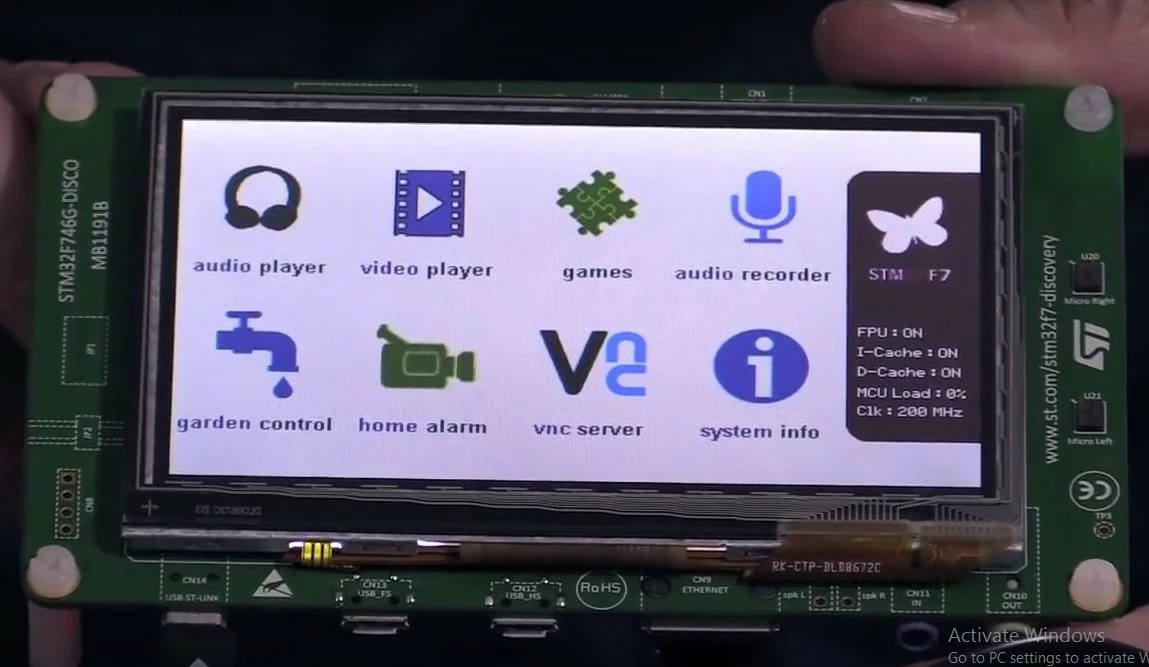
On sample video from

https://www.youtube.com/watch?v=R78zvO-s6H0

quality is good.0690X000006040sQAA.jpg

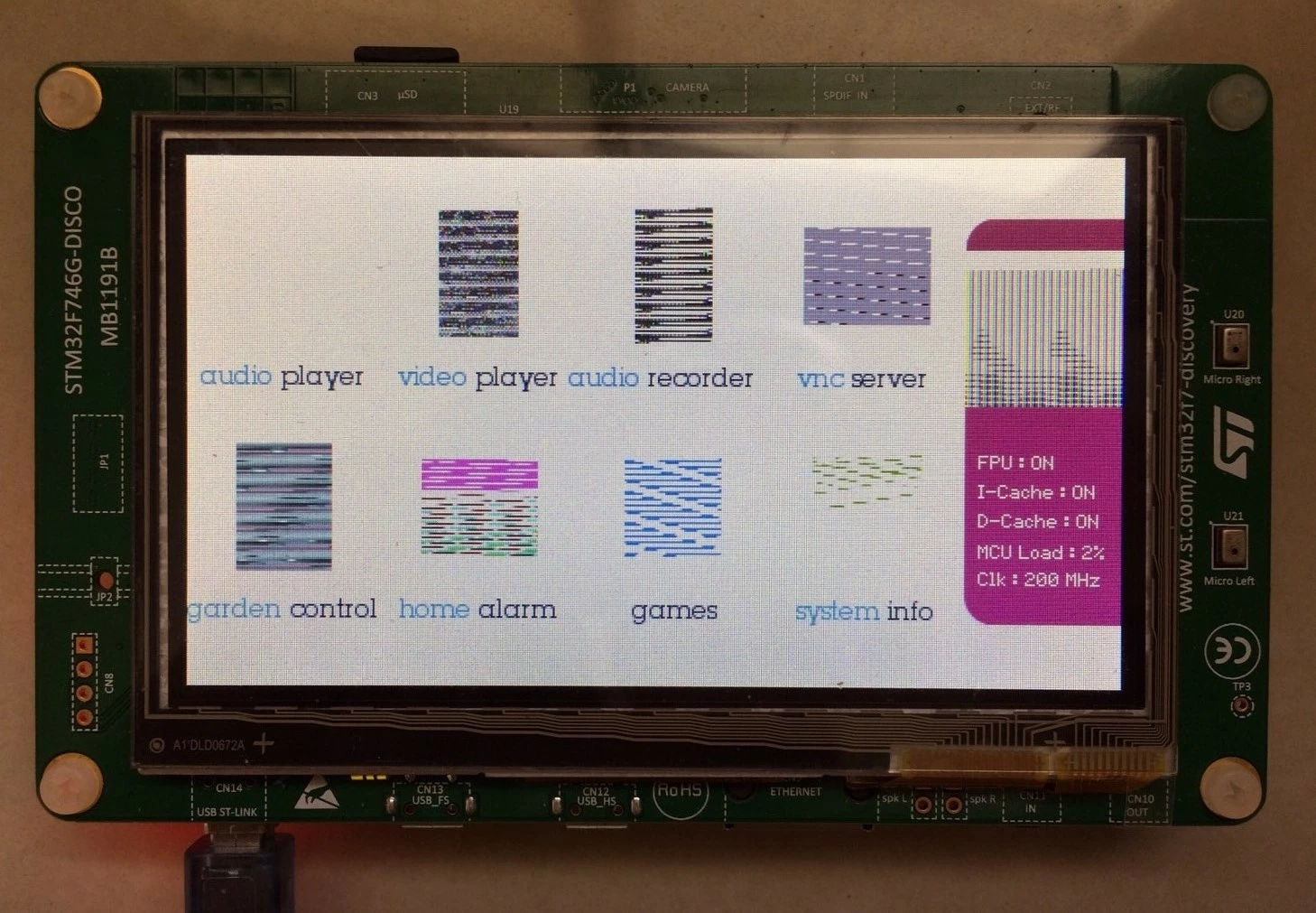
but on complier and run sample code. quality not same. maybe need to modify some setting in coding.

0690X000006040iQAA.jpg

Have someone can help me to fix this issue.

Thank you.

Thanormsin

    This topic has been closed for replies.

    4 replies

    waclawek.jan
    Super User
    August 22, 2017
    Posted on August 22, 2017 at 10:03

    Isn't the binary of the original demo present somewhere in that package? If yes, try to upload that one, to exclude hardware problem.

    Thanormsin Makthong
    Associate
    August 23, 2017
    Posted on August 23, 2017 at 16:46

    Dear waclawek.jan

    right now. I check hex file is 15MB.but board limit at 1MB.

    #################

    In order to program the demonstration you must do the following:

    1- Open STM32 ST-Link Utility V3.9, click on 'External Loader' from the bar menu then check

    'N25Q128A_STM32F746G-DISCO' box

    2- Connect the STM32746G-DISCOVERY board to PC with USB cable through CN14

    3- Use 'STM32CubeDemo_STM32746G-DISCO_V1.1.2.hex' file provided under “Binary�? with STM32 ST-Link Utility

    to program both internal Flash and external QSPI memory

    4- copy the audio and video files provided under 'Utilities/Media/' in the USB key

    5- Plug a USB micro A-Male to A-Female cable on CN12 connector

    -> The internal Flash and the external QSPI are now programmed and the demonstration is shown on the board.

    #################

    I make it correct?

    Thank you.

    Thanormsin.M

    ________________

    Attachments :

    pastedImage.png : https://st--c.eu10.content.force.com/sfc/dist/version/download/?oid=00Db0000000YtG6&ids=0680X000006HyOK&d=%2Fa%2F0X0000000b8T%2FUL.r_UCGc_JgjB64pULegGBmkkz7uPYfYTHkl0PG8lk&asPdf=false
    Max
    ST Employee
    August 22, 2017
    Posted on August 22, 2017 at 10:59

    The graphical elements are missing from the QSPI memory in your case.

    The easier way to upload them is to use

    http://www.st.com/content/st_com/en/products/embedded-software/development-tool-software/stsw-link004.html

    and to enable the QSPI external loader  (external loader menu -> N25Q128A_STM32F746G-DISCO)

    Follow the instructions from the readme file in the root of the demo project

    Thanormsin Makthong
    Associate
    August 23, 2017
    Posted on August 23, 2017 at 16:45

    Dear jive

    right now. I check hex file is 15MB.but board limit at 1MB.

    #################

    In order to program the demonstration you must do the following:

    1- Open STM32 ST-Link Utility V3.9, click on 'External Loader' from the bar menu then check

    'N25Q128A_STM32F746G-DISCO' box

    2- Connect the STM32746G-DISCOVERY board to PC with USB cable through CN14

    3- Use 'STM32CubeDemo_STM32746G-DISCO_V1.1.2.hex' file provided under “Binary�? with STM32 ST-Link Utility

    to program both internal Flash and external QSPI memory

    4- copy the audio and video files provided under 'Utilities/Media/' in the USB key

    5- Plug a USB micro A-Male to A-Female cable on CN12 connector

    -> The internal Flash and the external QSPI are now programmed and the demonstration is shown on the board.

    #################

    I make it correct?

    Thank you.

    Thanormsin.M

    ________________

    Attachments :

    pastedImage.png : https://st--c.eu10.content.force.com/sfc/dist/version/download/?oid=00Db0000000YtG6&ids=0680X000006HyU1&d=%2Fa%2F0X0000000b8S%2FLM2V4gTw9.TqhGhnm5ltYYqlXmwBBwdG41qunIWuIoM&asPdf=false
    Max
    ST Employee
    August 24, 2017
    Posted on August 24, 2017 at 06:41

    This HEX file also contains the data for the QSPI memory.

    This is exactly what you are missing right now.

    In order to program it, you must enable the flash loader so STLink utility can program it.

    Keil (or any other toolchain...) cannot do that.

    Once it is programmed you can use your own compiled version: You can modify it and debug as you like.

    Thanormsin Makthong
    Associate
    August 24, 2017
    Posted on August 24, 2017 at 15:25

    Dear Clive One

    I try like this.

    step 1.

    Step 2

    I make some wrong step ?

    if wrong. I you show screen to me. step by step

    to save time.

    Thank you

    Thanormsin.M

    ________________

    Attachments :

    pastedImage.png : https://st--c.eu10.content.force.com/sfc/dist/version/download/?oid=00Db0000000YtG6&ids=0680X000006HySz&d=%2Fa%2F0X0000000b8O%2FaDNcz0P112sLXJYdtUWAVr6Vu37doT9zM_N7hyIiqv0&asPdf=false

    pastedImage.png : https://st--c.eu10.content.force.com/sfc/dist/version/download/?oid=00Db0000000YtG6&ids=0680X000006HyTw&d=%2Fa%2F0X0000000b8P%2FIjahyvZBA42sQknww29zeahiqI7PfkHQekZol3orKEg&asPdf=false
    Thanormsin Makthong
    Associate
    August 28, 2017
    Posted on August 28, 2017 at 15:58

    0690X000006042jQAA.jpg

    After try

    Right now. Pic display correct.

    and I try to test modify some icon and change to thailand language

    0690X000006042oQAA.jpg

    Thank you for help

    Thanormsin.M