

Associate III
July 17, 2024
Solved

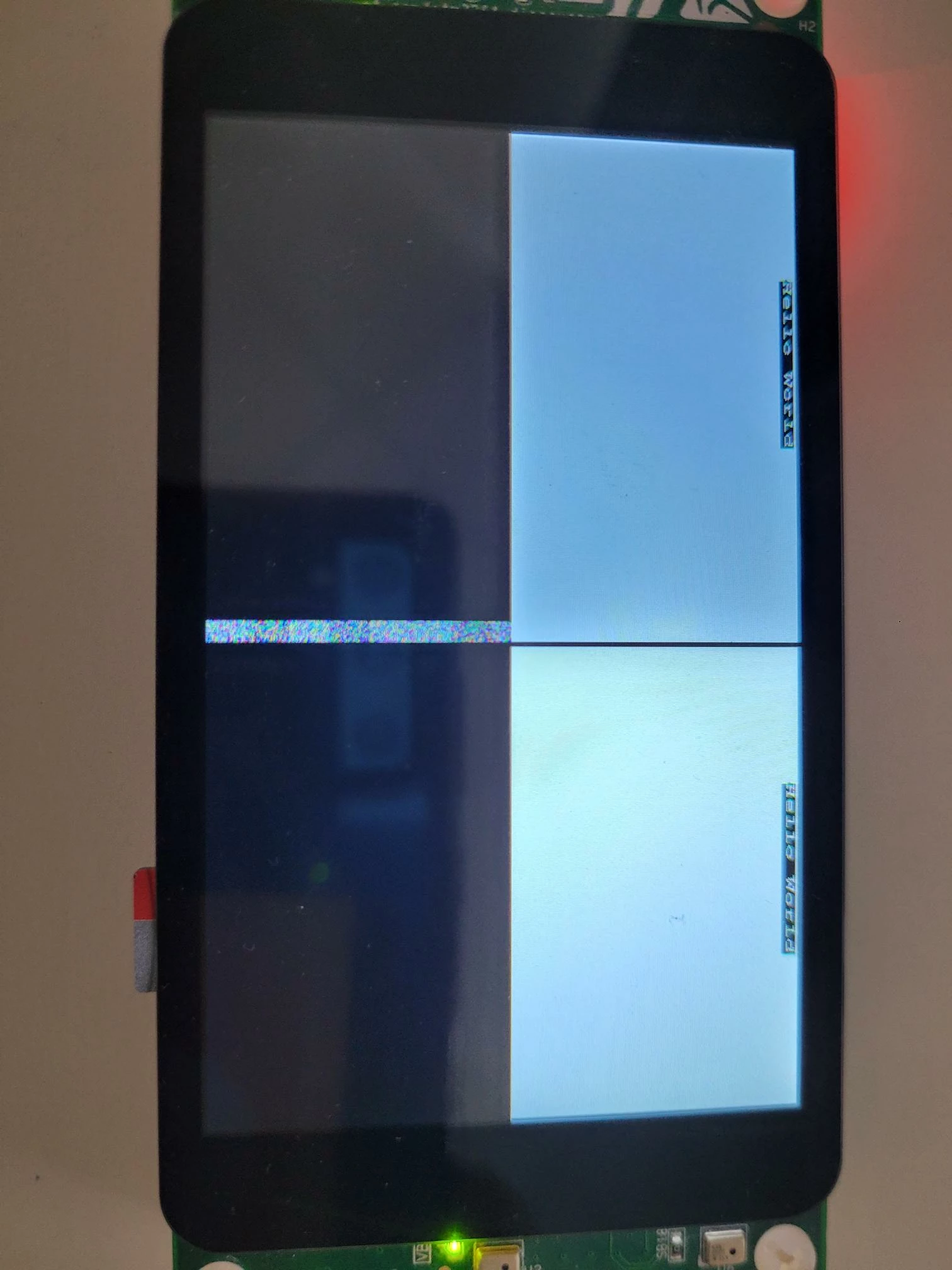
Stm32f469i Display is splitted in 4 Rectangles

  • July 17, 2024
  • 1 reply
  • 809 views

Hello,

I'm currently trying to program an STM32F469I-Discovery REV-B-01. I'm using the BSP files from STM32Cube_FW_F4_V1.28.0.

What I want: Just a white screen with "Hello World" at the top.


What I'm facing: Look at the picture.


This is my Code: 

 BSP_LCD_Init();
 BSP_TS_Init(800,480);

 BSP_LCD_LayerDefaultInit(0, 0xC0000000);
 BSP_LCD_SelectLayer(0);
 BSP_LCD_DisplayOn();
 BSP_LCD_Clear(((uint32_t) 0xFFFFFFFF));
 BSP_LCD_SetBackColor(((uint32_t) 0x00000000));
 BSP_LCD_SetTextColor(((uint32_t) 0xFFFFFFFF));
 sFONT *myfont = &Font24;
 BSP_LCD_SetFont(myfont);

 BSP_LCD_Clear(LCD_COLOR_BLACK);
 BSP_LCD_DisplayStringAt(0, 0, (uint8_t *)"Hello World", 0x01);
 HAL_GPIO_WritePin(LED1_GPIO_Port, LED1_Pin, GPIO_PIN_SET);

 

DerFreaker_0-1721208486726.jpeg


Best answer by KDJEM.1

Hello @DerFreaker ,

May be this example provided in the STM32CubeF4 firmware package help you: STM32Cube_FW_F4_V1.28.0\Projects\STM32469I-Discovery\Applications\STemWin

Please check the application note AN4323 for detailed steps on using the STemWin library.

Thank you.

Kaouthar

1 reply

KDJEM.1
KDJEM.1Best answer
Technical Moderator
July 19, 2024

Hello @DerFreaker ,

May be this example provided in the STM32CubeF4 firmware package help you: STM32Cube_FW_F4_V1.28.0\Projects\STM32469I-Discovery\Applications\STemWin

Please check the application note AN4323 for detailed steps on using the STemWin library.

Thank you.

Kaouthar

To give better visibility on the answered topics, please click on Accept as Solution on the reply which solved your issue or answered your question.