

[STM32F429I-DISC1] How to make a board work from external power source?
I'm currently developing an app based on STM32F429I-DISC1 board. It works great when the board is connected to STLINK through miniUSB cable, program runs and data are displayed on LCD display. One of the requirements is to make the board work from external power source. I'm using 5V pins to supply power. In this case the program does not start , the screen looks plain white. LD1 COM diode slowly flashes red (It constantly glows red when connected to computer). But when I plug in STLink the program starts. It also keeps running after I remove STLink cable.
Given this, I suppose that the problem is related to Clock setting.
I have looked at Board's Reference manual, on page 18:
OSC clock supply
The following information indicates all configurations for clock supply selection.� MCO from ST-LINK (from MCO of the STM32F429ZIT6)This frequency cannot be changed, it is fixed at 8 MHz and connected to PH0-OSC_INof the STM32F429ZIT6. The configuration needed is:� SB18 closed, SB19 open, R56 removed� SB20, R57, C20, C21, X3 = do not careThis seems to be an initial setting, as shipped from factory (but R56 was in place)
� Oscillator on board (from X3 crystal)
For typical frequencies and its capacitors and resistors, refer to the STM32F429ZIT6datasheet. The configuration needed is:� SB18, SB19, SB20 open� R56, R57, C20, C21, X3 solderedThis seemed likely as an answer to the question, so SB18 has been removed.
It did not help, the board does not start from external power source, but program runs when StLink is plugged (nothing changed).
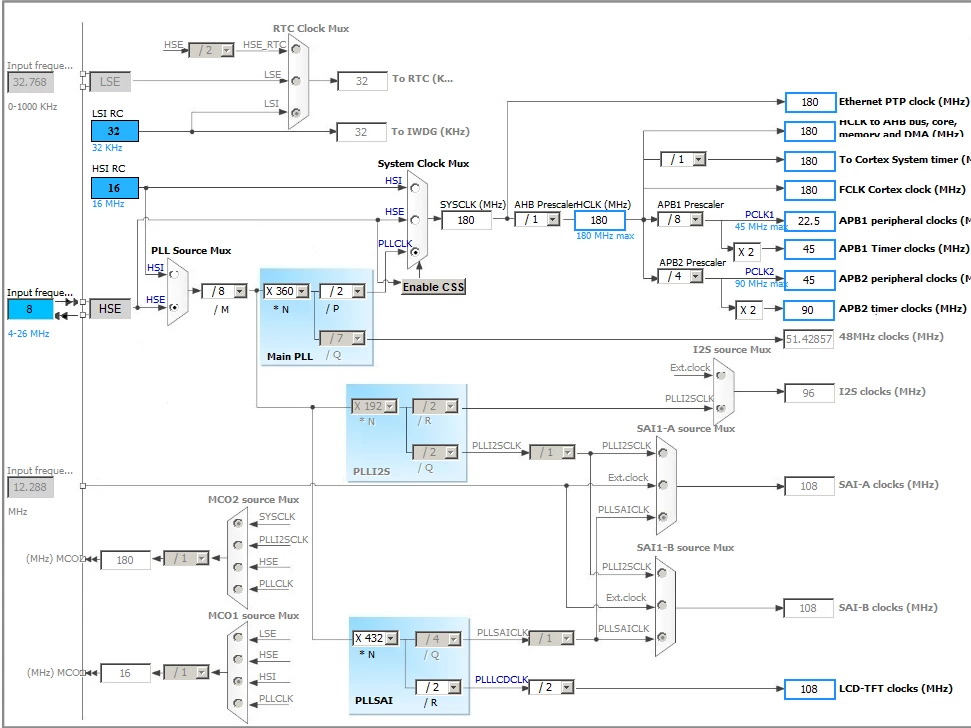
I have such clock settings (8Mhz at input runs to HSE, PLLCLK is used for SysClock):
 #stm32f429i-disc1