Terence D
Associate III
August 3, 2017
Solved

STM32F429: White screen, flashing COM LED

  • August 3, 2017
  • 9 replies
  • 2568 views
Posted on August 03, 2017 at 22:55

Hi guys, total newb question here: A few weeks back I got a STM32F429.  Immediately when I received it, I plugged it in and played with the demo software which seemed to work fine.  Busy with other things, I stored it away safely for the last few weeks.

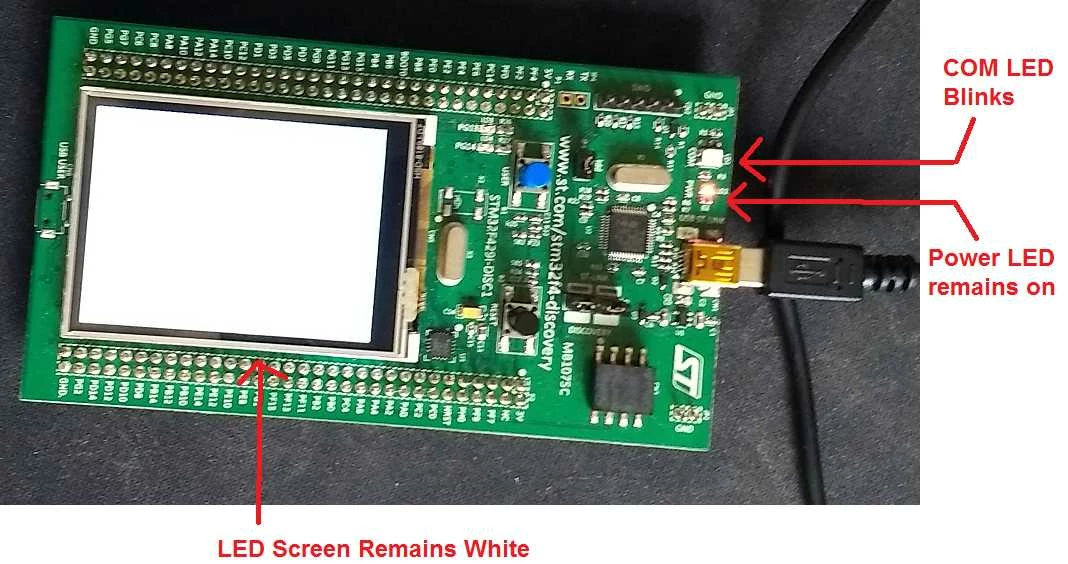
Just today I go to work with it, plug it back in and all I get is a white LCD screen, the COM LED is flashing periodically and the power LED is continuously on as shown in the image below.

Despite having the ST-Link/V2 drivers installed, Windows does not acknowledge the board as a plugged in USB device.

Searching this forum and Google have not provided me with any leads.  Anyone have any ideas? 

0690X00000603txQAA.jpg

#white-screen #stm32f429
This topic has been closed for replies.
Best answer by Vangelis Fortounas
Posted on August 06, 2017 at 10:46

Hello!

Check if your USB cable fits properly to the socket, and/or change the cable

Check the Black button (reset) if  has stucked

Check Idd jumper for proper fitting.

With a multimeter, check  VDD pin , The voltage must be around 3v

9 replies

Terence D
Terence DAuthor
Associate III
August 6, 2017
Posted on August 06, 2017 at 05:17

Bump

Vangelis Fortounas
Associate II
August 6, 2017
Posted on August 06, 2017 at 10:46

Hello!

Check if your USB cable fits properly to the socket, and/or change the cable

Check the Black button (reset) if  has stucked

Check Idd jumper for proper fitting.

With a multimeter, check  VDD pin , The voltage must be around 3v

Terence D
Terence DAuthor
Associate III
August 6, 2017
Posted on August 06, 2017 at 22:48

My bad, looks like a USB cable that although physically fits perfectly is not working with this board and another I had.  I must've gotten the cable mixed up in between using it previously and now.  Thanks so much.  Sorry for the bother.

Harsha Sandirigama
Visitor II
October 25, 2017
Posted on October 25, 2017 at 13:37

Hey!

It's great that you've solved your problem. But I suggest you to perform a firmware update as well. This update will eliminate issues when powering the board from the 5V pin. This update is extremely beneficial when powering the board from a battery.

http://www.st.com/content/st_com/en/products/development-tools/software-development-tools/stm32-software-development-tools/stm32-programmers/stsw-link007.html


Cheers! 

Terence D
Terence DAuthor
Associate III
October 25, 2017
Posted on October 25, 2017 at 15:58

Thanks!  Will do!

Tauqir Hassan
Associate II
March 27, 2019

Hey Friend ! Were you able to solve the problem ? Because changing the cable didn't worked for me.

Terence D
Terence DAuthor
Associate III
March 28, 2019

Yeah, I believe the problem is that some USB cables are just for charging and not also communicate data(?) I had mistakenly used one of these cables.

Tauqir Hassan
Associate II
March 28, 2019

@Terence D​  I have almost the same problem as your's .

Here's the link to my thread : https://community.st.com/s/feed/0D50X0000AaXYvU

Can you help me with any suggestions? Any help will be appreciable.

Terence D
Terence DAuthor
Associate III
March 29, 2019