

turboscrew
Senior III
November 24, 2018
Solved

STM32F427 FMC LCD interface with CubeMX

  • November 24, 2018
  • 4 replies
  • 2076 views

How do I generate FMC LCD interface using CubeMX?

I tried, but got nothing LCD-related.

Especially: nothing related to register select.
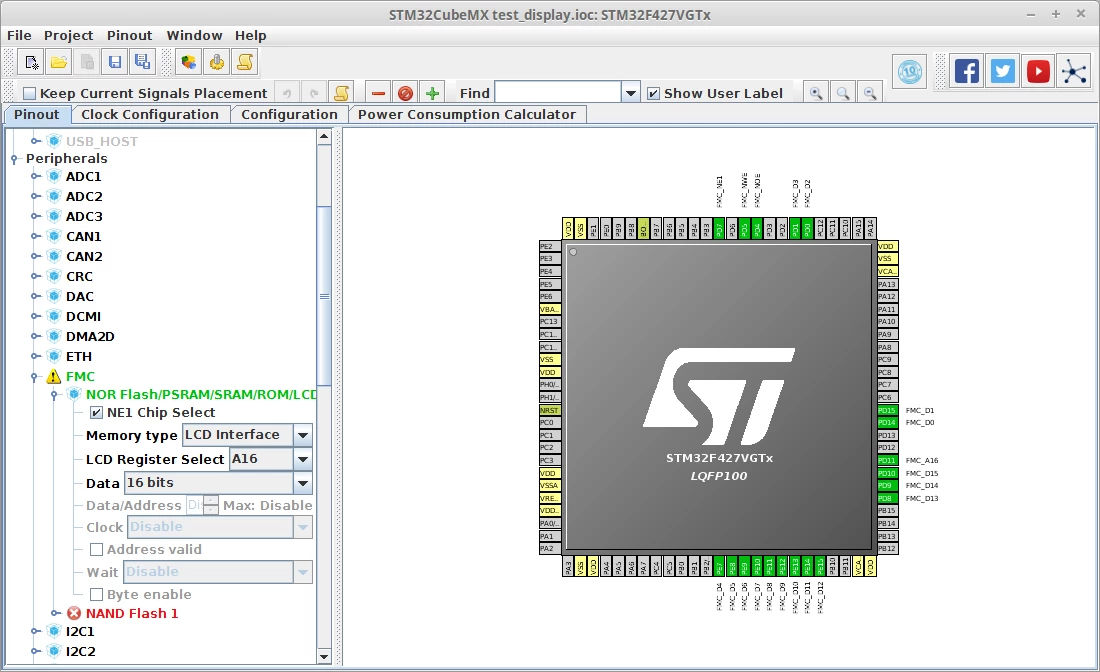
0690X000006CTJtQAO.png

    This topic has been closed for replies.
    Best answer by Tesla DeLorean

    Sorry, don't really understand the question.

    It gives you an option for the "LCD Register Select", in the usual sense this would allow you to access the LCD from two distinct memory decode regions, one for the DATA side (ie memcpy to a wide range say 64K space), and a second for CONTROL registers access.

    4 replies

    Tesla DeLorean
    Tesla DeLoreanBest answer
    Guru
    November 24, 2018

    Sorry, don't really understand the question.

    It gives you an option for the "LCD Register Select", in the usual sense this would allow you to access the LCD from two distinct memory decode regions, one for the DATA side (ie memcpy to a wide range say 64K space), and a second for CONTROL registers access.

    Tips, Buy me a coffee, or three.. PayPal Venmo (See Profile) Up vote any posts that you find helpful, it shows what's working..
    turboscrew
    Senior III
    November 24, 2018

    It doesn't even configure the GPIOs:

    static void MX_GPIO_Init(void)
    {
     
     /* GPIO Ports Clock Enable */
     __HAL_RCC_GPIOF_CLK_ENABLE();
     __HAL_RCC_GPIOE_CLK_ENABLE();
     __HAL_RCC_GPIOD_CLK_ENABLE();
     
    }

    and:

    /* FMC initialization function */
    static void MX_FMC_Init(void)
    {
     FMC_NORSRAM_TimingTypeDef Timing;
     
     /** Perform the SRAM1 memory initialization sequence
     */
     hsram1.Instance = FMC_NORSRAM_DEVICE;
     hsram1.Extended = FMC_NORSRAM_EXTENDED_DEVICE;
     /* hsram1.Init */
     hsram1.Init.NSBank = FMC_NORSRAM_BANK1;
     hsram1.Init.DataAddressMux = FMC_DATA_ADDRESS_MUX_DISABLE;
     hsram1.Init.MemoryType = FMC_MEMORY_TYPE_SRAM;
     hsram1.Init.MemoryDataWidth = FMC_NORSRAM_MEM_BUS_WIDTH_16;
     hsram1.Init.BurstAccessMode = FMC_BURST_ACCESS_MODE_DISABLE;
     hsram1.Init.WaitSignalPolarity = FMC_WAIT_SIGNAL_POLARITY_LOW;
     hsram1.Init.WrapMode = FMC_WRAP_MODE_DISABLE;
     hsram1.Init.WaitSignalActive = FMC_WAIT_TIMING_BEFORE_WS;
     hsram1.Init.WriteOperation = FMC_WRITE_OPERATION_ENABLE;
     hsram1.Init.WaitSignal = FMC_WAIT_SIGNAL_DISABLE;
     hsram1.Init.ExtendedMode = FMC_EXTENDED_MODE_DISABLE;
     hsram1.Init.AsynchronousWait = FMC_ASYNCHRONOUS_WAIT_DISABLE;
     hsram1.Init.WriteBurst = FMC_WRITE_BURST_DISABLE;
     hsram1.Init.ContinuousClock = FMC_CONTINUOUS_CLOCK_SYNC_ONLY;
     hsram1.Init.PageSize = FMC_PAGE_SIZE_NONE;
     /* Timing */
     Timing.AddressSetupTime = 15;
     Timing.AddressHoldTime = 15;
     Timing.DataSetupTime = 255;
     Timing.BusTurnAroundDuration = 15;
     Timing.CLKDivision = 16;
     Timing.DataLatency = 17;
     Timing.AccessMode = FMC_ACCESS_MODE_A;
     /* ExtTiming */
     
     if (HAL_SRAM_Init(&hsram1, &Timing, NULL) != HAL_OK)
     {
     _Error_Handler(__FILE__, __LINE__);
     }
     
    }

     I can't find a way to the control register access.

    turboscrew
    Senior III
    November 25, 2018

    A-ha, this explains the "register select"...

    https://www.st.com/content/ccc/resource/technical/document/application_note/group0/17/82/73/f8/b8/8a/47/c7/DM00338361/files/DM00338361.pdf/jcr:content/translations/en.DM00338361.pdf

    I, kind of, thought that CubeMX would generate register writing function with "automatic" register select GPIO handling.

    Is it still the idea, that the FMC-GPIOs need to be configured by user?

    turboscrew
    Senior III
    November 26, 2018

    Aha, the GPIO-configurations are there, but in a different file than in an older version.

