

Associate II
Feb 23, 2024 9:49 AM UTC
Question

STM32F411RE PC13 user button mode is only pull-up?

Hello ST community,

I can't find on the st.com website the documentation showing the electronic circuit of the STM32F411RE, especially for the user button. In which document can I find it?

On the web it seems that schematics from google image show that the user button on the STM32F411RE only has pull-up resistor. Is it true?

The pull-down mode when configured in MX_GPIO_Init() isn't working.

CU,

MH
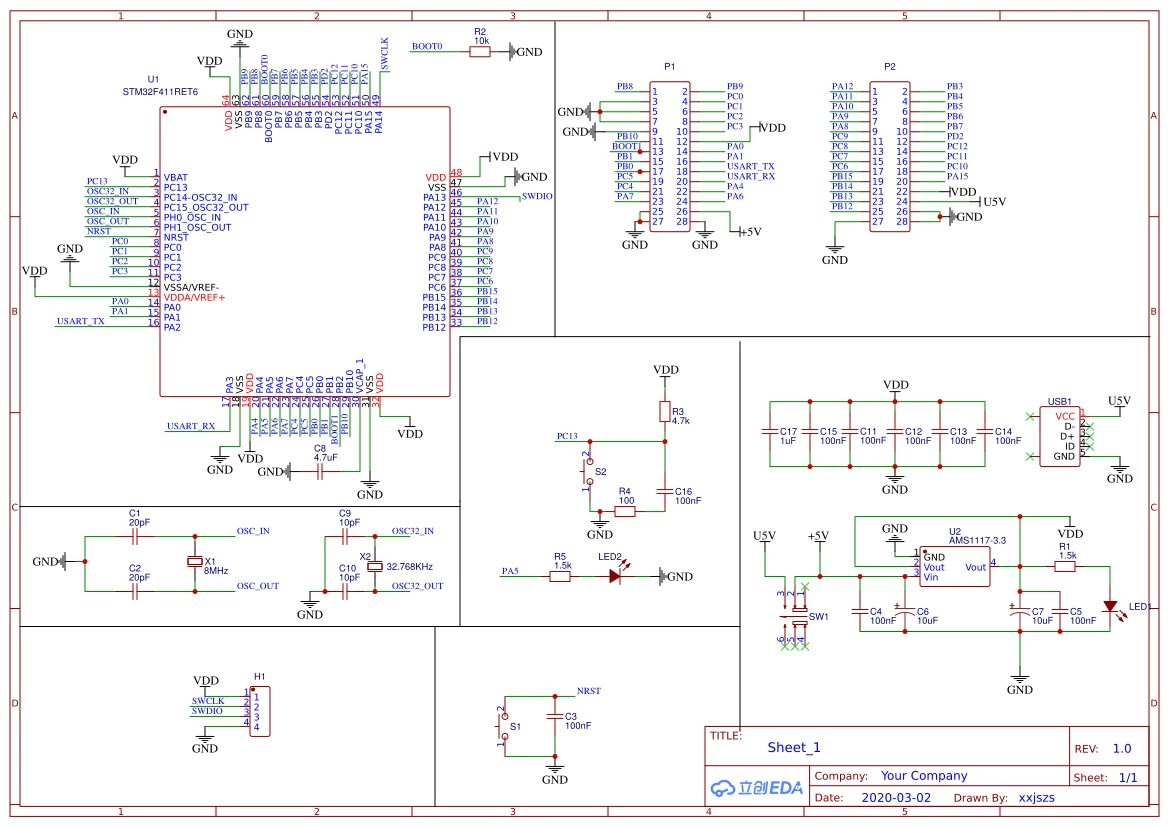
 

schematics.png


This topic has been closed for replies.

6 replies

gbm
Super User
Feb 23, 2024 11:20 AM UTC

STM32F411RE is a microcontroller, not a board. You need to find the schematic of the board you have. Maybe this link will help you:

https://stm32-base.org/boards/

My STM32 stuff on github - compact USB device stack and more: https://github.com/gbm-ii/gbmUSBdevice
Andrew Neil
Super User
Feb 23, 2024 11:42 AM UTC

As @gbm said, "STM32F411RE" is a microcontroller - not a board.

If you have an ST board, the schematics will be available on its Product Page; eg, for the NUCLEO-F411RE board:

AndrewNeil_0-1708688094969.png

https://www.st.com/en/evaluation-tools/nucleo-f411re.html 

Look on the 'CAD Resources' tab:

AndrewNeil_1-1708688127161.png

https://www.st.com/en/evaluation-tools/nucleo-f411re.html#cad-resources

Schematics are usually also included in the User Manual - see the 'Documentation' tab.


@MasterHans wrote:

On the web it seems that schematics from google image show ...

schematics.png


That is not an ST board - you'll have to contact the supplier or designer of that particular board with questions about it.

Do you actually have that board, or is it just a random image you found through Google?

You need to find the correct schematic for the board you actually have.

ST boards will have ST details bottom-right of each sheet; eg,

AndrewNeil_2-1708688490176.png


A complex system that works is invariably found to have evolved from a simple system that worked.A complex system designed from scratch never works and cannot be patched up to make it work.
Lead II
Feb 23, 2024 11:46 PM UTC

Yes, a pull-up OR a pull-down - never both at the same time.

Most of the time, with a simple push button (closing a circuit when pressed) "we" use a pull-up. It is there to avoid the input signal "floating" (unconnected) when the button is not pressed.

So, such a push button becomes "low active": if not pressed, MCU sees a 1 (hi), if pressed MCU sees a 0 (low). You can also configure a falling edge interrupt to realize when the button was pressed (the start, not the release).

If you have an external pull-up but you would enable an (MCU) internal pull-down - what happens?
It is a resistor divider! Now the signal level for this input signal "hangs somewhere in the middle" and it is not anymore a clear 0 or 1. (never both pull-x at the same time)

Andrew Neil
Super User
Feb 24, 2024 9:24 AM UTC

@tjaekel wrote:

Most of the time, with a simple push button (closing a circuit when pressed) "we" use a pull-up. It is there to avoid the input signal "floating" (unconnected) when the button is not pressed.


Indeed.

@MasterHans : But a pull-down (resistor to GND) could equally be used - with the button connecting to VDD.

In that case, it would be "active high":

  • if not pressed (inactive), MCU sees a 0 (low);
  • if pressed (active) MCU sees a 1 (high).

So, again, this is nothing to do with the STM32F411RE - it can work with either - it's all down to the external circuit, and how the designer of that external stuff decided  to do it.


A complex system that works is invariably found to have evolved from a simple system that worked.A complex system designed from scratch never works and cannot be patched up to make it work.
Pavel A.
Feb 23, 2024 11:59 PM UTC

The button connected to PC13 is right in the middle of your picture. When the button is pressed, PC13 will be connected to the ground. Contact 2 of the button is pulled up with a resistor. So you configure PC13 as simple input with neither [internal] pull up or pull down.

>  In which document can I find it?

AN4899


Lead II
Feb 24, 2024 5:40 AM UTC

Yes, Pavel A. is right.
Basic stuff: just understand what a voltage divider via resistors is (pull-up and pull-down active at the same time), what happens if you connect two resistors in parallel, etc.

If there is an external pull-up - and it is on your board! - you should NEVER enable also an MCU internal pull-up: now you have two resistors in parallel and the resultant resistance is way lower (and can kill your MCU pin).

So, as Pavel A. has mentioned: in this case: NEVER enable a pull-up neither a pull-down inside MCU.