


Neolithic
Associate III
December 15, 2023
Question

STM32F407ZET6 Could not verify ST Device

  • December 15, 2023
  • 19 replies
  • 12308 views

Hi All,


I have a setup where I bought a STM32F407ZET6 dev board from AliExpress and have been using for almost 6 years using STM32Cube IDE. It was only until i updated my IDE from 1.6 to 1.14 when it started saying that "Could not verify ST Device! Please verify that the latest version of gdb-server is used for the connection". my openocd is remotely running on Raspiberry pi where it uses the bitbanging driver to drive the GPIOs for establishing an SWD connection. 


This same question has been addressed in several other threads in the context of bluepill (https://community.st.com/t5/stm32-mcus-boards-and-hardware/how-to-deal-wirh-could-not-verify-st-device/td-p/234230/page/2).

On the OpenOCD side, i am getting this error:
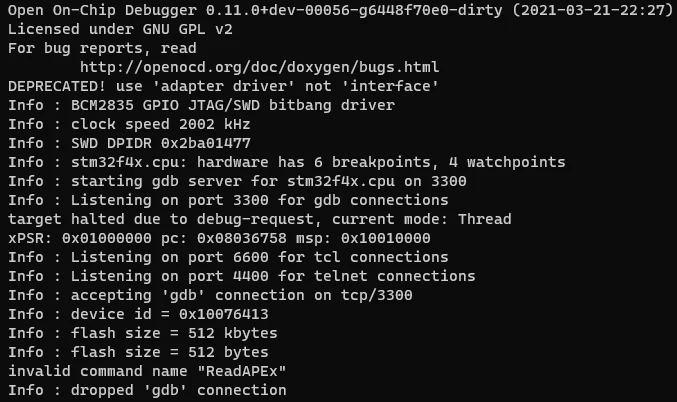
Neolithic_0-1702623539327.png

I tried changing the -expected-id $_CPUTAPID to different values suggested in different posts (including 0), but nothing works. Most of the forums talk about this issue in the context of Bluepill; however this is STM32F407 based board.


Can anyone please help me with this problem. I will appreciate the help. Thanks.


Regards,

Junaid

This topic has been closed for replies.

19 replies

TDK
December 15, 2023

You likely have a counterfeit programmer. Buy a genuine one or roll back to a previous CubeIDE version.


"If you feel a post has answered your question, please click ""Accept as Solution""."
Neolithic
NeolithicAuthor
Associate III
December 15, 2023

As I already mentioned in my post, I am not using any programmer. I am using Raspberry pi bit banging driver to drive GPIOs for SWD protocol to communicate with my device. So, its not really any programmer issue.

Tesla DeLorean
Guru
December 15, 2023

Some ST supplied component, say within the driver or debugger, is gate keeping this access, causing the error you are reporting.

Tips, Buy me a coffee, or three.. PayPal Venmo (See Profile) Up vote any posts that you find helpful, it shows what's working..
Tesla DeLorean
Guru
December 15, 2023
Tips, Buy me a coffee, or three.. PayPal Venmo (See Profile) Up vote any posts that you find helpful, it shows what's working..
Neolithic
NeolithicAuthor
Associate III
December 15, 2023

The question is that even if this is some giga device thing, which i am not sure about, why cube ide 1.6 has no issue at all and higher versions have issue. What was changed and how to fix it?

ST Employee
December 15, 2023

Hi All,


This question has been routed to our online support center for support from our team.


Regards,

Jake

ST Support

Neolithic
NeolithicAuthor
Associate III
December 15, 2023

Hi Jake. Thanks. When can I expect a reply?

Associate
May 3, 2024

Same board, same issue.

Did someone already found a solution?

Neolithic
NeolithicAuthor
Associate III
May 4, 2024

Unfortunately not. The ST's own tech support suggested me to use cube ide 1.6.0 since this issue seems to be weird as the chip is not counterfeit.


But, if you just use generic gdb debugging you can still do it with latest versions. 

Associate
May 6, 2024

Hi, thanks for your replay.

I'm using Version 1.6.0 now, but still facing issues.

splasher_0-1714985950905.png

splasher_1-1714986016052.png

splasher_0-1714986164645.png

If I change to OpenOCD I can debug - but not with GDB server.
Is this a different issue?


Visitor II
February 3, 2025

Hello,

I am not having the exact setup as of yours, but basically I am trying to debug my stm32f373 MCU, which is bought from mouser, with official stlinkv3 bought from ST and connected to raspberry pi as remote. At first I also had the problem, that STM32CubeIDE displays like "Cannot verify ST device, please check if the latest gdb server is used". Then I just copy the config file which is generated automatically by cubeide in the project to raspi, and the openocd script folder in stm32cubeide installation also to raspi and specify the search path for openocd with "-s" to the script folder just copied. And now it works, i didn't dig into the problem, but basically the interface/target script shipped with openocd are not the same as ST composes, maybe ST needs more functions for openocd gdb server configuration.

Every time I change the debug configuration in stm32cubeide, i have to copy the config file to raspi, e.g. when I add swv later on.

Just for someone who might have the similar problem as mine.

Neolithic
NeolithicAuthor
Associate III
February 3, 2025

Hi, Thank you for sharing your experience. This is very valuable. I will definitely try this and if it works for me too then I will accept your solution. And I agree, i also think that ST needs to add a bit more effort into supporting their SoCs in OpenOCD.