


EAktu.1
Associate
March 23, 2023
Question

STM32F407 not appearing in the COM port section in device manager.

  • March 23, 2023
  • 4 replies
  • 4121 views

My main purpose here is to write sensor data into the text file. Planning to send the data through COM port and read and write the data into the text file using MATLAB. This is the only way to write the data into text file that I am thinking about without using any external hardware.

However, I cannot display the mcu in COM ports.
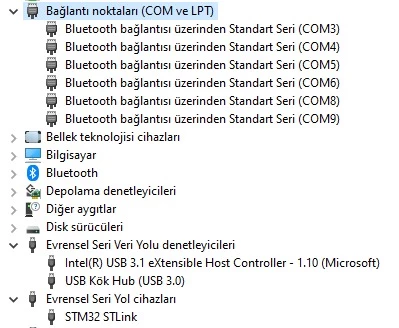
0693W00000aJYK7QAO.jpg 

I reinstalled the drivers, I connected mcu to pc both with mini and micro usb.

I am not sure how to proceed, any help would be appreciated.

Thanks!

Enes

This topic has been closed for replies.

4 replies

Peter BENSCH
ST Technical Moderator
March 23, 2023

To see the COM port, there must be either a real COM port or a virtual one.

For a real one you need an UART-USB converter, for a virtual one typically a development board from STMicroelectronics.

Is the STM32F407 on a NUCLEO, a DISCOVERY or your own board?

Regards

/Peter

In order to give better visibility on the answered topics, please click on Accept as Solution on the reply which solved your issue or answered your question.
EAktu.1
EAktu.1Author
Associate
March 23, 2023

It's a DISCOVERY board.

Peter BENSCH
ST Technical Moderator
March 23, 2023

OK, we are talking about the STM32F407G-DISCO and the younger STM32F407G-DISC1 respectively, both of which still contain the older ST-LINK/V2-A without Virtual COM Port (VCP). Newer DISCOVERY and NUCLEO contain the ST-LINK/V2-1 with more functions, including the VCP.

However, there is a workaround that allows you to retrofit the Virtual COM Port (VCP) for the ST-LINK/V2-A, but this involves either some soldering or connecting a USART-USB converter. Details are in the UM1472 in section 6.1.3.

If the problem is solved, please mark this thread as answered by selecting Select as best, as also explained here. This will help other users find that answer faster.

Good luck!

/Peter

In order to give better visibility on the answered topics, please click on Accept as Solution on the reply which solved your issue or answered your question.
EAktu.1
EAktu.1Author
Associate
March 23, 2023

I am definitely took advantage of this information and mark the thread when there is an update.

Thanks a lot!

Enes