


Andres Cao
Associate III
April 13, 2017
Question

STM32F4 Resetting itself (Nucleo 64)

  • April 13, 2017
  • 51 replies
  • 15572 views
Posted on April 14, 2017 at 00:58

Hi!

I have a Nucleo64-446RE and every 5/10 minutes the board resets itself.

I'm using the Virtual COM to send data to my PC and plot it (among many other things), and when the board resets I lose the Serial connection. I need to re-open it in order to plot again. If after this reset I want to program the microcontroller I get the ''Unable to reset target'' message for which I need to unplug and replug the USB(which is also powering the board). I'm using the System Workbench for STM32.

Here's an oscilloscope picture of the NRST pin (blue), which confirms the reset. The red trace is a 3.3V pin, which shows there are no power issues. 
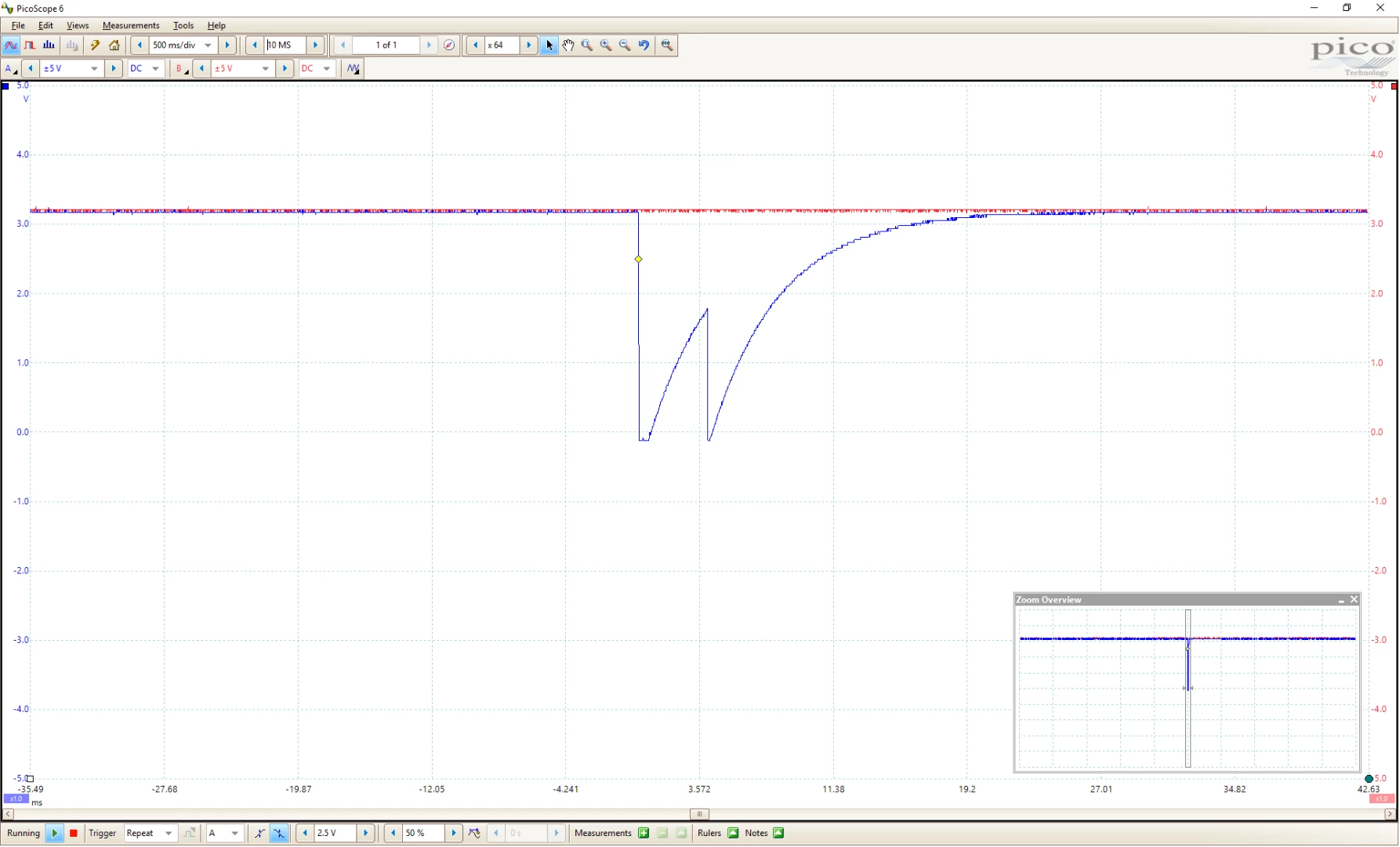
0690X00000606kYQAQ.png

Can you please help me debug this reset?

As I understand, it can't be a Hard Fault because (I think) in that case the system wouldn't reset but end up in an infinite loop. I haven't implemented any of the error handlers, but I think they're implemented by default with weak attributes.

Watching the following image:

0690X00000606llQAA.png

From external sources:

  • Definitely I'm not pressing the reset button
  • The ST-LINK could be resetting. How likely is this, why would it? Given that Virtual Com connection is lost it could be the case, since if I press the reset button the Virtual Com connection is not lost.

From internal sources:

  • WWDG is not activated
  • IWDG is not activated
  • Red trace would prove it's not a power reset
  • There's no lower-power mode being used.
  • Software reset, this would be the only option. What causes a software reset?

Thank you very much in advance for all your input!

Cheers,

Andrés

    This topic has been closed for replies.

    51 replies

    Tesla DeLorean
    Guru
    April 14, 2017
    Posted on April 14, 2017 at 02:28

    The STM32 has a reset reason register, you should inspect that.

    If it is not the power (VDDA has the POR circuit) then I start supposing the ST-LINK. what firmware do you have on that currently? Make a note of that, and then make sure you have the most up to date ST-LINK Utilities, and use that to upgrade the firmware.

    Tips, Buy me a coffee, or three.. PayPal Venmo (See Profile) Up vote any posts that you find helpful, it shows what's working..
    Andres Cao
    Associate III
    April 14, 2017
    Posted on April 14, 2017 at 13:46

    Thanks Clive!

    I'll check on the versions and confirm. 

    I checked the schematics, I will remove the solder bridge SB12 to isolate the reset signal from the ST-LINK and check if it's indeed that. Seems to be easy to test. 

    Regarding the reset register:

    0690X00000606m5QAA.png

    Reset value is not entirely clear.

    I understand I should read this register and then clear it with the RMVF bit. Then after the system resets itself I should see PIN + any other flag. And if I see only PIN, then it's the ST-LINK. Does this sound correct?

    I'll bring more updates on Tuesday, since my lab is closed until then.

    Thanks again,

    Andrés
    Andrei Chichak
    Lead
    April 14, 2017
    Posted on April 14, 2017 at 08:05

    Put a memory breakpoint somewhere between the stack and the heap. I'm wondering if you're grabbing memory, over indexing an array, or blowing the stack. I'm not sure how that would manifest itself, but rule it out anyway.

    Andrei

    Andres Cao
    Associate III
    April 14, 2017
    Posted on April 14, 2017 at 13:49

    Thank you Andrei,

    I'm not allocating memory dynamically, all arrays are fixed size. Also, the indexing of the arrays is also fixed, there's no array[variable] access. So that could leave blowing the stack as a possibility, I guess.

    Could you elaborate on how to put this memory breakpoint that you mention?

    Thanks!

    Andrés

    Andrei Chichak
    Lead
    April 15, 2017
    Posted on April 15, 2017 at 18:45

    It depends on your debugger. In eclipse, using the Memory Browser view, right click on a portion of memory between heap and stack and use 'Add Watchpoint'.

    You could set up the watchpoint to halt your program on reads or writes.

    How do you figure out where the heap ends? Luckily you are using static allocation of data, you are a very smart person. Have your compiler generate a 'map' file, and figure out what the highest address is for your declared variables. You should have free space above that.

    Another idea is to create a variable, once again using the map file, that is allocated at the high end of the heap. Give it a known value, and periodically check to see if it still has that value. If the stack is getting blown, this 'sentinel' value might get overwritten. A memory watchpoint on that variable will halt your program and you can see where in your code the access happened.

    You could run your program for some large portion of the normal time before it resets, halt, and inspect memory to see what is going on.

    Andrei

    Andres Cao
    Associate III
    April 18, 2017
    Posted on April 18, 2017 at 17:25

    Ok... so I think we've found it.

    First step: disconnect the T_NRST from ST-LINK to NRST of the Target MCU.

    So, after I did this I was still having problems, still the reset. So the T_NRST cannot be resetting the MCU. But anyway, I put a pullup to the T_NRST and registered what happenned when the MCU resets. This is the result, red trace is the NRST from the Target MCU. Blue trace is the T_NRST from the ST-LINK (50ms/div, and then a zoomed version):

    0690X00000606nrQAA.png0690X00000606iTQAQ.png

    Doesn't make much sense in the beginning. Looks like the ST-LINK knows beforehand that the MCU will reset. If you ''and both signals'' you will see the it has the double peak as showed in the first post. 

    Inspecting the RCC_CSR register the value I was getting (after a lot of trial since the debugger stopped working so I had to do it with the LED) was 0x14000000. This means Pin Reset + Soft Reset.

    So, only chance left is that they're connecting through the Serial Wire Debug. Either the ST-LINK senses a problem and then tries to reset the target MCU (which has some problem that causes a Soft Reset), or the ST-LINK is sending a Reset Command. 

    I take a look at what happens with the T_NRST and the SWD Clock signal. 

    0690X00000606l8QAA.png

    When ST-LINK is trying to reset the target MCU, there's some communication going on in the SWD interface. This would confirm what was thought previously.

    After this I disconnected the SWD Clock and Data I/O from the target MCU. Red is T_NRST and blue is the NRST from the MCU.

    0690X00000606nwQAA.png

    The ST-LINK tries to reset the MCU but now it has no way. It was sending a Reset command through the SWD and also using the T_NRST pin.

    Good news: My code is OK.

    Bad news: ST-LINK is still having problems and doing that every 3/4 minutes. This means that I'm losing the serial connection and have to reopen the port every time. Not acceptable for what I'm trying to do.

    Next step? I will upgrade the firmware as suggested and try again, I wanted to find the cause before upgrading.

    0690X00000606o1QAA.png

    Thanks for your help guys! I'll soon let you know if the upgrade solves the problem or if we need someone from ST to come in and solve this.

    EDIT: Updated firmware didn't solve the problem. The issue still remains.

    Cheers,

    Andrés

    Tesla DeLorean
    Guru
    April 18, 2017
    Posted on April 18, 2017 at 17:54

    >>

    if we need someone from ST to come in and solve this.

    It is not a problem that seems prolific, you could work with the ST FAE attached to your commercial account.

    Are you sure you don't have anything on the PC side that's probing the mbed MSC drive? Windows system goes into sleep, suspend, spins down drives, screen savers, etc.

    If you power the Nucleo from a USB Charger do these random resets occur?

    Tips, Buy me a coffee, or three.. PayPal Venmo (See Profile) Up vote any posts that you find helpful, it shows what's working..
    Andres Cao
    Associate III
    April 18, 2017
    Posted on April 18, 2017 at 19:12

    It's definitely something I can work around with a USB-Serial, but would prefer not to.

    I powered it with an external power supply and while connected to the computer it has the same behavior. However, with the external power supply but the USB disconnected the T_NRST is not triggered. But, of course, I get no data.

    I will try tomorrow with a Linux computer and see if the problem persists.

    Are you sure you don't have anything on the PC side that's probing the mbed MSC drive? Windows system goes into sleep, suspend, spins down drives, screen savers, etc.

    Not a 100% sure, no. I know there's no sleep, suspend, or screen savers. Regarding the MSC driver to be honest I don't know, not even how to check that. 

    Thanks again!

    Andrés
    ST Technical Moderator
    April 18, 2017
    Posted on April 18, 2017 at 23:57

    Hi

    Cao.Diego_Andres

    ,

    I will check this case and keep you informedabout the status of the checks.

    Imen

    In order to give better visibility on the answered topics, please click on 'Best answer' on the reply which solved your issue or answered your question. Thanks
    ST Technical Moderator
    April 19, 2017
    Posted on April 19, 2017 at 12:33

    Hi

    Cao.Diego_Andres

    ,

    Have you tried with other board and you get the same issue?

    Imen

    In order to give better visibility on the answered topics, please click on 'Best answer' on the reply which solved your issue or answered your question. Thanks
    Andres Cao
    Associate III
    April 20, 2017
    Posted on April 20, 2017 at 13:00

    DAHMEN.IMEN

    ‌,

    Turvey.Clive.002

    I've connected the Nucleo board (the same that was having problems) to a Raspberry PI, while showing my serial port in a normal terminal.It has been running for more than 30 minutes without any trouble, previously it would crash between 4 and 5.

    So either my computer (Dell XPS9550, Windows 10) is doing funny things with the USB which the ST-LINK doesn't like, or the ST-LINK and my computer can't agree on something (?).

    This is definitely non-critical, although I'm still curious about what is happening.

    Thank you all for the help!

    Andrés

    Brian Tetzlaff
    Visitor II
    April 21, 2017
    Posted on April 21, 2017 at 20:39

    I am having the same problem, however it is with a different Nucleo board.  After 3 to 4 mins, the board resets.  This causes 2 things to happen.

    1) If I was debugging, I would get disconnected from the debugger.

    2) The TX over the STLink VCOM connection stops working until the board is powered down and brought back it up again.

    This reset problem happens on both my Nucleo F767ZI and my STM32F746G-Disco board, so I do not think that it is a board problem.  I also trapped the reset cause and it shows up as an External Reset.  We scoped the NRST line and saw that it gets pulled down when the reset happens.

    I am using the latest STlink USB drivers and updated the STlink firmware in the Nulceo board.  I even updated my BIOS and Laptop Drivers too.  I have the board running off of an external 5v power supply.  And I tried removing SB15 from the Nucleo board.  Nothing I have tried as been able to fix the problem.

    I did a lot of tests and found out that by just having the STlink USB cable plugged into my laptop that that is enough to get the reset problem to happen.  It does not have to be used for debugging or as a power supply or even have the USB drivers installed.  All it needs to be is just connected to have the problem happen.

    I found another laptop at the company that also causes the board to reset.  Oddly enough that laptop is from the same family as the one I am using.  I use a Dell Precision 3510 and the other one is a Dell Precision 7710.  The other Dell laptops at the company work just fine.  They are all older models such as a Dell Inspiron and a Dell Lattitude.

    Gregory Hancock
    Visitor II
    April 21, 2017
    Posted on April 21, 2017 at 22:26

    I am seeing the same behavior with a Nucleo-32 board (P/N NUCLEO�L432KC). The board works fine and is completely stable when connected to a Lenovo ThinkStation E31 desktop running Windows 7, but it exhibits spontaneous self-reset when connected to a Dell Precision 7510 laptop running Windows 10. I have the same versions of the ST-LINK driver and utilities installed on both. I upgraded the firmware on the Nucleo board just a couple of weeks ago.

    I have not yet dug into troubleshooting the problem, but I thought it worthwhile to let others know that this problem may be more widespread than initially assumed. Maybe something with Windows 10?

    In my case, the ST-LINK Virtual COM port (VCP) stops displaying the Nucleo's output after the reset, but data to the Nucleo continues to flow. I have to disconnect and reconnect my terminal software (TeraTerm) for the VCP to begin displaying Nucleo serial output again.

    I will post an update if I find a resolution.

    Tesla DeLorean
    Guru
    April 22, 2017
    Posted on April 22, 2017 at 12:42

    Try disabling the mass storage driver, the mbed firmware wants to use that to send firmware on to the STM32.

    Screen savers, AV and power down options may come into play. If a USB charger works without incident then the issues is with the PC and the software running on it.

    Tips, Buy me a coffee, or three.. PayPal Venmo (See Profile) Up vote any posts that you find helpful, it shows what's working..
    Andres Cao
    Associate III
    April 22, 2017
    Posted on April 22, 2017 at 14:40

    If a USB charger works without incident then the issues is with the PC and the software running on it.

    I agree Clive.

    On the other hand, I can run my USB oscilloscope, mouse, keyboard, etc., without problems at all. So there's something else to this, specifically related to the ST-LINK. 

    I wouldn't consider it chance that the 3 cases reported fail with Dell computers.

    Dilbert K
    Associate III
    May 17, 2017
    Posted on May 17, 2017 at 20:35

    I am using Nucleo-F411RE board and running AC6 (SystemWorkbench) on Dell Laptop (Window 10).

    Once every ~10 mins the Openocd will have following message, then STM32F4 will RESET.

    Examination failed, GDB will be halted. Polling again in 100ms

    Info : Previous state query failed, trying to reconnect

    Polling target stm32f4x.cpu failed, trying to reexamine

    Seems like issue is similar or the same.... Just wonder this is the on board STlink problem or not.

    I don't want to buy a stand alone STlink V2 and end up same issue.

    Tesla DeLorean
    Guru
    May 17, 2017
    Posted on May 17, 2017 at 21:38

    Instrument your code to indicate a reset, or count them, and run from a USB charger, if this doesn't fail, then it's something stupid your Dell is doing. People throughout the history of time have installed stupid and broken filter drivers onto the Microsoft storage driver stack. Usually because someone at DELL, HP or TOSHIBA want some dumb tray icon to animate or otherwise 'enhance' your experience.

    Tips, Buy me a coffee, or three.. PayPal Venmo (See Profile) Up vote any posts that you find helpful, it shows what's working..
    Dilbert K
    Associate III
    May 18, 2017
    Posted on May 18, 2017 at 22:22

    If this is Dell (Laptop) issue, should there be a way to install the STLink - USB driver to resolve this ??

    During the debugger loading, it has the Error, but it continue to load/run code, I did not pay attention.

    Anyone know how to remove this error ?  See this could resolve my issue.

    Info : clock speed 1800 kHz

    Error: libusb_open() failed with LIBUSB_ERROR_NOT_SUPPORTED

    Info : STLINK v2 JTAG v28 API v2 M v18 VID 0x0483 PID 0x374B

    Info : using stlink api v2

    Info : Target voltage: 3.241334

    Info : stm32f4x.cpu: hardware has 6 breakpoints, 4 watchpoints

    Info : accepting 'gdb' connection on tcp/3333

    Daniel Dyck
    Visitor II
    May 31, 2017
    Posted on May 31, 2017 at 19:49

    I have uninstalled ALL Dell support software and it is still reinstalling the driver every time I unplug and plug in the board, after manually removing it. I am running Windows 10 on a Dell Precision Tower 3420. 

    Anyone encounter this problem?

    Dilbert K
    Associate III
    June 2, 2017
    Posted on June 02, 2017 at 01:59

    Yes, happened to me too on my Dell (window 10).  STLink debug driver will reinstall (when ST board is connected) even u uninstalled. 

    Which should not caused you problem.

    I find out the issue with below, it is due to Mv18 on board, I managed to borrow a board which has Mv15 STlink frimware.

    The ERROR message is not show anymore. 

    Error: libusb_open() failed with LIBUSB_ERROR_NOT_SUPPORTED

    Info : STLINK v2 JTAG v28 API v2 M v18 VID 0x0483 PID 0x374B

    I am able to ask anyone know where to get previous version of stsw-link007

    Mark Peter Vargha
    Associate III
    March 7, 2018
    Posted on March 07, 2018 at 06:26

    The ST-Link V2-1 (with mass storage) is unusable. Randomly disconnects, resets target, ST-Link not found error, etc. Standalone ST-Link V2-0 is rock solid and works fine. It would be so nice to let us officially downgrade the onboard debugger. The hardware is the SAME.

    There is only the unofficial way now: Download standalone ST-Link's old firmware binary from some dev forum, reflash onboard STM32F103, and update with official tool. It works fine.

    I never missed the mass storage mode. Virtual serial port would be nice to have, but working debug is more important.

    Tesla DeLorean
    Guru
    March 7, 2018
    Posted on March 07, 2018 at 07:11

    You could always convert it to a J-LINK OB

    Tips, Buy me a coffee, or three.. PayPal Venmo (See Profile) Up vote any posts that you find helpful, it shows what's working..
    Mark Peter Vargha
    Associate III
    March 7, 2018
    Posted on March 07, 2018 at 07:20

    Yes, I know. I tried, but I did not like.