

omercpp
Associate
July 27, 2020
Solved

STM32F4 HardFault with 1 bit flipped address access

  • July 27, 2020
  • 7 replies
  • 1692 views

Hello Everyone,

I have a Communication (UARTs) and DMA intense application running on stm32f439z.

I am getting a strange Hardfault, not very rarely, I would say one per hour average, related to a wrong address access on the bus.

Not happening always for the same address or same point of the code, however, the behavior is same, 1 bit is flipped or corrupted or changed somehow and getting a faulty bus access.

For the example below, while it was trying to read from address 0x2000002c, the register( r3) content is somehow 0x2020002c and this address is out of bounds of course ( Ram end: 0x20030000)

Could anyone have any guess about such a Fault?

Could this be a Flash corruption or Flash-read error?

Could this be related to a voltage/clock error?

I am using internal 16MHz HSI RC, and system clock is 80 MHz. APB1 PCLK is 40MHz, APB2 PCLK is 80MHz.

Hw is custom PCB, Vcc of MCU is 3v3.

Any hint to go further debugging of such fault?

The details of the debug of one example on STM32CubeIDE environment is as follows:

 800b60a: 4b18    ldr r3, [pc, #96] ; (800b66c)

 800b60c: 4628    mov r0, r5

 800b60e: 6819    ldr r1, [r3, #0]

 .....

 800b66c: 2000002c .word 0x2000002c

RElevant Fault Registers:

Register: CFSR_UFSR_BFSR_MMFSR

Address: 0xe000ed28

Value: 0x8200

Size: 32

Reset value: 0x0

Reset mask: 0xFFFFFFFF

Access permission: RW

Read action:

Description:

Configurable fault status

     register


Register: BFAR

Address: 0xe000ed38

Value: 0x2020002c

Size: 32

Reset value: 0x0

Reset mask: 0xFFFFFFFF

Access permission: RW

Read action:

Description:

Bus fault address register

 General Purpose registers:

r0 0x2001c6a0 (Hex)

r1 0x0 (Hex)

r2 0x2001ccdc (Hex)

r3 0x2020002c (Hex)

r4 0x2001c558 (Hex)

r5 0x2001c6a0 (Hex)

r6 0x2001ec50 (Hex)

r7 0x2002fe40 (Hex)

r8 0x51 (Hex)

r9 0x2001ec58 (Hex)

r10 0x2001ec54 (Hex)

r11 0x2001ec50 (Hex)

r12 0x1 (Hex)

sp 0x2002fd30 (Hex)

lr 0xffffffe9 (Hex)

pc 0x8004eda (Hex)

xpsr 0x61000003 (Hex)

d0 0x738d (Hex)

d1 0xa8c0 (Hex)

d2 0x0 (Hex)

d3 0x0 (Hex)

d4 0x0 (Hex)

d5 0x0 (Hex)

d6 0x0 (Hex)

d7 0x26dcd (Hex)

d8 0x0 (Hex)

d9 0x0 (Hex)
This topic has been closed for replies.
Best answer by TDK

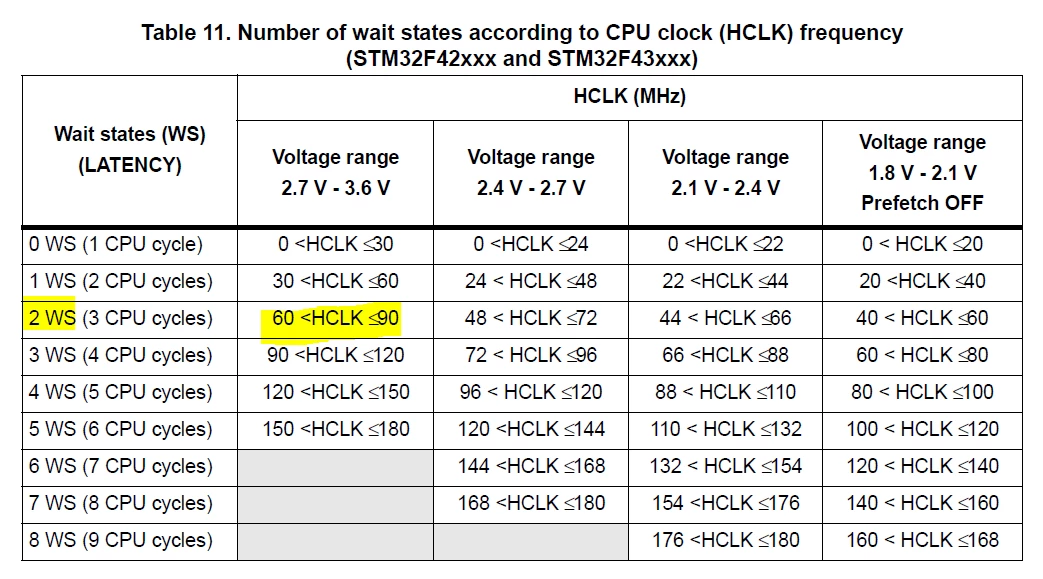
Looks like you should be at 2 wait states. Per the reference manual:

0693W000003BS4tQAG.png

7 replies

TDK
Super User
July 27, 2020

Weird. Does it also occur if you increase the wait states? or decrease the system clock rate (if possible)? Is the ART accelerator enabled and does it still occur if disabled?

"If you feel a post has answered your question, please click ""Accept as Solution""."
waclawek.jan
Super User
July 27, 2020

(unnecessarily duplicated TDK's hints, so reducing noise, deleted it, sorry)

JW

omercpp
omercppAuthor
Associate
July 27, 2020

Thank you for the response TDK.

Very good questions and points.

I will start with wait states, as it is 1 at the moment.

(HAL_RCC_ClockConfig(&RCC_ClkInitStruct, FLASH_LATENCY_1)

For the Flash settings, I have only the settings below, using Hal drivers by the way. How can I check the ART accelerator is enabled or not? ( I did not enable it intentionally..)

 /* Configure Flash prefetch, Instruction cache, Data cache */ 

 __HAL_FLASH_INSTRUCTION_CACHE_ENABLE();

 __HAL_FLASH_DATA_CACHE_ENABLE();

 __HAL_FLASH_PREFETCH_BUFFER_ENABLE();

I only found this how to enable the ART accelerator: (If these are the only settings needed, then it seems it is disabled, since pre-fetch buffer is enabled also as above.)

/* Disable prefetch buffer */

FLASH->ACR & = ~FLASH_ACR_PRFTEN;

/* Enable flash instruction cache */

FLASH->ACR |= FLASH_ACR_ICEN;

/* Enable flash data cache */

FLASH->ACR |= FLASH_ACR_DCEN;

TDK
TDKBest answer
Super User
July 27, 2020

Looks like you should be at 2 wait states. Per the reference manual:

0693W000003BS4tQAG.png

"If you feel a post has answered your question, please click ""Accept as Solution""."
Tesla DeLorean
Guru
July 27, 2020

>>(HAL_RCC_ClockConfig(&RCC_ClkInitStruct, FLASH_LATENCY_1)

That's definitely not sufficient for 80 MHz

Tips, Buy me a coffee, or three.. PayPal VenmoUp vote any posts that you find helpful, it shows what's working..
Tesla DeLorean
Guru
July 27, 2020

I'd be at 2 or 3, the ART can hide most of this, so I wouldn't try to catch the critical path

0693W000003BS61QAG.jpg

Tips, Buy me a coffee, or three.. PayPal VenmoUp vote any posts that you find helpful, it shows what's working..
omercpp
omercppAuthor
Associate
July 27, 2020

Exactly, I was also looking at the same table at the moment, with your suggestion. Thank you very much TDK!

I will try this and get back to here. For sure this one is a bug here.

omercpp
omercppAuthor
Associate
July 28, 2020

After 9 hours of running, no errors. So definitely this helped.

What is strange to me is, I was using same wrong configuration for the previous revision of the FW, never encountered this problem.

The previous revision was less intensive, this is my only explanation that the probability was a bit low, and when it is increased, the problem started to show up..

Thanks for the help!
