

Senior
May 6, 2024
Solved

STM32F4 build error on local copy

Hi, I copied example “en.stm32cubef4-v1-28-0\STM32Cube_FW_F4_V1.28.0\Projects\STM324x9I_EVAL\Examples\FMC\FMC_SRAM” in a separate local folder.

Copied files in included paths as shown below:
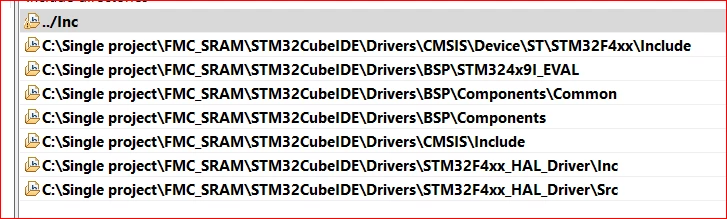
GauravK_0-1714984884678.png


1 error remaining “Description    Resource             Path       Location              Type

make: *** No rule to make target 'C:/Drivers/STM32F4xx_HAL_Driver/Src/stm32f4xx_hal.c', needed by 'Drivers/STM32F4xx_HAL_Driver/stm32f4xx_hal.o'.  Stop.       FMC_SRAM                                      C/C++ Problem”

Please let me know what changes required.

This topic has been closed for replies.
Imen.DBest answer
ST Technical Moderator
May 7, 2024

Hello @GauravK ,

It seems you have opened the folder, but not the project.

You should open/import the project in the repository tree (and not copy the example) - using File > Open projects from file system to import the project in your current workspace).

In order to give better visibility on the answered topics, please click on 'Best answer' on the reply which solved your issue or answered your question. Thanks

2 replies

Imen.DBest answer
ST Technical Moderator
May 7, 2024

Hello @GauravK ,

It seems you have opened the folder, but not the project.

You should open/import the project in the repository tree (and not copy the example) - using File > Open projects from file system to import the project in your current workspace).

In order to give better visibility on the answered topics, please click on 'Best answer' on the reply which solved your issue or answered your question. Thanks
GauravKAuthor
Senior
May 8, 2024

I had used "open project from file system".

I tried creating new project and copying LED toggle example projects src and inc that was able to build.

I will try combining two 2 examples with same approach "SPI and GPIO toggle". Also need to check MCU challenges as well.