

KHabe.1
Associate
June 12, 2023
Solved

STM32F302VCT6 - PC13 -> RTC_OUT_CALIB ?

  • June 12, 2023
  • 5 replies
  • 3424 views

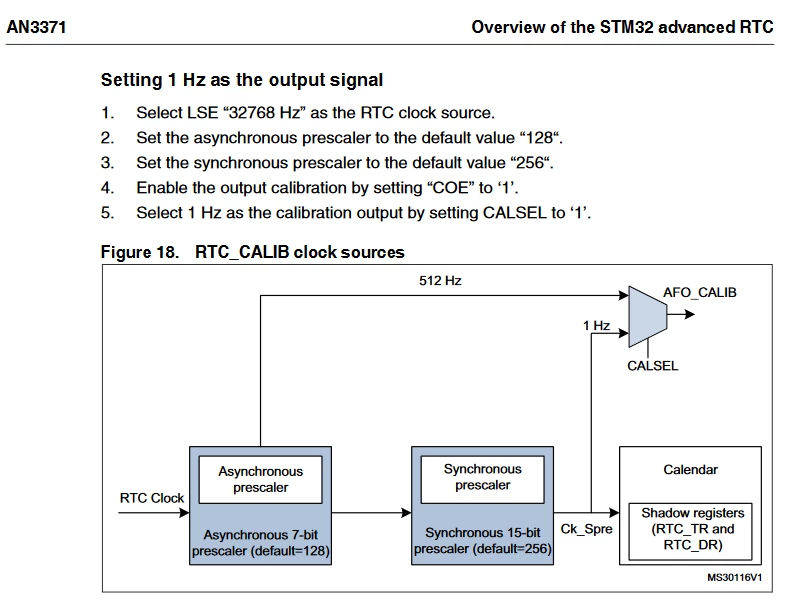
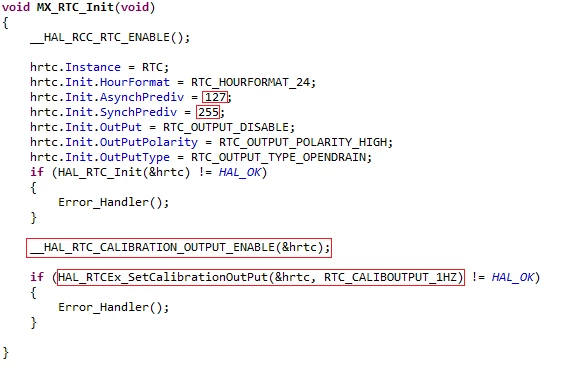
I would like to set a 1Hz signal on the PC13 (RTC_OUT_CALIB). I have found a manual in document AN3371 (see picture in appendix). The code is also in the appendix. Unfortunately, nothing happens on the PC13 but the RTC works. If anyone has any idea what else to add here, thank you, greetings, KH

_legacyfs_online_stmicro_images_0693W00000dDc1sQAC.png
_legacyfs_online_stmicro_images_0693W00000dDbR2QAK.png

This topic has been closed for replies.
Best answer by waclawek.jan

If PC13 is configured in RTC to any RTC function, that overrides the GPIO settings, see RTC chapter in RM.

Reset the backup domain (remove battery or any source from VBAT, or use the software reset) and don't enable RTC etc. Then try again.

JW

5 replies

waclawek.jan
Super User
June 12, 2023

What is your hardware? If you set PC13 to GPIO OUtput and toggle it, can you observe those pulses?

Read out and check/post the RTC registers content.

JW

KHabe.1
KHabe.1Author
Associate
June 12, 2023

Thanks for your answer!

I can set all pins (0-12) of PortC as output or input. All these pins work, only PC13 remains (apparently) always configurated as input and cannot be changed!?

waclawek.jan
waclawek.janBest answer
Super User
June 12, 2023

If PC13 is configured in RTC to any RTC function, that overrides the GPIO settings, see RTC chapter in RM.

Reset the backup domain (remove battery or any source from VBAT, or use the software reset) and don't enable RTC etc. Then try again.

JW

KHabe.1
KHabe.1Author
Associate
June 12, 2023

Thanks for your information! By removing and reinstalling the battery (VBAT), the PC13 first works as a normal IO port.

After that I have activated the RTC again (see code above, and the GPIO function of PC13 deactivated again) and PC13 now outputs the 1Hz!

thanks and best regards, KH

KHabe.1
KHabe.1Author
Associate
June 12, 2023

Now I understand, PC13 is supplied by VBAT!