

Associate
April 10, 2024
Question

STM32F103: SD CARD, SDIO

  • April 10, 2024
  • 3 replies
  • 4940 views

Hello,

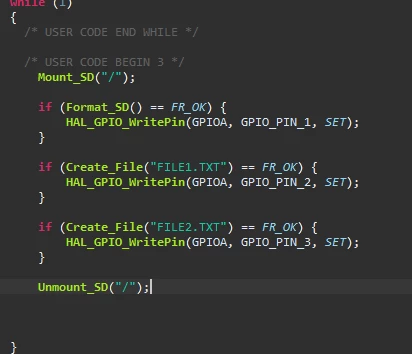
I am using the STM3210E-EVLA board. I want to create files on an SD card. While consulting the documentation for the STM3210E, I noticed that the size of the SD card is 128 Mbytes, whereas I am using an 8-GbytesSD card. I have written a simple code (below), but it does not display anything and does not work correctly (I have properly included the FATFS libraries). I am wondering if the large size of the SD card I am using compared to the one supported by the STM32 could be causing the issue.

Thank u.
rania_0-1712748897435.png


This topic has been closed for replies.

3 replies

mƎALLEm
ST Technical Moderator
April 10, 2024

Hello,

As you're already using STM3210E-EVAL board, did you already try this native example?

In my opinion, you need to validate your SD card before writing your own code.


To give better visibility on the answered topics, please click "Best answer" on the reply which solved your issue or answered your question.
raniaAuthor
Associate
April 15, 2024

Yes, that was the issue. You need to reconfigure and include the correct library.

You can find it at this link: https://github.com/STMicroelectronics/STM32CubeF1/tree/master?tab=readme-ov-file

Simply clone the project using Git, then execute the corresponding .cproject file for the STM3210E-EVAL project. After that, the program should work correctly.

Tesla DeLorean
Guru
April 10, 2024

Don't write or format until.you are sure the reading works.

The board can use SDHC and SDXC but is old enough thar 128MB was quite large at the time.

FATFS shipped by ST for many years is capable of 100's of GB, Microsoft would prefer EXFAT for cards of 64GB and above.

Cards should come suitably formatted

Check on the PC

Tips, Buy me a coffee, or three.. PayPal Venmo (See Profile) Up vote any posts that you find helpful, it shows what's working..