

Senior
March 8, 2024
Solved

STM32F042F6P7 (TSSPOP20 package): CAN availability on CubeMx

  • March 8, 2024
  • 2 replies
  • 1028 views

Using STM32CubeIDE (v1.14.0) with STM32F042F6P7 (TSSOP 20) to configure CAN pins on custom board. However the CAN peripheral is grayed-out when I open the IOC file in STM32CubeIDE. For pin assignments, PB8 is available for CAN rx but CAN tx is not show for any other pin. How do I access alternate pins for the CAN peripheral? Reference manual says PA12 should be available as alternate for CAN tx; and PA11 should be available as alternate for CAN rx.

This topic has been closed for replies.
Best answer by mƎALLEm

Hello,

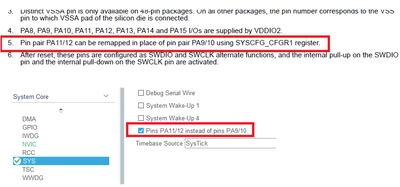
As stated in the datasheet you need to remap the IOs PA11/12 in place of IO pair PA9/10 using SYSCFG_CFGR1 register:

SofLit_0-1709933856214.png

So in CubeMx go to SYS menu and check the checkbox "Pins PA11/12 instead of pins PA9/10". CAN peripheral will be available.

2 replies

mccabehmAuthor
Senior
March 8, 2024

I was able to select alternate functions for pins on another STM32 part using <Ctrl + mouse left> when configuring pinout in IOC file. This doesn't appear to be possible with the STM32F042F6P7. Does this mean I can't use the STM32CubeIDE and HAL for the STM32F042F6P7 part?

mƎALLEm
mƎALLEmBest answer
ST Technical Moderator
March 8, 2024

Hello,

As stated in the datasheet you need to remap the IOs PA11/12 in place of IO pair PA9/10 using SYSCFG_CFGR1 register:

SofLit_0-1709933856214.png

So in CubeMx go to SYS menu and check the checkbox "Pins PA11/12 instead of pins PA9/10". CAN peripheral will be available.

To give better visibility on the answered topics, please click "Best answer" on the reply which solved your issue or answered your question.