n.serina
Associate III
April 8, 2017
Solved

STM32Cubemx stuck in ''Generating user source code''

  • April 8, 2017
  • 29 replies
  • 9383 views
Posted on April 08, 2017 at 08:29

Hello, 

I recently installed cubemx 4.20 latest version 4.20.1

I can generate the project only 1 time, later if i try to update the project by adding new peripherals, i can not able to generate the code, the whole application is stuck in 'Generating user source code '. the only way i can close this application is killing it by 'Task manager'. it happens every time. Please help 

    This topic has been closed for replies.
    Best answer by Jeanne Joly
    Posted on April 12, 2017 at 15:15

    Hello

    n.serina

    ,

    In fact, the problem you highlighted is solved in CubeMX4.1.

    Please, upgrade with the latest release of CubeMX.

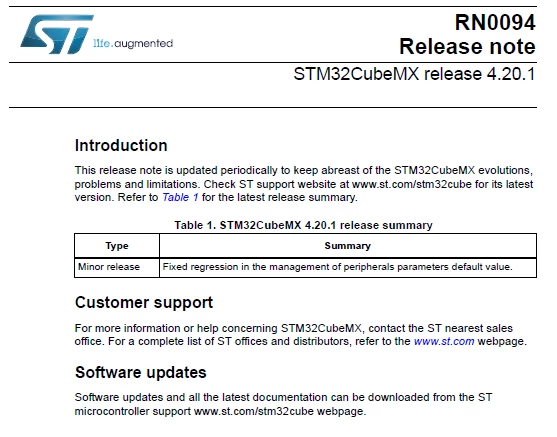
    Here is a screen shot of the CubeMX4.1 release note :

    0690X00000606kEQAQ.png

    Hope it will help you and that you won't encounter this issue in the future.

    BR. Eric

    29 replies

    ST Technical Moderator
    April 9, 2017
    Posted on April 09, 2017 at 22:44

    Hi  n.serina,

    I will report your issue internally to our CubeMx team.

    Thank you  for your contribution.

    Imen

    In order to give better visibility on the answered topics, please click on 'Best answer' on the reply which solved your issue or answered your question. Thanks
    Daming Liu
    Associate
    June 28, 2017
    Posted on June 28, 2017 at 07:47

    Hi Imen,

    I got same problem with CubeMx 4.21.0. 

    It can generating code well after I added some codes in USER CODE area and change CubeMX configuration. But after I changed some code in debug.h and cc.h for Lwip, and then I changed some lwip configuration in CubeMX, Finally it will stuck in Generating user source code... as followed pic.

    0690X00000607XRQAY.png

    The only method to make it work again is to make a new project with same .ioc file.

    I use IAR7.7 in window 8.

    May I change Lwip files with cubemx?

    ST Technical Moderator
    April 10, 2017
    Posted on April 10, 2017 at 14:38

    Hi,

    Can you please send us the STM32CubeMX.log file you find under your user directory in the .stm32cubemx folder.

    Thanks

    Imen

    In order to give better visibility on the answered topics, please click on 'Best answer' on the reply which solved your issue or answered your question. Thanks
    Jeanne Joly
    Jeanne JolyBest answer
    Associate
    April 12, 2017
    Posted on April 12, 2017 at 15:15

    Hello

    n.serina

    ,

    In fact, the problem you highlighted is solved in CubeMX4.1.

    Please, upgrade with the latest release of CubeMX.

    Here is a screen shot of the CubeMX4.1 release note :

    0690X00000606kEQAQ.png

    Hope it will help you and that you won't encounter this issue in the future.

    BR. Eric

    Rob.Riggs
    Senior
    April 13, 2017
    Posted on April 13, 2017 at 05:04

    Hi

    Joly.Jeanne

    ‌,

    It would be helpful to us CubeMX users to have more more completeinformation in the release summary. Nothing in the referencedsummary indicates to me a fix to a hang within the CubeMX code generator. A separate 'Release Notes' section that went into more detail about the specific fixes that were made would also be helpful. And so would a public issue tracker (with references to resolvedissues in the release notes).

    We'd also like to see apublic git repo for CubeMX and the HAL libraries. Many of us wouldlove to help ST make the Cube software and HAL libraries a better product.

    Rob

    Jeanne Joly
    Associate
    April 13, 2017
    Posted on April 13, 2017 at 09:53

    Hello

    Riggs.Rob

    ,

    On the CubeMX release summary, we have a particular section for each official release with all the trackers listed (Id and headline) that are delivered in. (please, have a look to the

    http://www.st.com/content/ccc/resource/technical/document/release_note/b2/02/4b/e3/81/32/49/c4/DM001076pdf/files/DM001076pdf/jcr:content/translations/en.DM001076pdf

    ).

    For the CubeMX release 4.1, it is more specific as we should not have this intermediate/minor release but we discovered an important issue in CubeMX 4.0. Only one bug was delivered in CubeMX4.1 (compare to CubeMX4.0).

    That is why you only have one sentence that describes the issue we encountered in CubeMX4.

    Regarding your repo git for CubeMX users question,

    • for the HAL librairies, this question is under analysis/study yet. As FW is only source code, it have sense to have a repo git.
    • however, for CubeMX, as CubeMX is delivered as a binary file, it has no sense to have a repo git for CubeMX release. Hence, no repo git for CubeMX is planned or under study for the moment.

    BR. Eric

    n.serina
    n.serinaAuthor
    Associate III
    April 13, 2017
    Posted on April 13, 2017 at 18:00

    Thank you so much for the help, i came to know that after updating my KEIL-MDK-5 software, the issue got resolved automatically,  

    Chet Ferry
    Associate II
    April 13, 2017
    Posted on April 13, 2017 at 21:39

    I have had the same problem with CubeMx hanging for quite a while now.  Same fix for me is to open task manager and kill it then open it and try again.  I have the latest version 4.20.1 and it does NOT solve the problem.  Just thought I would chime in.  Thanks.

    n.serina
    n.serinaAuthor
    Associate III
    April 14, 2017
    Posted on April 14, 2017 at 02:22

    Ferry.Chet

    ‌ are you using keil -mdk software ? try uninstalling it and installing a newer version.

    Chet Ferry
    Associate II
    April 17, 2017
    Posted on April 17, 2017 at 15:42

    I'm not using Keil.  I am using Visual GDB (bolts together GNU compiler tools and Visual Studio).  I use 'True Studio' as the output toolchain, but then don't use TrueStudio.  I just use all the C code that gets generated.

    dpryan2
    Visitor II
    April 14, 2017
    Posted on April 14, 2017 at 02:17

    It is also broken for me.

    I'm using 4.20.1. 

    The log doesn't say anything exciting. Here are the last few lines:

    [INFO] CodeGenerator:404 - code generatio: config db path: C:\Program Files (x86)\STMicroelectronics\STM32Cube\STM32CubeMX//db/

    [WARN] IP:1042 - AutoBaudRateEnableParam not found: check if there is a RefParameter without a condition.

    [INFO] CodeEngine:162 - oldGeneratedFile, C:\Projects\someproject\Src\license.tmp_save

    [INFO] CodeEngine:180 - Generated code: C:\Projects\someproject\Src\license.tmp

    Edit: Maybe I wasn't waiting long enough? 9 minutes later, it completed.

    Jeanne Joly
    Associate
    April 14, 2017
    Posted on April 14, 2017 at 10:04

    Hi

    Ryan.David.002

    ,

    Do you want to send me your ioc file where you encounter your issue in order that I have a quick look at it?

    By the way, could you please precise in details the process you follow when you have your issue?

    BR. Eric

    Pawe? Jab?o?ski
    Associate II
    April 17, 2017
    Posted on April 17, 2017 at 11:45

    Hello,

    I have this same problem in version 4.20.1 under Ubuntu. Under Windows it's working. I have run CubeMX via terminal under Linux and the following logs are there, when the program will not responding:

    2017-04-17 11:07:33,444 [INFO] ProjectBuilder:1120 - Time for Copy HAL[1] : 584mS.

    2017-04-17 11:07:33,604 [INFO] ProjectBuilder:1314 - Project Generator version: 2.22.0

    2017-04-17 11:07:33,622 [INFO] ConfigFileManager:297 - The Die is : DIE444

    Exception in thread 'Thread-862' java.lang.IllegalAccessError: class stm32Families.Families (in unnamed module @0x1e9e725a) cannot access class com.sun.org.apache.xerces.internal.parsers.DOMParser (in module java.xml) because module java.xml does not export com.sun.org.apache.xerces.internal.parsers to unnamed module @0x1e9e725a

    at stm32Families.Families.getDestinations(Families.java:962)

    at convertor.Convertor.generate(Convertor.java:342)

    at com.st.microxplorer.plugins.projectmanager.model.ToolchainGenerator.generate(ToolchainGenerator.java:99)

    at com.st.microxplorer.plugins.projectmanager.engine.ProjectBuilder.createToolChainFolders(ProjectBuilder.java:1351)

    at com.st.microxplorer.plugins.projectmanager.engine.ProjectBuilder.createProject(ProjectBuilder.java:490)

    at com.st.microxplorer.plugins.projectmanager.engine.GenerateProjectThread.run(GenerateProjectThread.java:41)

    I hope, that it will help to find the reason of problem and fix it ASAP. Where I can download old versions of CubeMX? I need to generate project under Linux.

    Sirma Siang
    ST Employee
    April 24, 2017
    Posted on April 24, 2017 at 11:01

    Hello jablonski.pawel,

    to be able to reproduce the same symptoms, could it be possible that you share your ioc file ?

    Could you please details your Linux distribution (Ubuntu, or ?.... Oracle JDK, or ? )

    Great thanks in advance

    Kind regards

    Sirma

    Pawe? Jab?o?ski
    Associate II
    April 24, 2017
    Posted on April 24, 2017 at 23:47

    Hello,

    here is zip with ioc file, generated files and log from terminal generated at working CubeMX - 

    https://drive.google.com/open?id=0B70yM14XBbBmOGJHd2FHUVoyYVE

     . Now I see, that CubeMX is generating code just when Toolchain is set as 'Other Toolchains (GPDSC)'. In any other option it crash at code generating. I am using Ubuntu 17.04 and Java 9-ea.

    Thanks

    Paweł

    Glen Larson
    Associate III
    May 5, 2017
    Posted on May 05, 2017 at 19:35

    Let me add to the chorus. After upgrading to 0.1 one project won't generate and I can't open the settings dialog, either. The log file shows nothing obviously of interest. No java faults, to be sure.

    I can open the tool on three other ioc files and it all works fine. Swap to the fourth ioc and no settings and an attempt to generate gets a 'no progress' bar and it has to be killed through the task manager. It will do the 'Generate Report' just fine and the output in the pdf looks OK.

    I'm running this directly from the OS on Windows 10 with Java 8.

    ioc attached

    ________________

    Attachments :

    F469DiscGen.ioc.zip : https://st--c.eu10.content.force.com/sfc/dist/version/download/?oid=00Db0000000YtG6&ids=0680X000006HygI&d=%2Fa%2F0X0000000bAu%2FjVgMg_xoR0KrYEA2wbj4QU4xzYgOoxell0iGW.YJ8J8&asPdf=false
    Pawe? Jab?o?ski
    Associate II
    May 5, 2017
    Posted on May 05, 2017 at 21:33

    Your ioc file works fine on me. As attachment is generated project for SW4STM Another projects, which are working, are also based on F4 libraries? Try to remove library and download again. Try also to run CubeMX from command prompt. There you should have logs directly from program.

    ________________

    Attachments :

    F469DiscGen.zip : https://st--c.eu10.content.force.com/sfc/dist/version/download/?oid=00Db0000000YtG6&ids=0680X000006HygR&d=%2Fa%2F0X0000000bAs%2FfdEPdvHMD22EKFysLw5m1SOIeeBaU.l4o3uTVJsIkbk&asPdf=false
    Glen Larson
    Associate III
    May 5, 2017
    Posted on May 05, 2017 at 21:56

    Thanks for checking that out for me. It does seem like some odd combination of java, cube and the ioc file history. I'm working on one F0 chip and 3 F4 chips now and it's just the F469 project that's not working.

    umut ANKARALI
    Visitor II
    October 31, 2017
    Posted on October 31, 2017 at 11:22

    Hi

    I got the same problem My cubemx version is 4.23.0 and i am using cubeF4 lib V1.17.0 is only stuck with F4 series when I use F0 series there is no problem, is working well. I updated java to 8.151 but it didnt work. i added my ioc file

    https://drive.google.com/file/d/0B3GYXIYVe_UxQTU0WFgzUGJXYkU/view?usp=sharing

    Jeroen3
    Senior
    October 31, 2017
    Posted on October 31, 2017 at 16:32

    I experienced this as well, and determined this was due to other processed accessing the generated files immediately.

    Think about Dropbox, Owncloud or other indexing and cloud software.

    Moving out of these managed folders resolved the problem.

    Pausing these services while inside the managed folder resolved the problem.