Associate
September 6, 2024
Solved

ST-Link V2 Connection Issue

  • September 6, 2024
  • 6 replies
  • 2109 views

My V2 is having communication link issues with my STVP.  It was running fine and then boom I get hit with a notification that

"Cannot communicate with the device!

Check the SWD cable connection and check all the needed pin connections on the SWD connector. 

Reboot the ST-Link with USB cable.

If the device has been programmed with Protection Level 2, no more communication is possible."

What can I do to fix the issue?  I am not sure how to reboot the ST-Link with the usb cable nor understand why all of a sudden there would be a protection level on the device.  I am sorry I am not very tech savy I have been thrown onto this project. 

I did have to install the driver once I noticed the connection issue on the device manager.

Please help.



This topic has been closed for replies.
Best answer by STTwo-32

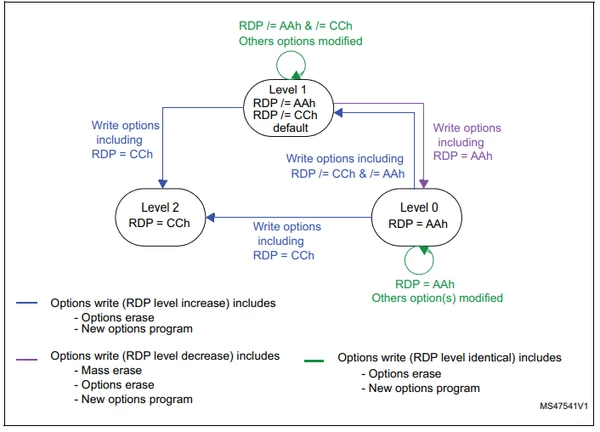
The RDP option byte is set to 0xCC:

STTwo32_1-1725639201232.png


Best Regards.

STTwo-32

6 replies

STTwo-32
ST Technical Moderator
September 6, 2024

Hello @LostSauceMeatBall and welcome to the ST Community :smiling_face_with_smiling_eyes:.

If a device is in Protection Level 2, it is not possible to recover the MCU. You should have a new one.

Best Regards.

STTwo-32

To give better visibility on the answered topics, please click on Accept as Solution on the reply which solved your issue or answered your question.
Associate
September 6, 2024

How does a device get a Protection Level 2?

STTwo-32
STTwo-32Best answer
ST Technical Moderator
September 6, 2024

The RDP option byte is set to 0xCC:

STTwo32_1-1725639201232.png


Best Regards.

STTwo-32

To give better visibility on the answered topics, please click on Accept as Solution on the reply which solved your issue or answered your question.