


FBerg.1
Associate II
July 16, 2024
Solved

(some) example projects don't use *.ioc file?

  • July 16, 2024
  • 2 replies
  • 2137 views

E.g. the FatFs_USBDisk sample does not have a *.ioc file.

Maybe not all example projects use STM32CubeMX?
(the issue sounds like https://community.st.com/t5/stm32-mcus/creating-stm32cubmx-ioc-project-for-older-stm32cube-firmware/ta-p/49664)

How can I enable the view "Device Configuration Tool" for that example project?
Or: what's the best way to see the Mikrocontroller resources used by that project?

Reason for asking:
I can't add support for serial console (including DMA) to FatFs_USBDisk from a reference project. There seems to be a clashing of using the resources.

This topic has been closed for replies.
Best answer by Andrew Neil

@Andrew Neil wrote:

Correct - they don't all have a .ioc file.


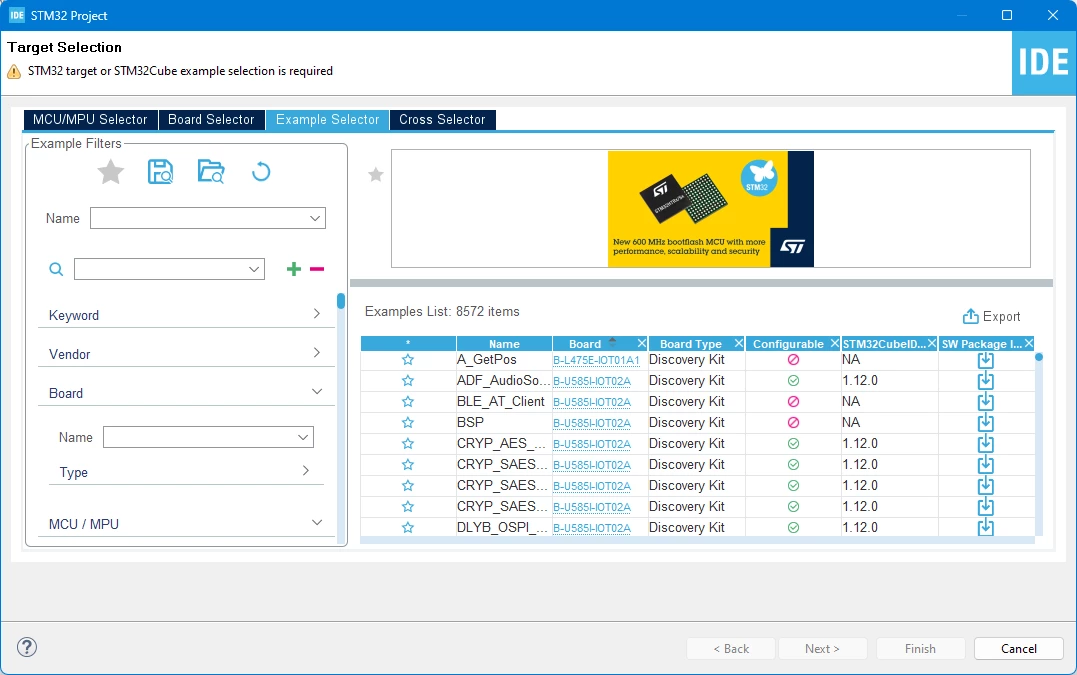
I think the 'Configurable' column tells you which is which:

AndrewNeil_0-1721148534071.png

AndrewNeil_1-1721148616417.pngfor the ones which do have a .ioc file;

AndrewNeil_2-1721148655038.pngfor the ones which don't.


PS:

This, of course, doesn't stop you from re-configuring the project - it just means that you have to do it directly in code, rather than though the CubeMX GUI.

In most cases, the so-called non-configurable (sic) ones will have a Board Support Package (BSP) to abstract the hardware details and, thus, facilitate re-configuration.

PPS:

An example of creating an .ioc file from source code:

https://community.st.com/t5/stm32-mcus/creating-a-stm32cubmx-ioc-project-for-older-stm32cube-firmware/ta-p/49667 

2 replies

Andrew Neil
Super User
July 16, 2024

Correct - they don't all have a .ioc file.

Some just have C initialisation code for the clocks, peripherals, etc - see here.


@FBerg.1 wrote:

How can I enable the view "Device Configuration Tool" for that example project?


You can't.


@FBerg.1 wrote:

Or: what's the best way to see the Mikrocontroller resources used by that project?


Just have to browse the code to see what's used.


If the example in question is for an ST board, then MXCube should have awareness of that board ...


See also:

https://community.st.com/t5/stm32-mcus-embedded-software/stm32cubemx-file-for-the-stm32h747i-disco-usb-webcam-example/m-p/745530/highlight/true#M57279


PS:

An example of creating an .ioc file from source code:

https://community.st.com/t5/stm32-mcus/creating-a-stm32cubmx-ioc-project-for-older-stm32cube-firmware/ta-p/49667 

A complex system that works is invariably found to have evolved from a simple system that worked.A complex system designed from scratch never works and cannot be patched up to make it work.
Andrew Neil
Andrew NeilBest answer
Super User
July 16, 2024

@Andrew Neil wrote:

Correct - they don't all have a .ioc file.


I think the 'Configurable' column tells you which is which:

AndrewNeil_0-1721148534071.png

AndrewNeil_1-1721148616417.pngfor the ones which do have a .ioc file;

AndrewNeil_2-1721148655038.pngfor the ones which don't.


PS:

This, of course, doesn't stop you from re-configuring the project - it just means that you have to do it directly in code, rather than though the CubeMX GUI.

In most cases, the so-called non-configurable (sic) ones will have a Board Support Package (BSP) to abstract the hardware details and, thus, facilitate re-configuration.

PPS:

An example of creating an .ioc file from source code:

https://community.st.com/t5/stm32-mcus/creating-a-stm32cubmx-ioc-project-for-older-stm32cube-firmware/ta-p/49667 

A complex system that works is invariably found to have evolved from a simple system that worked.A complex system designed from scratch never works and cannot be patched up to make it work.
Tesla DeLorean
Guru
July 16, 2024

Yes, some of the examples were actually coded by engineers familiar with the job, and not pressing buttons.

CubeMX generates code from templates and boiler-plate, and whilst it uses HAL, its not the type of HAL or SPL code we typically write.

With the Non-IOC methods, it's perhaps better to sand-box your CubeMX/IDE stuff into it own project, and then pull/merge the salient code, for initialization and interaction, into the more generic HAL implementation.

The Reference Manual then becomes your resource to know what peripherals work/conflict with each other, and how to make choices from the tables of routing/interconnectivity the IC facilitates, and the Data Sheet is the resource with respect to the pins and alternate function mappings there.

Tips, Buy me a coffee, or three.. PayPal Venmo (See Profile) Up vote any posts that you find helpful, it shows what's working..