

LBeau.1
Associate II
December 15, 2020
Solved

Proper keyword font not showing in Cpp

  • December 15, 2020
  • 7 replies
  • 4868 views

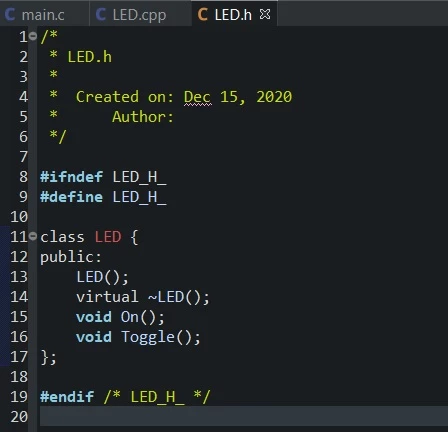
Hello, why are the keywords class, public, virtual not in bold font?

Where to change this feature?0693W000006Fnt4QAC.jpg
    This topic has been closed for replies.
    Best answer by Peter BENSCH

    It will be bold if you install DevStyle from the Eclipse Marketplace.

    Please make sure http://download.eclipse.org/releases/oxygen/ is part of the Available Software Sites for it work:

    Window > Preferences > Install/Update > Available Software Sites

    Good luck!

    When your question is answered, please close this topic by choosing Select as Best. This will help other users find that answer faster.

    /Peter

    7 replies

    Ozone
    Principal
    December 15, 2020

    Syntax coloring would be a functionality of your undisclosed editor.

    LBeau.1
    LBeau.1Author
    Associate II
    December 15, 2020

    its stm32cubeide

    STM32CubeMX IDE CPP Programming - YouTube

    watch this video @ 11:26 , what is he doing that I am not?

    Ozone
    Principal
    December 15, 2020

    Not a Cube IDE user.

    But as Eclipse-based IDE, you will find thess settings under Windows->Preferences.

    And there, under C/C++->Editor->Syntax Coloring.

    LBeau.1
    LBeau.1Author
    Associate II
    December 15, 2020

    Classes are in the blue category, why dont I see blue?

    yawn..O well.

    LBeau.1
    LBeau.1Author
    Associate II
    December 15, 2020

    ..

    Peter BENSCH
    Peter BENSCHBest answer
    ST Technical Moderator
    December 15, 2020

    It will be bold if you install DevStyle from the Eclipse Marketplace.

    Please make sure http://download.eclipse.org/releases/oxygen/ is part of the Available Software Sites for it work:

    Window > Preferences > Install/Update > Available Software Sites

    Good luck!

    When your question is answered, please close this topic by choosing Select as Best. This will help other users find that answer faster.

    /Peter

    In order to give better visibility on the answered topics, please click on Accept as Solution on the reply which solved your issue or answered your question.
    LBeau.1
    LBeau.1Author
    Associate II
    December 15, 2020

    ahaha I installed the dark theme but unclicked the Devstyle.

