

DS.4
Senior
January 23, 2024
Question

Power meas. - How to put PA13 and PA14 to analog no pull up and no pull down?

  • January 23, 2024
  • 6 replies
  • 2800 views

Hi

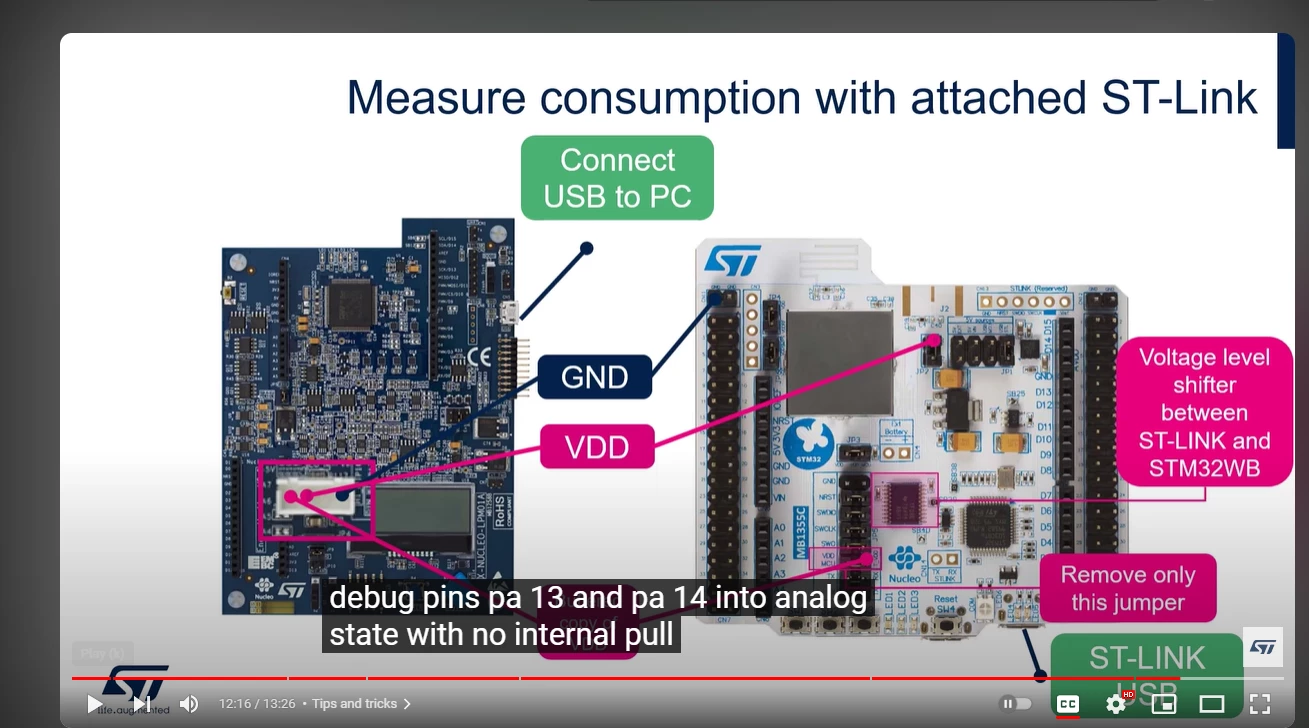
I am using X-NUCLEO-LPM01A to measure some currents on P-NUCLEO-WB55 according to video:
https://www.youtube.com/watch?v=7IVs-nuoXj8.

To keep ST Link enbaled the commentator asks to put some pins to analog state , no internal pull-up , and pull-down state


See here:
DS4_0-1706018159101.png

How do I do that?


This topic has been closed for replies.

6 replies

Andrew Neil
Super User
January 23, 2024

You can link to a specific time in a YouTube video:

AndrewNeil_0-1706020093885.png

eg, https://youtu.be/7IVs-nuoXj8?t=736


@DS.4 wrote:

To keep ST Link enbaled the commentator asks to put some pins to analog state


I think you may have misunderstood what he meant: that will still break the debug connection - it just saves you having to physically fit & remove the jumpers.

Also, if you're trying to get your application down to really the lowest possible current level, this will still leave some leakage - so you'll still need to physically disconnect.

Anyhow ...


@DS.4 wrote:

How do I do that?


Something like this:


 GPIO_InitTypeDef GPIO_InitStruct;

 GPIO_InitStruct.Mode = GPIO_MODE_ANALOG;
 GPIO_InitStruct.Pull = GPIO_NOPULL;
 GPIO_InitStruct.Pin = GPIO_PIN_All;

 HAL_GPIO_Init(GPIOB, &GPIO_InitStruct);


A complex system that works is invariably found to have evolved from a simple system that worked.A complex system designed from scratch never works and cannot be patched up to make it work.
DS.4
DS.4Author
Senior
January 23, 2024

"that will still break the debug connection" - why?

Prior to adding PIN13 and PIN5 to be analog, I Ran a quick test , programmed the WB55 in debug mode (CubeIDE) , and ran.

Have some weird base current of 1 mA on advertising during sleep.  (BleHeartRate example)
But then,  I do get to hold a breakpoint on connection event  , debug doesn't break. But I see the current jump high to 3mA while I am holding the break point. here:

2.png

Exiting debug:

Pressing the" Reset button" on WB55 does not exit debug.

Only if I press "RESET TARGET" on STM32CubeMonitor-Power than I lose it. And only then I see datasheet sleep currents. (3uA). See here:

1.png


So what's going on? and what is then the correct way to keep debug with sleep if I need it?


Andrew Neil
Super User
January 24, 2024

@DS.4 wrote:

"that will still break the debug connection" - why?


Because you are disconnecting the SWD connection - which goes through those pins.


@DS.4 wrote:

So what's going on? and what is then the correct way to keep debug with sleep if I need it?


You will never get true low power readings with a debugger connected - the debugger keeps the CPU awake.

Also, as mentioned earlier, the physical connection will give you some leakage/stray currents.

As well as the SWD connections, also check:

  • Reset from the ST-Link
  • Target voltage sense
  • UART connection
  • Trace connection
  • Connections to other "features" on the dev board.

It is a non-trivial exercise to find & disconnect all these things, and the ST documentation is often incomplete; eg:

https://community.st.com/t5/stm32-mcus-wireless/current-consumption-in-stop-mode-using-b-l072z-lrwan1/m-p/448139/highlight/true#M14437

(unfortunately the link in that post seems to be broken)

EDIT: I found what it should link to:

https://community.st.com/t5/stm32-mcus-wireless/excess-current-consumption-running-b-l072z-lrwan1-from-battery/m-p/322961


@DS.4 wrote:

what is then the correct way to keep debug with sleep if I need it?


You can't have both sleep and debug - choose one.


A complex system that works is invariably found to have evolved from a simple system that worked.A complex system designed from scratch never works and cannot be patched up to make it work.
Andrew Neil
Super User
January 24, 2024

AndrewNeil_0-1706090742437.png


A complex system that works is invariably found to have evolved from a simple system that worked.A complex system designed from scratch never works and cannot be patched up to make it work.
