Shubhamkeshari
Associate II
March 5, 2025
Solved

NUCLEO-H755ZIQ MCU went under low power state while debugging

  • March 5, 2025
  • 20 replies
  • 1654 views

I am using STM32s NUCLEO-H755ZIQ board , while debugging through eclipse IDE for the M7 core the board's MCU went under low power state and LD6 which is over current led (red) is turned on.

When I am connecting the board with the STM32CubeProgrammer the board is gettting detected but ST-Link is failing to flash the board. 


Please help me with this problem as same thing has happend with the another NUCLEO-H755ZIQ board.

Both the boards are having same problem 

This topic has been closed for replies.
Best answer by mƎALLEm

In that case either:

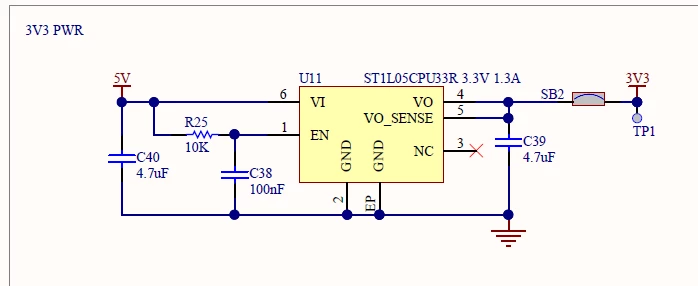
1- This regulator is internally short-circuited :

mALLEm_0-1741171206855.png

2 - Or you have a short circuit on the board.

To differentiate between the two cases you need to unsolder SB2 and fit again JP2.

If LD6 is lit: the regulator is broken. You need to purchase another board.

If LD6 is off you have a short circuit on the board. In that case you need to check your board and find if VDD is short-circuited.

Hope that helps.


20 replies

mƎALLEm
ST Technical Moderator
March 5, 2025

Hello @Shubhamkeshari and welcome to the community,


@Shubhamkeshari wrote:

while debugging through eclipse IDE for the M7 core the board's MCU went under low power state


How do you know it's a low power mode?

What example are you using?

Did you generate the project with CubeMx? if yes, Are you using STM32CubeIDE?

To give better visibility on the answered topics, please click "Best answer" on the reply which solved your issue or answered your question.
Shubhamkeshari
Associate II
March 5, 2025

The project I have flashed is developed on Zephyr RTOS.

Which has multiple threads 5 in working at a time.


Shubhamkeshari_0-1741160128729.png

This is the message comming when I am connecting with STM32CubeProgrammer

mƎALLEm
ST Technical Moderator
March 5, 2025

The voltage is very low: 0.87:

mALLEm_0-1741160743775.png

Check the VDD voltage level with a multimeter on JP4.


To give better visibility on the answered topics, please click "Best answer" on the reply which solved your issue or answered your question.
mƎALLEm
ST Technical Moderator
March 5, 2025

What is the position of the jumper here?:

mALLEm_0-1741161321969.png

And how are you powering the board? via ST-Link?


To give better visibility on the answered topics, please click "Best answer" on the reply which solved your issue or answered your question.
Shubhamkeshari
Associate II
March 5, 2025

The position of the jumper is same as the image.

The board is been powered by a USB cable 

I have changed the USB cable and tried, still the same 

mƎALLEm
ST Technical Moderator
March 5, 2025

USB cable connected to CN1 (ST link USB connector)?:

mALLEm_0-1741163562152.png


To give better visibility on the answered topics, please click "Best answer" on the reply which solved your issue or answered your question.
mƎALLEm
mƎALLEmBest answer
ST Technical Moderator
March 5, 2025

In that case either:

1- This regulator is internally short-circuited :

mALLEm_0-1741171206855.png

2 - Or you have a short circuit on the board.

To differentiate between the two cases you need to unsolder SB2 and fit again JP2.

If LD6 is lit: the regulator is broken. You need to purchase another board.

If LD6 is off you have a short circuit on the board. In that case you need to check your board and find if VDD is short-circuited.

Hope that helps.


To give better visibility on the answered topics, please click "Best answer" on the reply which solved your issue or answered your question.