


Nicholas Yunker_2
Senior
July 10, 2023
Solved

Nucleo-F091RC CAN Bus not communicating

  • July 10, 2023
  • 8 replies
  • 7928 views

I am using the Nucleo-F091RC board to communicate with a Motor that allows me to change it's speed with CAN.  I have the nucleo board attached to an Adafruit CAN Pal board which has a TJA1051T/3 from NXP as the CAN transceiver but I have yet to actually connect the motor to the CAN_H and CAN_L outputs from the transceiver.  I am powering the board with 3.3V generated by the nucleo board and the CAN signals attached to PA12 and PA11 and Silent pin connected to PB12 generating a low signal all the time to make sure the transceiver is in "normal" mode.  I have been able to get the nucleo board to output a CAN message every 65ms and I can see it on the CAN_TX pin being output from the nucleo board to the adafruit CAN Pal.  When I attach my scope to the output of the transceiver (CAN_H) the signal is always High...no data.

Here is my CAN setup code:

static void MX_CAN_Init(void)
{

/* USER CODE BEGIN CAN_Init 0 */

/* USER CODE END CAN_Init 0 */

/* USER CODE BEGIN CAN_Init 1 */

/* USER CODE END CAN_Init 1 */
hcan.Instance = CAN;
hcan.Init.Prescaler = 16;
hcan.Init.Mode = CAN_MODE_NORMAL;
hcan.Init.SyncJumpWidth = CAN_SJW_2TQ;
hcan.Init.TimeSeg1 = CAN_BS1_2TQ;
hcan.Init.TimeSeg2 = CAN_BS2_3TQ;
hcan.Init.TimeTriggeredMode = DISABLE;
hcan.Init.AutoBusOff = DISABLE;
hcan.Init.AutoWakeUp = ENABLE;
hcan.Init.AutoRetransmission = DISABLE;
hcan.Init.ReceiveFifoLocked = DISABLE;
hcan.Init.TransmitFifoPriority = ENABLE;
if (HAL_CAN_Init(&hcan) != HAL_OK)
{
Error_Handler();
}
/* USER CODE BEGIN CAN_Init 2 */
HAL_GPIO_WritePin(CAN_Silent_GPIO_Port, CAN_Silent_Pin, CAN_SILENT_DEFAULT);
/* USER CODE END CAN_Init 2 */

}

Since the motor can't talk back to me I am not setting up anything to do with receiving data from the CAN bus.  Can anyone help me with why I would be seeing data coming from the MCU but then the transceiver not then transmitting that data onto the bus?  Does the transceiver need to be connected to a CAN Bus in order for data to appear on it?  I've tested similar CAN devices that transmit data and they do not seem to have to be connected to the bus for data to appear on CAN_H.
This topic has been closed for replies.
Best answer by Nicholas Yunker_2

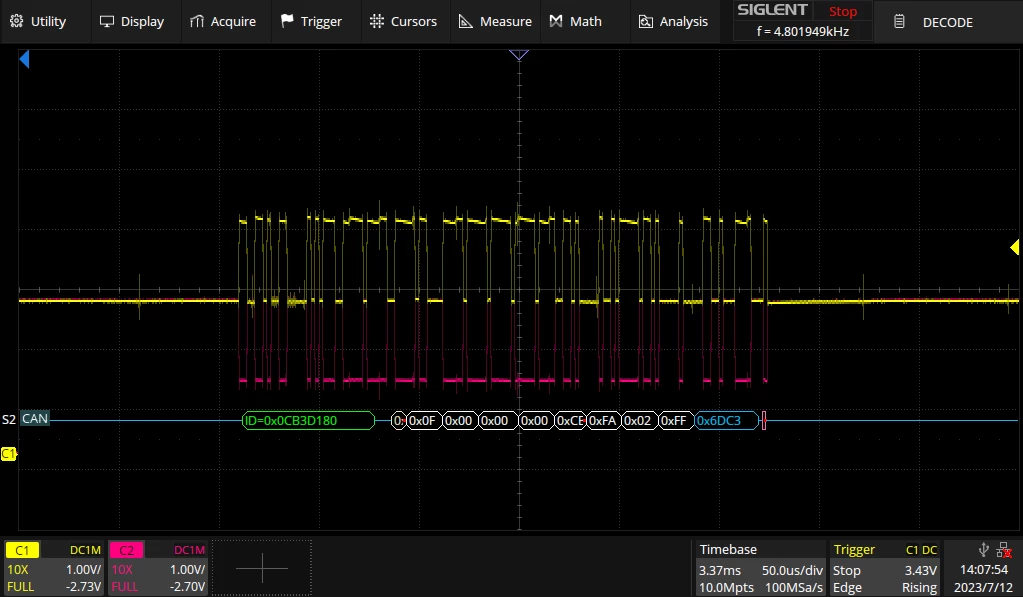
My apologies...I used the oscilloscope probes instead of the logic probes and now I see both CAN_H and CAN_L signals as I would expect.  I am still new to CAN and I wasn't aware that the "zero" for CAN is actually 2.5V...with that in mind here is the CAN_H and CAN_L with the decoded message coming from the Nucleo board:

NicholasYunker_2_0-1689185806420.png

As for why the motor is not responding I believe I may have to take that up with the motor manufacturer.  Thank you for your assistance!

8 replies

Nicholas Yunker_2
Senior
July 10, 2023

Ok, So I've been able to hook it up to the motor now and I am getting a ton of traffic on the CAN Bus (I'm only connected to the motor, there is nothing else on the bus).  As soon as I do this the CAN_TX line out of the Nucelo board doesn't do anything..it's just goes low and then high really quick and then the code hangs and nothing works.  On the CAN_H pin of the CAN bus I see a ton of data coming through.  Am I required to set up the RX side of things in my code and then clear some register out so it doesn't cause the code the hang?  If so, what do I need to set up for the STM32F091RC MCU?

Karl Yamashita
Principal
July 10, 2023

Yes, the TJA1051 CAN bus needs to be connected to the motor CAN bus, along with the terminating resistors. Otherwise it'll detect a bus fault and go into a bus-off state.  

If a reply has proven helpful, click on Accept as Solution so that it'll show at top of the post.CAN Jammer an open source CAN bus hacking toolCANableV3 Open Source
Nicholas Yunker_2
Senior
July 10, 2023

Thank you, that answers one question and explains why when the motor is connected I get traffic on the CAN bus.  That said, for the first 5 seconds after power up I get TX data out of the MCU and nothing on the CAN bus and then after about 5 seconds the MCU hangs and stops working all together and then the CAN Bus comes alive with a ton of traffic (presumably from the motor and not the MCU).

As I mentioned in my last post, I have not implemented any CAN receive code since I am not trying to talk back and forth with the motor...just give it commands.  Do I need to implement some sort of receive routines in order to not crash my code when there is data on the bus coming back at me?

I've attached screen captures of the CAN_TX line from the MCU as well as the CAN_H signal on the CAN Bus to show you what I'm seeing.

mƎALLEm
ST Technical Moderator
July 11, 2023

Hello,

Transmit and Receive are independent. So if your application needs only transmitting messages it's ok and no need for Rx implementation.

Apart of this:

hcan.Init.Prescaler = 16;  --> try to decrease this value
hcan.Init.TimeSeg1 = CAN_BS1_2TQ; --> try to increase this value
hcan.Init.TimeSeg2 = CAN_BS2_3TQ; --> try to increase this value

And select BS1 > BS2. So sample point will be around 80%.


To give better visibility on the answered topics, please click "Best answer" on the reply which solved your issue or answered your question.
LCE
Principal II
July 11, 2023

If the transmit messages are not properly ACKnowledged, the TX FIFO might get full, then it stops sending data, so check all TX buffers / FIFOs / memories.

I recommend to receive CAN data anyway, for the sake of learning and controlling the peripheral - and out of curiosity what's happening on the bus...

mƎALLEm
ST Technical Moderator
July 11, 2023

Hello,

You have an issue with your system clock config:

--> RCC_OscInitStruct.OscillatorType = RCC_OSCILLATORTYPE_HSI|RCC_OSCILLATORTYPE_HSI48; ??? HSI or HSI48?

Also for CAN communication it's NOT RECOMMENDED to use any of the internal source of Clock HSI, HSI48 etc.. This introduce some instability in the communication. So you need to use HSE and an external crystal by soldering X3 or in your case you can use MCO source generated by ST-Link module (which in turn is generated by X1 a 8MHz crystal), for this you need to solder SB16 and SB50 (please refer to the board schematic) and you need to configure HSE in bypass mode: 

RCC_OscInitStruct.HSEState = RCC_HSE_BYPASS;

To give better visibility on the answered topics, please click "Best answer" on the reply which solved your issue or answered your question.
mƎALLEm
ST Technical Moderator
July 11, 2023

I suggest this config for the system clock and CAN at 500kb/s

SofLit_0-1689081698386.png

Please check the availability of the 8Mhz on SB50 with an oscilloscope.

To give better visibility on the answered topics, please click "Best answer" on the reply which solved your issue or answered your question.
Nicholas Yunker_2
Senior
July 11, 2023

I have implemented the changes you suggested and the Nucleo board powers up and seems to run ok as long as I'm plugged into a PC...once I try to power the board off a 5V external supply nothing works.  I believe i've followed the instructions on powering the board externally correctly...

1) move JP5 to pins 2 and 3

2) Remove JP1

3) Attach external 5V to E5V pin on CN7 (pin 6)

The LEDs on the Nucleo board come on but nothing seems to work beyond that.  I suspect the external 8MHz being generated by the STLink portion isn't coming up...does this HAVE to be plugged into a PC to work?

mƎALLEm
ST Technical Moderator
July 11, 2023

That's strange.

According to the schematics, ST-LINK still powered even you are using an external power supply:

SofLit_0-1689088657202.png

So yes if ST-Link is no more powered, no 8MHz outputted for your MCU.

Check the power supply on JP6.

To give better visibility on the answered topics, please click "Best answer" on the reply which solved your issue or answered your question.
LCE
Principal II
July 11, 2023

You might want to start with the loopback mode to check if your transmissions are okay.

Even better, in case you have 2 boards you should try to set up communication between these, without the motor.

And have you checked all hardware connections, including the correct motor pins and the wiring? Maybe it's kust a broken cable.

mƎALLEm
ST Technical Moderator
July 12, 2023

Also for your issue with power, check VIO voltage level of your transceiver on Pin 5 when you switch from PC to an external power supply. 

To give better visibility on the answered topics, please click "Best answer" on the reply which solved your issue or answered your question.
LCE
Principal II
July 12, 2023

Maybe you already damaged the transceiver? But they are usually very robust.

Anyway, do you have another CAN board and or another Nucleo?

Have you already tested your firmware with the external loopback mode?

I would also check the logic analyser settings and connections, and I would instead connect an oscilloscope, just to be sure...

Nicholas Yunker_2
Nicholas Yunker_2AuthorBest answer
Senior
July 12, 2023

My apologies...I used the oscilloscope probes instead of the logic probes and now I see both CAN_H and CAN_L signals as I would expect.  I am still new to CAN and I wasn't aware that the "zero" for CAN is actually 2.5V...with that in mind here is the CAN_H and CAN_L with the decoded message coming from the Nucleo board:

NicholasYunker_2_0-1689185806420.png

As for why the motor is not responding I believe I may have to take that up with the motor manufacturer.  Thank you for your assistance!