

Nitesh Padiyar
Associate
Jun 13, 2018 9:19 AM UTC
Question

Not able to Run STM32CubeMX Tool

Posted on June 13, 2018 at 11:19
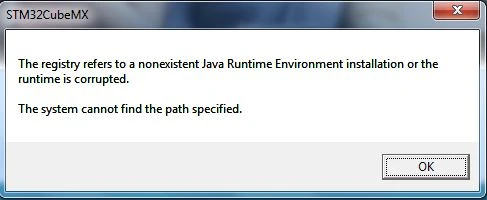
I have installed STM32CubeMx IDE Tool, i am getting error while i run the tool ,Please let me know how to resolve this

0690X00000604fxQAA.jpg
    This topic has been closed for replies.

    11 replies

    Khouloud GARSI
    ST Employee
    Jun 13, 2018 11:57 AM UTC
    Posted on June 13, 2018 at 13:57

    Hi

    nitesh.padiyar

    ‌,

    We will check this and answer you ASAP.

    Khouloud.

    Mohamed Mansouri
    Visitor II
    Jun 19, 2018 7:38 AM UTC
    Posted on June 19, 2018 at 09:38

    Hi

    nitesh.padiyar

    ,

    It seems that you have problem with java version which can not be compatible with your CubeMX version. Please can you specify this two information (java and CubeMX version).

    As an information, the help document of CubeMX precises the minimal java version that can work with. Here is an example for CubeMX 4.

    0690X0000060BiIQAU.png

    Best Regards,

    Mohamed.

    Nitesh Padiyar
    Associate
    Jun 19, 2018 12:13 PM UTC
    Posted on June 19, 2018 at 12:13

    Hi,

    Java run time environment version is 1.8.0_151 in my laptop.

    0690X00000604i6QAA.jpg

    Please confirm whether this is right?

    Nitesh

    Mohamed Mansouri
    Visitor II
    Jun 20, 2018 1:48 PM UTC
    Posted on June 20, 2018 at 15:48

    Hi

    nitesh.padiyar

    ,

    As mentioned in the picture below extract of CubeMX help, for macOS, you should install Java Development Kit JDK and not JRE (Run time Environment) to run CubeMX correctly.

    0690X0000060BkJQAU.png

    Hoping it helps you, please do not hesitate to contact me for further details.

    Best Regards,

    Mohamed.

    Nitesh Padiyar
    Associate
    Jun 21, 2018 5:20 AM UTC
    Posted on June 21, 2018 at 05:20

    Hi ,

    I am using Windows 7, not mac OS. Please let me know solution for the windows.

    Nitesh

    Mohamed Mansouri
    Visitor II
    Jun 21, 2018 7:23 AM UTC
    Posted on June 21, 2018 at 09:23

    Hi,

    Can you please share your log file (you find it under this directory: C:\Users\mohamed mansouri\.stm32cubemx) to figure out the problem.

    Thanks,

    Best Regards,

    Mohamed.

    Nitesh Padiyar
    Associate
    Jun 21, 2018 1:45 PM UTC
    Posted on June 21, 2018 at 13:45

    Not finding the log folder also in my system

    Mohamed Mansouri
    Visitor II
    Jun 21, 2018 12:02 PM UTC
    Posted on June 21, 2018 at 14:02

    Hi,

    Unfortunately, I'm not able to reproduce your issue. CubeMX runs properly with 1.8.0 java version. Can you please try to select just 1.8.0_151 java version and disabled the two others versions installed in your laptop.

    Best Regards,

    Mohamed.

    Tesla DeLorean
    Guru
    Jun 21, 2018 3:23 PM UTC
    Posted on June 21, 2018 at 15:23

    Perhaps it has an issue with finding JRE 9.0, or there is some old junk still in the registry.

    I just have JRE 1.8.0.151 installed (not multiple) and the Java Control Panel looks different. That runs CubeMX without problems.

    Tips, Buy me a coffee, or three.. PayPal Venmo (See Profile) Up vote any posts that you find helpful, it shows what's working..