Associate III
June 28, 2024
Solved

Not able to connect to STM32U5 Device from STlink debugger after programming Readout Protection level to 1

  • June 28, 2024
  • 4 replies
  • 3175 views

Hi ,

While exploring flashloader macro using IAR IDE to update Option bytes , I programmed FLASH_OPTR register with Readout Protection level 1.
harisuvarna_0-1719611337283.png

Since then  I am not able to communicate to device using STLink and following is the error
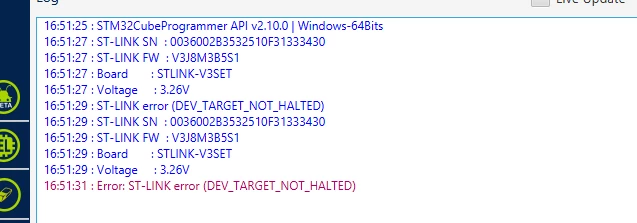
harisuvarna_2-1719611504537.png

Is there anyway I can establish communication with device using debugger to rewrite the readout protection level bit to level 0. Please share your thoughts.


Regards,

Hareesha
 

Best answer by harisuvarna

Hi All,

I am using customized Hardware for my development. I am able to establish communication with my device using debugger. Followed following steps-based info provided above by forum folks.

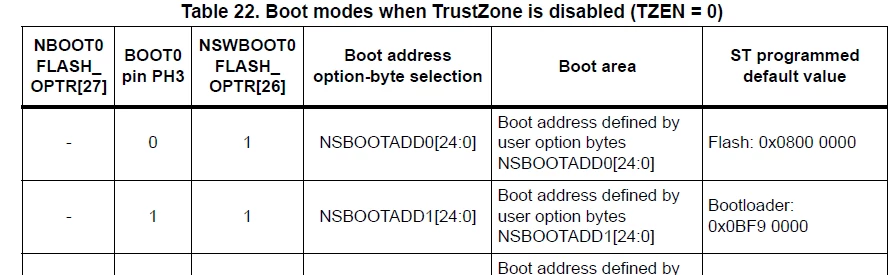
1. Pulled PH3-BOOT0 pin high to boot from bootloader  

harisuvarna_0-1719854837366.png

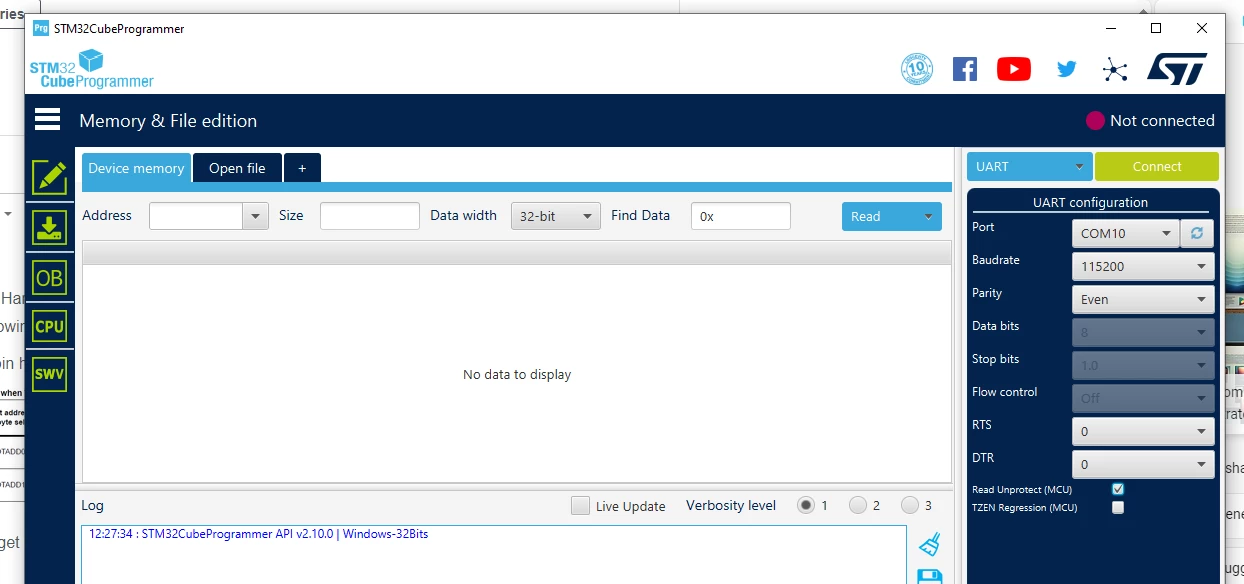
2.  Connected to my target board using UART interface as follows

harisuvarna_1-1719854905617.png

3. Followed steps mentioned in forum to disable Security Zone (TZONE)

Security:How to disable TrustZone in STM32L5xx devices during development phase - stm32mcu


Thank you all for your support.

Regards,

Hareesha


4 replies

BarryWhit
Lead
June 29, 2024

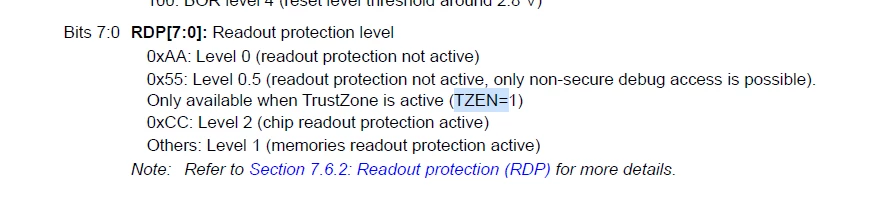
From AN4758:

RDP.jpg

The appnote talks about L4+, but the same principle applies across families.

If you can connect to your board with STM32CubeProgrammer, it has a dedicated screen for modifying options bytes. Reset the RDP option byte to level 0, wait for the chip to fully erase, and you should be ok.


If you can't connect over ST-Link,  all may not be lost. All STM32 chips by default have a built-in bootloader  (See AN2606 for details). You can try to activate this built-in STM32 bootloader. STM32CubeProgrammer can then connect to the board over USB or UART, and modify the Option Byte over that connection.


Untested Instructions (for connecting via bootloader):

1. Download and install STM32CubeProgrammer.

2. Connect a USB cable to your board.

3. Get into bootloader mode. If you have such buttons (most eval boards do), you do this by holding nRST+BOOT0 buttons, and then releasing the nRST button, wait a moment, then release the BOOT0 button. You should now be in bootloader mode, and the board should show up on your system as a USB-DFU device.

4. Open STM32CubeProgrammer. Connect to the board by seting the connection type to "USB" and clicking connect.

5. Once connected, go to the "OB" pane (The "Option Bytes" pane), and reset the RDP option byte to level 0.

Wait until the process completes.

6. Your board should now be functional again.

OB.jpg


Good luck.


Update:

for good measure, read this official ST thread


"- If someone's post helped resolve your issue, please thank them by clicking ""Accept as Solution"".- Please post an update with details once you've solved your issue. Your experience may help others."
MM..1
Chief III
June 29, 2024

v2.10 is little old for U5

BarryWhit
Lead
June 29, 2024

v2.10 is little old for U5

but is supported. 

img.jpg


"- If someone's post helped resolve your issue, please thank them by clicking ""Accept as Solution"".- Please post an update with details once you've solved your issue. Your experience may help others."
harisuvarnaAuthorBest answer
Associate III
July 1, 2024

Hi All,

I am using customized Hardware for my development. I am able to establish communication with my device using debugger. Followed following steps-based info provided above by forum folks.

1. Pulled PH3-BOOT0 pin high to boot from bootloader  

harisuvarna_0-1719854837366.png

2.  Connected to my target board using UART interface as follows

harisuvarna_1-1719854905617.png

3. Followed steps mentioned in forum to disable Security Zone (TZONE)

Security:How to disable TrustZone in STM32L5xx devices during development phase - stm32mcu


Thank you all for your support.

Regards,

Hareesha


BarryWhit
Lead
July 1, 2024

Well, I'm glad someone got accepted as solution.


Also helpful that you waited to mention you've previously enabled TrustZone (It's disabled by default) until your final post. Good work.:thumbs_up:

"- If someone's post helped resolve your issue, please thank them by clicking ""Accept as Solution"".- Please post an update with details once you've solved your issue. Your experience may help others."