
ARyan.4
Associate
October 16, 2021
Solved

My STM32L051K8T6 gets stuck in an infinite loop in HAL_Delay(1000); but I know its a hardware problem, not a software problem. Where should I focus my hardware debugging on?

I have used this same chip on a previous project and managed to toggle an LED on and off using HAL_Delay(1000); function. I copied the same code across to my new project board, uploaded it successfully, toggled the LED on successfully but when I step into HAL_Delay(1000); it gets stuck infinitely.

I know it's a hardware problem because the same code works on my other board.

The thing that confuses me is the

  • The STM32 allows me to upload my firmware and step through it, so I know the MCU isn't broken.
  • I know the code works, as it works on my original board (different design, same chip).

What I'm asking for is there any places I should be looking for that might cause this problem on a hardware level, system clock problems?

Admittedly the MCUs are different batches, however I'm sure its just a layout problem.

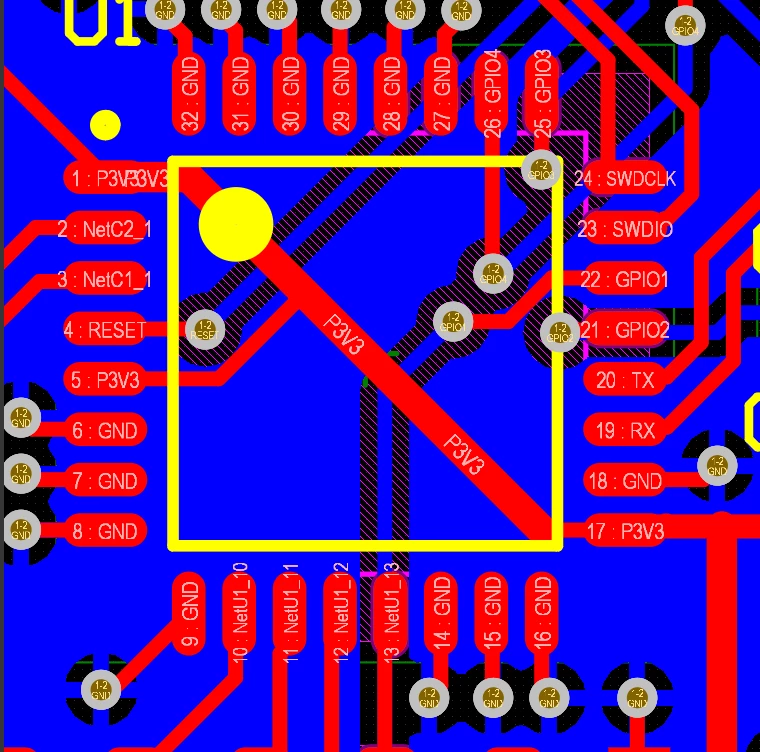
This is the layout of the original board that works:
0693W00000FCj26QAD.png 

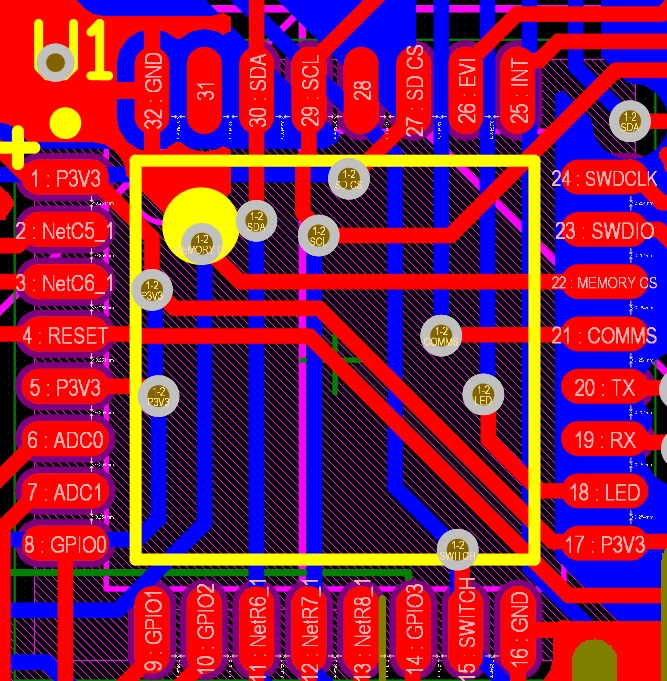
This is the layout of the board that isn't working:
0693W00000FCj2GQAT.png

This topic has been closed for replies.
JVart.1
JVart.1Best answer
Visitor II
October 16, 2021

Hi *****.4,

From your hardware layout, check pin 31 - it looks like that is the BOOT0 pin and should be pulled to GND. On the board that is not working, you have left it floating.

Hope this helps

5 replies

JVart.1
JVart.1Best answer
Visitor II
October 16, 2021

Hi *****.4,

From your hardware layout, check pin 31 - it looks like that is the BOOT0 pin and should be pulled to GND. On the board that is not working, you have left it floating.

Hope this helps

MM..1
Super User
October 16, 2021

Boot0 can issue start code at all, but when code stuck isnt BOOT0 source.

HAL_Delay is based on nterrupts and in basic code you cant use it in ISR roiutines code without change priority .

I recommend first check your software.

TDK
October 16, 2021

Changing the hardware won't make HAL_Delay fail to work and let other code work fine. Perhaps revisit your assumptions as to if the code getting there in the first place.

"If you feel a post has answered your question, please click ""Accept as Solution""."
Tesla DeLorean
Guru
October 17, 2021

Ensure the the FLASH is mapped into the Zero Address Space

In GNU, have code in startup.s

Reset_Handler:
 ldr r0, =_estack
 mov sp, r0 /* set stack pointer */
 
/*Check if boot space corresponds to system memory*/
 
 LDR R0,=0x00000004
 LDR R1, [R0]
 LSRS R1, R1, #24
 LDR R2,=0x1F
 CMP R1, R2
 BNE ApplicationStart
 
 /*SYSCFG clock enable*/
 LDR R0,=0x40021034
 LDR R1,=0x00000001
 STR R1, [R0]
 
/*Set CFGR1 register with flash memory remap at address 0*/
 LDR R0,=0x40010000
 LDR R1,=0x00000000
 STR R1, [R0]
 
ApplicationStart:
...

Tips, Buy me a coffee, or three.. PayPal Venmo (See Profile) Up vote any posts that you find helpful, it shows what's working..
ARyan.4
ARyan.4Author
Associate
October 17, 2021

Hi all, I wanted to just confirm that the problem was indeed hardware as I expected. As soon as I pulled the BOOT pin to ground (like pin 31 in the first photo was, but not the second), as per JVart.1's response there was no more issues with HAL_Delay, and everything runs as expected. (No code was just, just grounded the pin). Thanks all for your help!