

Associate
December 11, 2023
Question

lwip on STM32h743

Hello,

I am using a Nucleo-h743ZI2 and would like to enable Ethernet with LWiP module. I have started with the "How to create project for STM32H7 with Ethernet and LwIP stack working" guide. I am using, with a few modifications as possible, the STM32H743_Nucleo_ETH example found here: https://github.com/stm32-hotspot/STM32H7-LwIP-Examples. I can build, download and execute successfully, but cannot ping the Nucleo. When I ping I get the following:
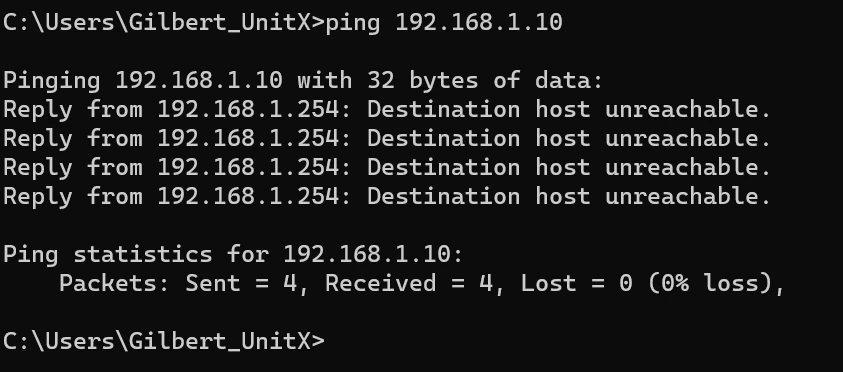
GilRoss_0-1702327149669.png

I have included a WireShark trace. I can see some activity from the Nucleo, but am not sure if it is operating correctly. I have tried the ping from a home computer with all firewalls disabled with the same result. So, I guess I have two questions:

  1. Is the LWiP code on the Nucleo operating as expected?
  2. If so, why doesn't the Nucleo respond to the ping?

Thanks,

Gil

This topic has been closed for replies.

3 replies

GilRossAuthor
Associate
December 11, 2023

Also, using RMII.

mƎALLEm
ST Technical Moderator
December 12, 2023

Hello,

First try the example provided natively in STM32CubeH7 under the path Projects\NUCLEO-H743ZI\Applications\LwIP\LwIP_HTTP_Server_Netconn_RTOS,

then it depends on the "few modifications" you inserted into the project.

To give better visibility on the answered topics, please click "Best answer" on the reply which solved your issue or answered your question.
GilRossAuthor
Associate
December 19, 2023

OK, I got the example you suggested to build, download and execute. It seems it is running (see WireShark trace), but still does not respond to a ping (see attached text file showing "ipconfig", "arp -a" and "ping" commands. The WireShark trace was produced by connecting the Ethernet cable to the Nucleo.