Senior
September 19, 2023
Solved

LPTIM2 Pulse Counter

On NUCLEO-H563ZI board I put 3KHz square wave on LPTIM2_ETR (PC4). I want LPTIM2 to continuously count. However the count never increases. LPTIM2 setup...
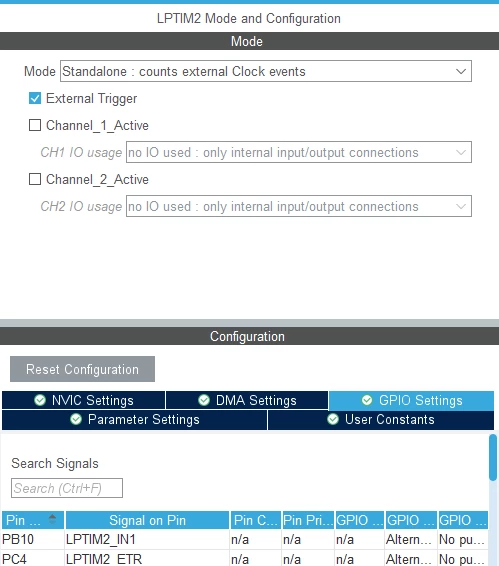
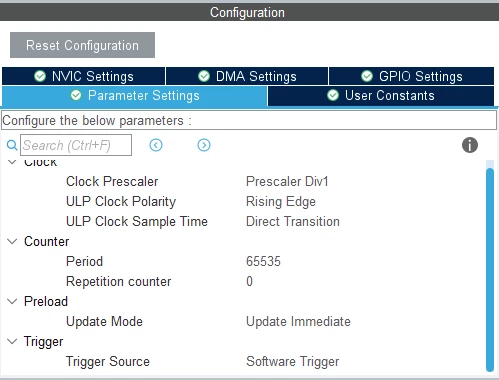
mccabehm_0-1695156427779.png

And

mccabehm_1-1695156480655.png

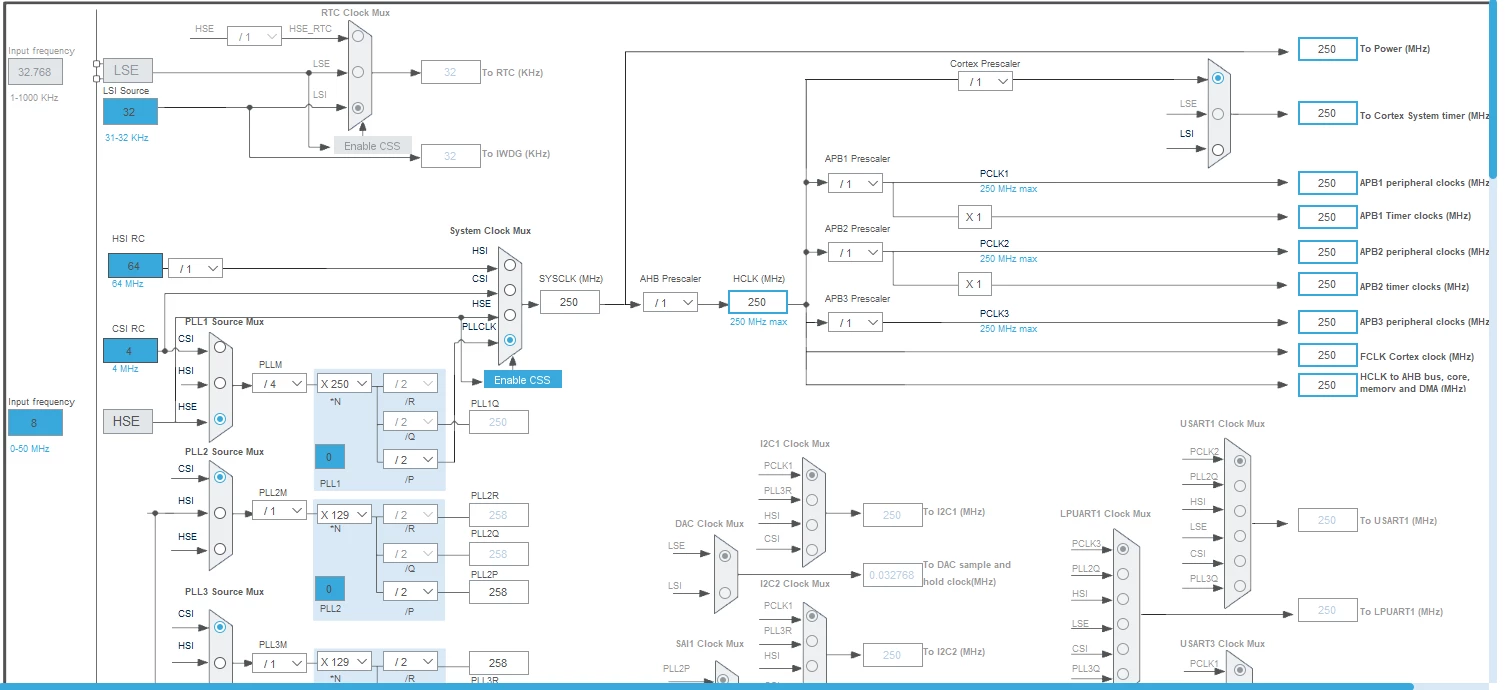
Clock looks like

mccabehm_2-1695157445931.png

MX_LPTIM2_Init() looks like

static void MX_LPTIM2_Init(void)
{
 /* USER CODE BEGIN LPTIM2_Init 0 */
 /* USER CODE END LPTIM2_Init 0 */
 /* USER CODE BEGIN LPTIM2_Init 1 */
 /* USER CODE END LPTIM2_Init 1 */
 hlptim2.Instance = LPTIM2;
 hlptim2.Init.Clock.Source = LPTIM_CLOCKSOURCE_ULPTIM;
 hlptim2.Init.Clock.Prescaler = LPTIM_PRESCALER_DIV1;
 hlptim2.Init.UltraLowPowerClock.Polarity = LPTIM_CLOCKPOLARITY_RISING;
 hlptim2.Init.UltraLowPowerClock.SampleTime = LPTIM_CLOCKSAMPLETIME_DIRECTTRANSITION;
 hlptim2.Init.Trigger.Source = LPTIM_TRIGSOURCE_SOFTWARE;
 hlptim2.Init.Period = 65535;
 hlptim2.Init.UpdateMode = LPTIM_UPDATE_IMMEDIATE;
 hlptim2.Init.CounterSource = LPTIM_COUNTERSOURCE_EXTERNAL;
 hlptim2.Init.Input1Source = LPTIM_INPUT1SOURCE_GPIO;
 hlptim2.Init.Input2Source = LPTIM_INPUT2SOURCE_GPIO;
 hlptim2.Init.RepetitionCounter = 0;
 if (HAL_LPTIM_Init(&hlptim2) != HAL_OK)
 {
 Error_Handler();
 }
 /* USER CODE BEGIN LPTIM2_Init 2 */
 /* USER CODE END LPTIM2_Init 2 */
}

Startup looks like

... 
MX_LPTIM2_Init();
/* USER CODE BEGIN 2 */
...
HAL_LPTIM_Counter_Start(&hlptim2);
...

 Following HAL_LPTIM_Counter_Start() CR = 0x5 and and CFGR = 0x800001. But CNT is zero. Same result if I use alternate ETR PE0.

What is missing?
This topic has been closed for replies.
mccabehmBest answer
Senior
October 12, 2023

Sarra,

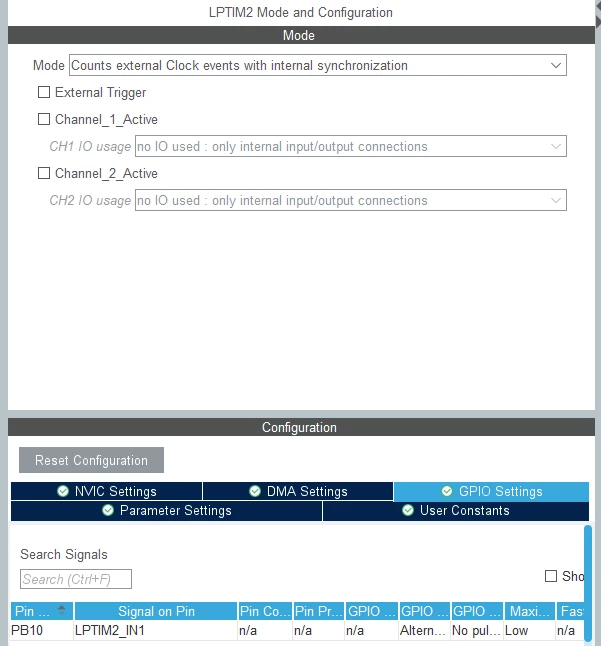
Thank you! Using LPTIM_INPUT1SOURCE_GPIO works. LPTIM2 configured with STM32CubeIDE as follows...

mccabehm_0-1697119064498.png


4 replies

ST Employee
September 20, 2023

Hello @mccabehm, 

The input source is set to LPTIM_INPUT1SOURCE_GPIO, which means that the LPTIM2 is expecting the input signal to come from a GPIO pin, however, your input signal is coming from an external trigger pin (PE0 or PC4).

Try changing the input source to LPTIM_INPUT1SOURCE_EXTERNAL

Hope that helps!


To give better visibility on the answered topics, please click on Accept as Solution on the reply which solved your issue or answered your question.
mccabehmAuthorBest answer
Senior
October 12, 2023

Sarra,

Thank you! Using LPTIM_INPUT1SOURCE_GPIO works. LPTIM2 configured with STM32CubeIDE as follows...

mccabehm_0-1697119064498.png


mccabehmAuthor
Senior
September 20, 2023

No, not a solution yet! Any way undo the accept?

The initialization already sets clock source to LPTIM_COUNTERSOURCE_EXTERNAL. Not clear to me why I need input sources at all. At one time LPTIM1, LPTIM2, and LPTIM6 worked fine. Then something unknown changed and none of the LPTIMs count.

waclawek.jan
Super User
September 21, 2023

Read out and check/post content of LPTIM and relevant GPIO registers.

JW