


GreenGuy
Senior III
September 28, 2023
Solved

Lan8742 Hardfault

  • September 28, 2023
  • 10 replies
  • 6973 views

Stats:

STM32CubeIDE

Version: 1.13.2

Build: 18220_20230914_1601 (UTC)


Windows 10 Enterprise


I have a project using STM32H743 and Azure RTOS, ThreadX, NetX, and FileX.

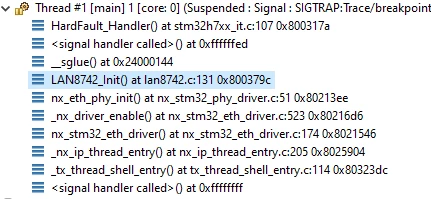
In the NetX portion during initialization of the netx thread, the code performs initiation of the LAN8742 device.

Here is the call stack tree in the debugger:
GreenGuy_0-1695862962474.png

The hard fault occurs on line 131 in the lan8742.c code which is :

if(pObj->IO.WriteReg(pObj->DevAddr, LAN8742_BCR, LAN8742_BCR_SOFT_RESET) >= 0)

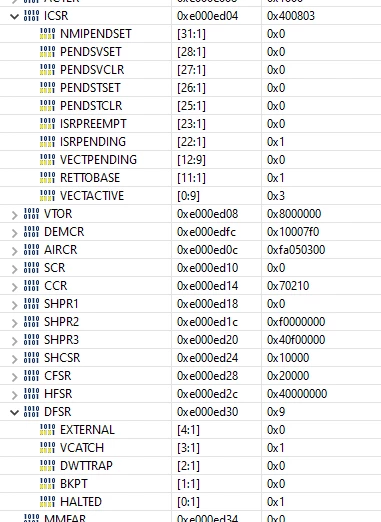
The Status registers show:
GreenGuy_1-1695863168854.png

The fault is 100% repeatable.

The fault appeared after adding some code to a completely unrelated section

and the fault happens prior to any of the added code being executed. As far as I can tell

The only difference is that the added code has pushed the LAN8742.c code a

little farther down in the flash. I also noticed that some of the printf()'s for debug also

cause issues like mem faults and have to be commented out. I am not finished experimentation

with what causes the hard fault in the Lan8742 code but any comments at this pint are welcome.


This topic has been closed for replies.
Best answer by GreenGuy

This is true, but in this case not much help or at least not much different than inspecting the stack and the fault registers.  But as it turns out the error always occurs on the same statement which was a strtok call.  Further research shows the strtok call to not be thread safe.  strtok_r() is and it works.  The faults are not occurring anymore.

10 replies

TDK
September 28, 2023

Look at the hard fault registers in order to determine the cause of the hard fault.

Your line of code uses a lot of data within structures. Verify the data within those structures is valid at the time of the call.

"If you feel a post has answered your question, please click ""Accept as Solution""."
GreenGuy
GreenGuyAuthor
Senior III
September 28, 2023

The screen shots presented in the original post are the hard fault registers? 

TDK
September 28, 2023

Yeah, I don't know how I missed them. Sorry about that.

If printf causes issues, it is very likely to be a heap overflow as the default implementation uses the heap, especially as the problem is sensitive to subtle code changes. Perhaps the thread is overflowing its allocation. Try increasing the amount. I would hope that allocation in AzureOS is thread-safe, but I'm not an expert there.

"If you feel a post has answered your question, please click ""Accept as Solution""."
STM32_ZA
ST Employee
September 28, 2023

Can you retest with cache disabled ?

GreenGuy
GreenGuyAuthor
Senior III
September 28, 2023

This morning the hard fault is no longer occurring.  Gremlins?  If the problem re-appears I will try disabling cache.

GreenGuy
GreenGuyAuthor
Senior III
September 28, 2023

I am noticing that the printf statements end up passing a pointer that references ram (i.e. 0x240029eB).  I would have expected the string in the printf to be in ROM space.  But what happens if the function crosses 32 byte boundaries?  Should not be an issue since the function operates at the byte level. 

Past experience indicates the code is sensitive to placement as new code is added it makes or breaks execution.  Odd! 

GreenGuy
GreenGuyAuthor
Senior III
September 28, 2023

I kept adding printf statements until the error occurred again.  This time it ends up in the mem_manage handler.  The fault repeats on every run.  Commenting out the Cache Enables for I and D, one at a time, and then both, does not change the location of the error or error type.  The call stack is always:

GreenGuy_0-1695928039408.png

Lacking patience for this I guess I am going to make my own terminal debug functions and put them in a thread.  Hopefully it will be a little behaved.


GreenGuy
GreenGuyAuthor
Senior III
September 28, 2023

I made my own debug print routing in a task using HAL_UART_Transmit_DMA.  The faults keep happening.  If the DMA is busy I sleep the thread.  The faults still occur; sometimes hard , sometimes memory.  I turned my attention to how long the debug had to sleep and was quite astonished.  So I though there maybe some contention between priorities and operation with the threads.  Most of the priorities are 10.  I dropped the priority of the debug thread to 15 and raised the priority of the network threads to 9.  

No more faults.

So far.


Pavel A.
September 29, 2023

CubeIDE debugger has the fault analyzer tool. It is there for you, please use it to understand why the faults occur.


GreenGuy
GreenGuyAuthorBest answer
Senior III
October 3, 2023

This is true, but in this case not much help or at least not much different than inspecting the stack and the fault registers.  But as it turns out the error always occurs on the same statement which was a strtok call.  Further research shows the strtok call to not be thread safe.  strtok_r() is and it works.  The faults are not occurring anymore.