spack
Associate
October 5, 2018
Question

Interrupt not working after jump to code from bootloader

  • October 5, 2018
  • 5 replies
  • 5958 views

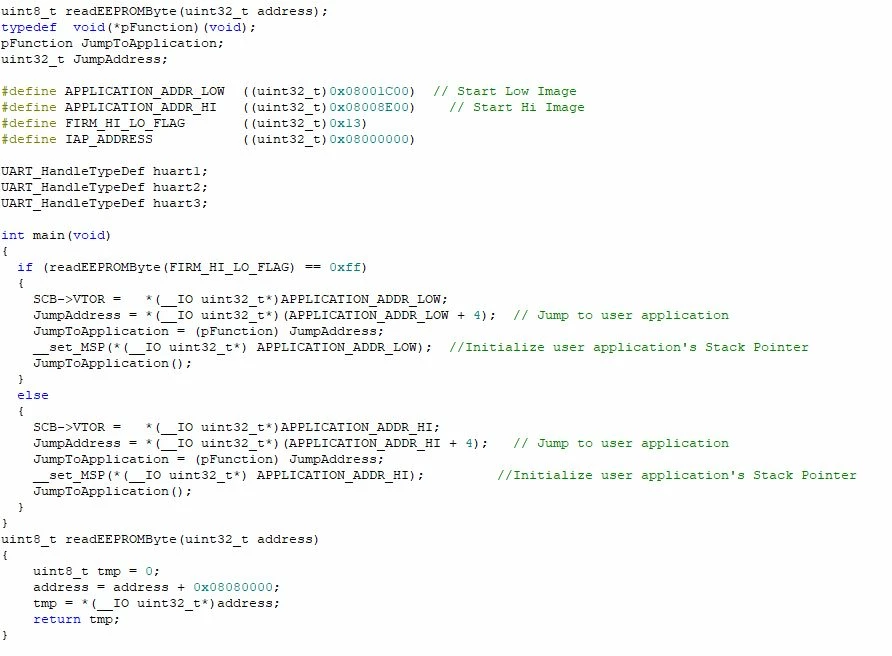
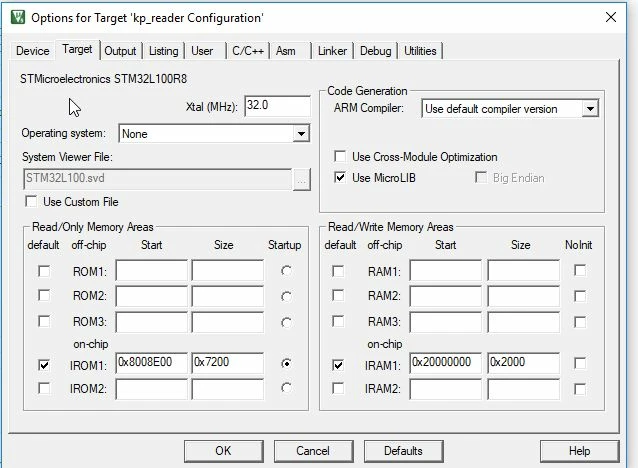
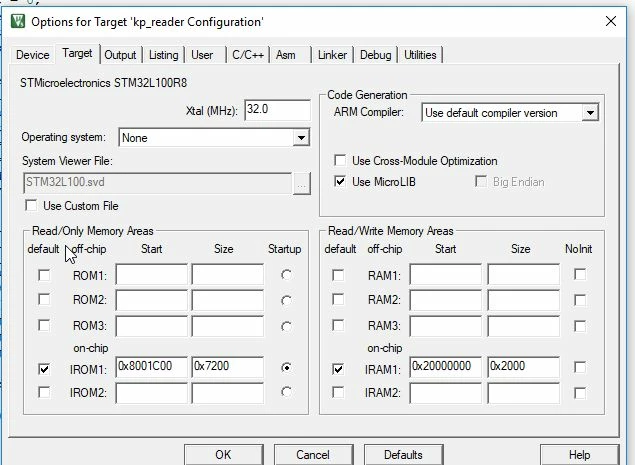
I have a project that consists of a bootloader and 2 pieces of code on STM32L100R8. The bootloader correctly switches to the relevant piece of code but it seems as though when the code receives it first interrupt it fails. Attached are screenshots of the bootloader and linker/target options in the keil environment. Any ideas ??
0690X000006C8etQAC.jpg0690X000006C8eoQAC.jpg0690X000006C8ejQAC.jpg

    This topic has been closed for replies.

    5 replies

    Bob S
    Super User
    October 5, 2018

    Define "fails".

    Basic debugging: start your debugger, run the bootloader, let it call your app. When the app fails, pause the debugger and see where you are. Then see if you can figure out how you got there. This can be tricky when you have a bootloader and separate application.

    Hint: What steps does the CPU take when it gets an interrupt? And from where does it fetch whatever data it needs to do that? And what data is actually there? I am guessing at how you generate all of your code, but this may help you find the answer.

    Tesla DeLorean
    Guru
    October 5, 2018

    Make sure the code in the application sets the SCB->VTOR properly, typically in SystemInit()

    Tips, Buy me a coffee, or three.. PayPal VenmoUp vote any posts that you find helpful, it shows what's working..
    Palitsky.Gennady
    Associate III
    January 15, 2019

    Hello Clive,

    in one of the previous posts you recommended not to use SystemInit() in application code, removing call to it in a startup_*.s

    Could you please elaborate on it?

    Thank you,

    Gennady

    Tesla DeLorean
    Guru
    January 15, 2019

    Can you actually cite the post, it depends on the context.

    I've suggested in the past that if you have a "contract" between the Boot Loader and App you shouldn't need to reconfigure the clocks and external bus interfaces repeatedly. Such activity can be highly disruptive.

    The FPU is probably already enabled also, and the code in startup.s could be expanded to set SCB->VTOR appropriately automatically.

    LDR R0, =0xE000ED08 ; SCB->VTOR
     LDR R1, =__Vectors
     STR R1, [R0]

    In the HAL a lot of the code that should be in SystemInit() has migrated to a call to SystemClock_Config() from main()

    This can be a bit late for external memories you want to use or initialize. https://community.st.com/s/question/0D50X0000ADDERqSQP/how-to-initialize-external-sram-in-systemstm32l4xxc

    Tips, Buy me a coffee, or three.. PayPal VenmoUp vote any posts that you find helpful, it shows what's working..
    spack
    spackAuthor
    Associate
    October 8, 2018

    Hi - Many thanks for the quick replies ! The project is a keypad that is connected to a telematics device using UART2. In normal operation data travels in both directions between the keypad and telematics device - when located at the standard address of 0x8000000 everything works fine.

    I have discovered that if I disconnect the RX line from the telematics unit to the STM32 then everything indeed works fine (so the STM32 can still send data to the telematics unit - it just can't receive it), even with the code relocated to address 0x8001C00. However, once I connect up the RX Line to the STM32 it seems to go into a loop. This leads me to believe that the Interrupt connected to UART2 is not being handled properly.

    In one reply you mention setting SCB->VTOR in the application - does this not get set in the bootloader code I set out above - and the compiler/linker place this at the start of memory 0x8001C00 when I compile the application ? To be safe I also added the SCB->VTOR to the application itself and it seem to make no difference.

    Once the program seems to loop and I stop the debugger it does not seem to have me in a recognizable location ? To be honest as per the comment above I suspect it is not the easiest thing to debug separate bits of code like this !

    These are the relevant bits of code that handle the interrupt - but I'm hoping that the fact that it all works when located at 0x8000000 and only fails when located to a different memory space that it is a compiler/linker option ?

    This is issued at the start of the application :

    HAL_UART_Receive_IT(&huart2, &Rx2_char, 1);

    This is the function to deal with the interrupt :

    void HAL_UART_RxCpltCallback(UART_HandleTypeDef *UartHandle)

    {

    if (UartHandle->Instance == USART2) //If data on uart2

    {

    HAL_NVIC_ClearPendingIRQ(USART2_IRQn);

    Rx2_buf[Rx2_count] = Rx2_char;

    Rx2_count++;

    if (Rx2_char == 0x0D)

    {

    uart2_dta_set = 1;

    }

    HAL_UART_Receive_IT(&huart2, &Rx2_char, 1);

    return;

    }

    }

    void HAL_UART_ErrorCallback(UART_HandleTypeDef *UartHandle)

    {

    if (UartHandle->Instance == USART2) //If data on uart2

    {

    if (UartHandle->ErrorCode == HAL_UART_ERROR_ORE)

    {

    __HAL_UART_CLEAR_OREFLAG(UartHandle);

    HAL_UART_Receive_IT(&huart2, &Rx2_char, 1);

    }

    }

    }

    Tesla DeLorean
    Guru
    January 16, 2019

    Set VTOR to the address of the table, not to the stack pointer in the table.

    Tips, Buy me a coffee, or three.. PayPal VenmoUp vote any posts that you find helpful, it shows what's working..
    JBond.1
    Senior
    August 22, 2021

    Did you ever figure the solution for this? I have the same issue on STM32F407

    SysTick->CTRL = 0;
    SysTick->LOAD = 0;
    SysTick->VAL = 0;

    I do this before jumping to application, it worked on STM32F103 but does not work on STM32F407 (timer interrupt doesnt trigger after jump to application). Any ideas?

    JBond.1
    Senior
    August 22, 2021

    Nevermind I have solved by setting VECT_TAB_OFFSET which I forgot to set. Now interrupt is working!