

INäf.1
Associate
October 8, 2020
Question

I try to build a RS232 conversation via the sub-D port on my STM32F769I-EVAL to my Computer.

  • October 8, 2020
  • 3 replies
  • 2794 views

Hi everyone.

I have been struggling with the connection with RS232 between the sub-D port on my STM32F769I-EVAL and my Computer for sometime . I did follow the tutorial insturctions (https://www.youtube.com/watch?v=tMS5IOfZXyo) step by step but I don't get any signal back from the sub-D port (USART1 CN7). I try to read the signal with the Putty-Application and I took the same port configuration as in my program (see the picture below).0693W000004J4FiQAK.png
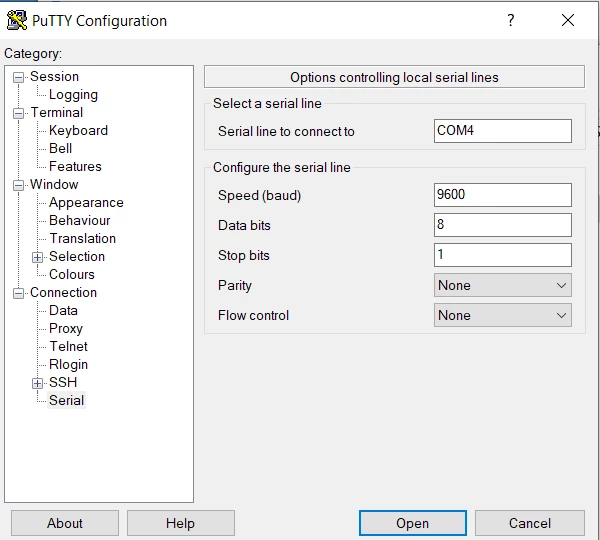
Is there an error in the code (see in attachment) or did I a mistake in connection the board to my computer? (To connect I took a sub-D cable.)

You see I'm new in this forum and I would be grateful if someone could help me with this connection issue.

Thanks a lot in advance!

Kind regards,

 Irene

This topic has been closed for replies.

3 replies

Tesla DeLorean
Guru
October 8, 2020

Video for DISCO not EVAL​ board. As I recall the EVAL board has some jumper settings dealing with the routing of USART pins.

​

Double check EVAL board manual on pins, jumpers and UART assignments. Also watch if the HSE clock and HSE_VALUE are consistent. Pretty sure EVAL clocks at 25 MHz, but worth checking.​

Tips, Buy me a coffee, or three.. PayPal Venmo (See Profile) Up vote any posts that you find helpful, it shows what's working..
INäf.1
INäf.1Author
Associate
October 8, 2020

Thanks a lot for your advice.

I checked the pins (PA9 and PA10) and jumpers. The jumpers are positioned like in the picture in the appendix and JP11 is closed (see picture jumper_configuration).0693W000004J7aKQAS.png Further I have opened SB68, R265 and R115 (see picture PA9 and PA10).0693W000004J7Z7QAK.png0693W000004J7ZCQA0.png

I used the hint with the clock and set the HSE clock to 25 MHz (see picture clock_configuration). But with the clock setting I am still not quite sure if I did it right.0693W000004J7ZlQAK.png

Unfortunately it still does not work.

Attached you will also find the main.c document.

Kind regards,

Irene

INäf.1
INäf.1Author
Associate
October 8, 2020

I attached also the .ioc-file. It's maybe easier to read than the picture with the clock configuration.

Thanks for hint and advice!

Kind regards,

Irene