

Associate III
February 12, 2025
Question

HSE Clock for CAN

Tested CAN on STM32h723ZGT6 using internal clock i.e., HSI ,which is working fine. When I tried to test it using external clock i.e., HSE with same configuration I am unable to get data on BUS-Analyzer. When I try to transmit the data, the data is able to store in the RAM and even transmit handler is hit. But unable to get data on BUS.

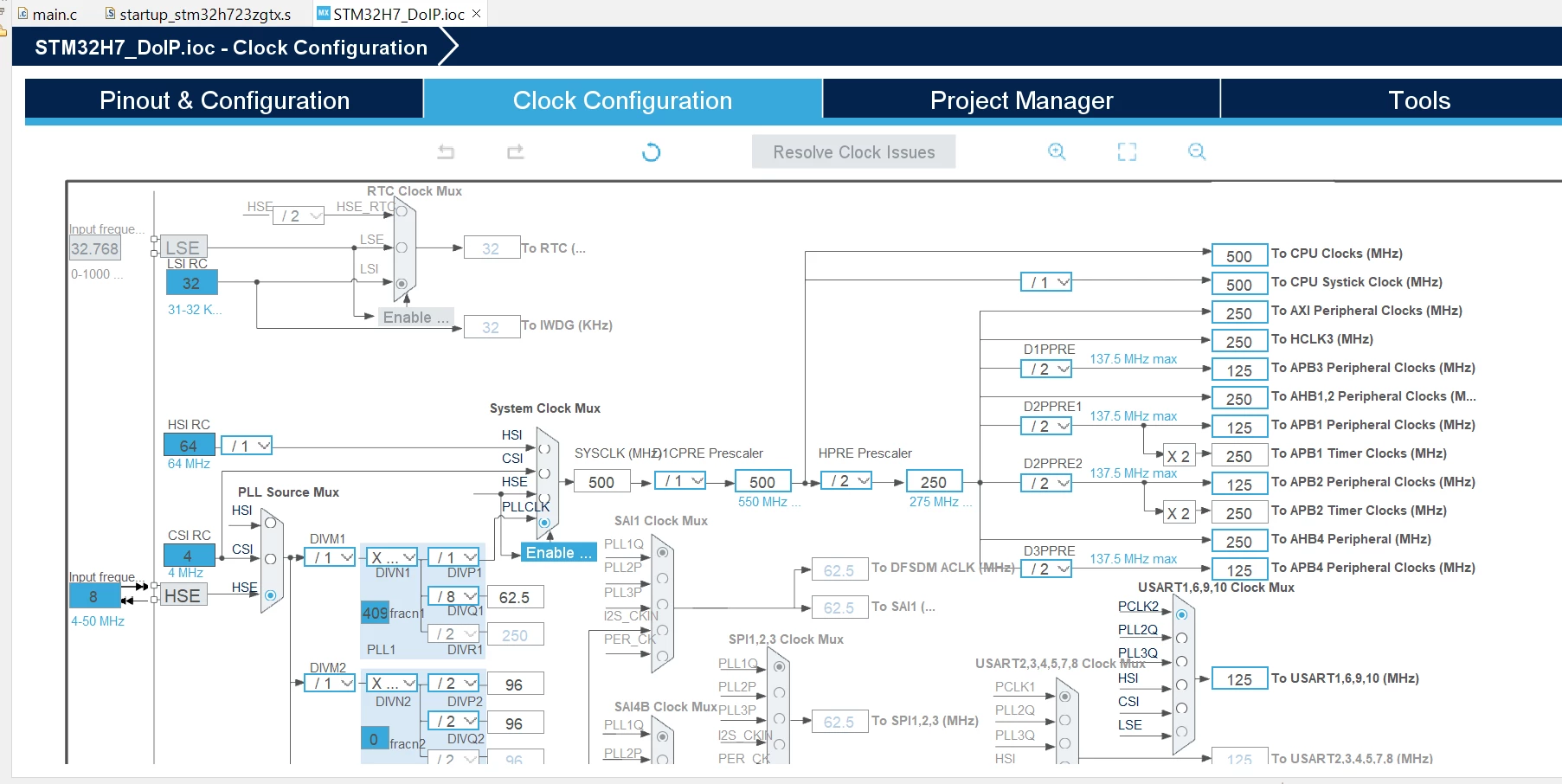
I am using crystal oscillator with 12MHz frequency, baudrate 500k, clock frequency to CAN is 8MHz and all the remaining configurations are as seen in the image below.


Thank you and best Regards,

Aashritha V.
 

Capture.PNG

This topic has been closed for replies.

10 replies

mƎALLEm
ST Technical Moderator
February 12, 2025

Hello,

Need to check again your bitrate when you switched from HSI to HSE.

PS: it's not recommended to use HSI for CAN communication.

To give better visibility on the answered topics, please click "Best answer" on the reply which solved your issue or answered your question.
Associate III
February 12, 2025

LED, SPI are working with external clock. There is only issue with CAN. 

HSE is ON in the driver generated even then I am getting issue in transmission. I am able to transmit but unable to get on BUS.

Capture1.PNG

mƎALLEm
ST Technical Moderator
February 12, 2025

1- Please use </> button to paste the code instead of sharing screen shots. See this link.

2- Sorry I didn't understand, are you using CubeMx to generate the configuration or are you coding the config yourself? if the second case, I suggest you to generate the code with CubeMx, test it, if it's OK, you can inspire from the register configuration from the HAL.

To give better visibility on the answered topics, please click "Best answer" on the reply which solved your issue or answered your question.
mƎALLEm
ST Technical Moderator
February 12, 2025

Another question regarding this statement:


@Aashritha_Vuda wrote:

Tested CAN on STM32h723ZGT6 using internal clock i.e., HSI ,which is working fine. When I tried to test it using external clock i.e., HSE with same configuration I am unable to get data on BUS-Analyzer. When I try to transmit the data, the data is able to store in the RAM and even transmit handler is hit. But unable to get data on BUS.


What do you mean by Bus analyzer? a CAN analyzer (CAN to USB converter)? did you establish a complete CAN bus with CAN_H and CAN_L that connect two nodes?

To give better visibility on the answered topics, please click "Best answer" on the reply which solved your issue or answered your question.
Associate III
February 13, 2025

I connected both CANL and CANH and transmitted using internal clock. The issue is only with external clock. I used CAN Bus analyzer tool as ECU to observe transmitted data and also to send data from tool. The complete IOC file is attached below.


mƎALLEm
ST Technical Moderator
February 13, 2025

Hello,

Thank you for sharing the ioc file,

But according to ioc file attached:

1- The HSE value is set to 8MHz contrarily to what you said


@Aashritha_Vuda wrote:

I am using crystal oscillator with 12MHz frequency,


SofLit_2-1739443856848.png

Need also to clarify what do you mean exactly by "Crystal oscillator"? a crystal or crystal oscillator? see this article.

2-  The FDCAN configuration you set is at 32kb/s:


SofLit_1-1739443709791.png

Which is not inline with what you said in the first post:


baudrate 500k, clock frequency to CAN is 8MHz and all


Could you please double check and confirm?

To give better visibility on the answered topics, please click "Best answer" on the reply which solved your issue or answered your question.
Associate III
February 17, 2025

I used a crystal. The frequency of that crystal is 12MHz. Baud rate is set to 500k by changing nominal prescaler, timsegment 1 and 2.

 Thank you,

Aashritha V.

mƎALLEm
ST Technical Moderator
February 17, 2025

Hello,

Sorry I didn't understand your reply. Did you solve your issue following the changes I suggested in CubeMx?

To give better visibility on the answered topics, please click "Best answer" on the reply which solved your issue or answered your question.