

Associate III
October 18, 2024
Question

How to read/write from external memory in RiverDI RVT50HQSNWN00 module for OTA update

Hello,

I am facing the below scenario in my development board. I am trying to do OTA update in my RIverDI 5 inch display module. I receive the firmware chunk from the ESP board which is connected through the external connectors of the riverDI module and through USART1. The USART1 receives the firmware elf chunks and I need to store them in the STM32. The size of my elf file is more than 3MB and I cant directly store the data in the internal flash memory. The only option that I have right now is the external memory, but I am unable to read/write from it.

When I looked through the internet, it was not suggested to write into the external memory since it is allocated for storing the TouchGfx Assets. But my only option is to store the elf file chunks in the external memory and use the same for the OTA update process.

This is what I tried to do in my appliation.

1. Initialized the OSPI in main 

MX_OCTOSPI1_Init();

2. Made sure the Memory mapped more is enabled and the API response for OSPI_NOR_EnableMemoryMappedMode() is 0

3. Called memcpy() to write a simple string into the external memory location

memcpy( (uint8_t *)0x91000000, "hello", 5);


I receive a hardfault handler error when I call the memcpy(). Can you please let me know what am I doing wrong here?
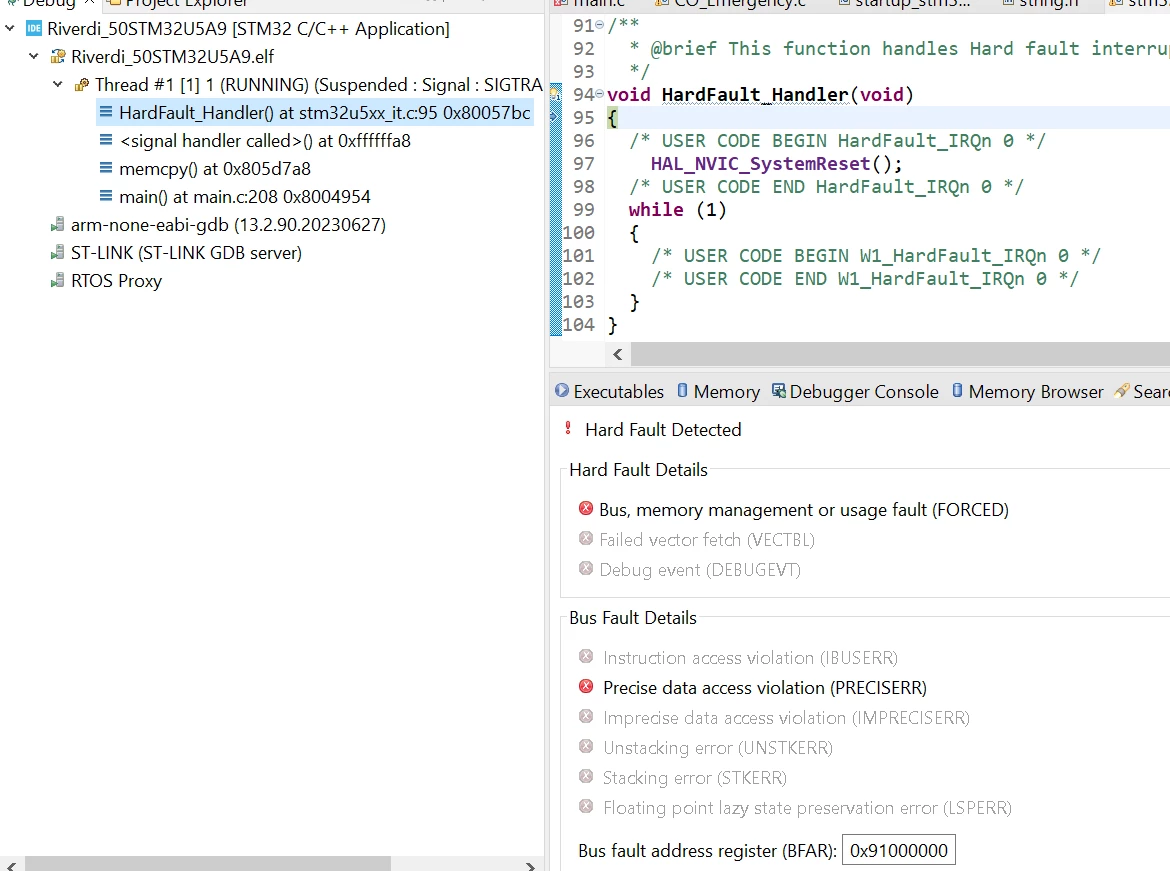
RiverDi_user_0-1729248868688.png


Regards

RiverDI user


This topic has been closed for replies.

19 replies

Andrew Neil
Super User
October 18, 2024
A complex system that works is invariably found to have evolved from a simple system that worked.A complex system designed from scratch never works and cannot be patched up to make it work.
Associate III
October 18, 2024

Yes, its related.

Andrew Neil
Super User
October 18, 2024

So why two threads on the same subject?

A complex system that works is invariably found to have evolved from a simple system that worked.A complex system designed from scratch never works and cannot be patched up to make it work.
mƎALLEm
ST Technical Moderator
October 18, 2024

Hello,

You question does not seem to be related to TouchGFX but how to write to a QSPI Flash.

So, as you are writing to a NOR Flash this is not correct. memcpy is only used for volatile RAM. 


memcpy( (uint8_t *)0x91000000, "hello", 5);


You need to program that Flash. You can isnspire from this example: https://github.com/STMicroelectronics/STM32CubeH7/tree/master/Projects/STM32H743I-EVAL/Examples/QSPI/QSPI_ReadWrite_IT

To give better visibility on the answered topics, please click "Best answer" on the reply which solved your issue or answered your question.
Tesla DeLorean
Guru
October 18, 2024

What's the size of the region being mapped. Trapping at 16MB

Check Size field passed at OSPI Init


Tips, Buy me a coffee, or three.. PayPal Venmo (See Profile) Up vote any posts that you find helpful, it shows what's working..
KDJEM.1
ST Technical Moderator
October 21, 2024

Hello @RiverDi_user ,


Could you please check if DQSE bit is set or not?

Because it is mentioned in the errata sheet, when doing memory-mapped writes it is recommended to set the DQSE bit of the OCTOSPI_WCCR register, even for memories that have no DQS pin. 

KDJEM1_0-1729525091782.png

Thank you.

Kaouthar


To give better visibility on the answered topics, please click on "Best answer" on the reply which solved your issue or answered your question.
Associate III
October 22, 2024

Its set as 0, but I am unable to set to 0x1

RiverDi_user_0-1729606922311.png


KDJEM.1
ST Technical Moderator
October 22, 2024

Hello @RiverDi_user ,


You need to enable the DQS by using a line of code, like this:

sCommand.DQSMode = HAL_XSPI_DQS_ENABLE;

Please take a look at this example OSPI_NOR_MemoryMapped and get inspired. I think can help you.


Thank you.

Kaouthar

To give better visibility on the answered topics, please click on "Best answer" on the reply which solved your issue or answered your question.
KDJEM.1
ST Technical Moderator
October 23, 2024

Hello @RiverDi_user ,

The STM32U5A9 supports three interfaces (OCTOSPI1, OCTOSPI2 and HSPI1).

The STM32U5 HAL  delivers both stm32u5xx_hal_ospi.c/.h and stm32u5xx_hal_xspi.c/.h files for customers.

- stm32u5xx_hal_ospi.c/.h: for OCTOSPI1 and OCTOSPI2

- stm32u5xx_hal_xspi.c/.h: for HSPI1, OCTOSPI1 and OCTOSPI2


When using STM32CubeMx for generation code:

* stm32u5xx_hal_ospi.c is used when OCTOSPI instance is chosen

* stm32u5xx_hal_xspi.c is used when HSPI instance is chosen

 >but that throws lots of error due to settings like (error: 'XSPI_HandleTypeDef' undeclared), USE_HAL_XSPI_REGISTER_CALLBACKS etc, and it doesn't compile as expected.

->If you want to use OCTOSPI interface, you can used OSPI_HandleTypeDef and  USE_HAL_OSPI_REGISTER_CALLBACKS instead of XSPI_HandleTypeDef and USE_HAL_XSPI_REGISTER_CALLBACKS.


I recommend you to take a look at AN5050  this application note explains the difference between Octo-SPI, Hexadeca-SPI and XSPI interfaces in STM32 MCUs. Also this application note provides many examples in section 7 OCTOSPI application examples can help you.


Thank you.

Kaouthar  


To give better visibility on the answered topics, please click on "Best answer" on the reply which solved your issue or answered your question.