

AAlzh.1
Associate II
January 18, 2022
Solved

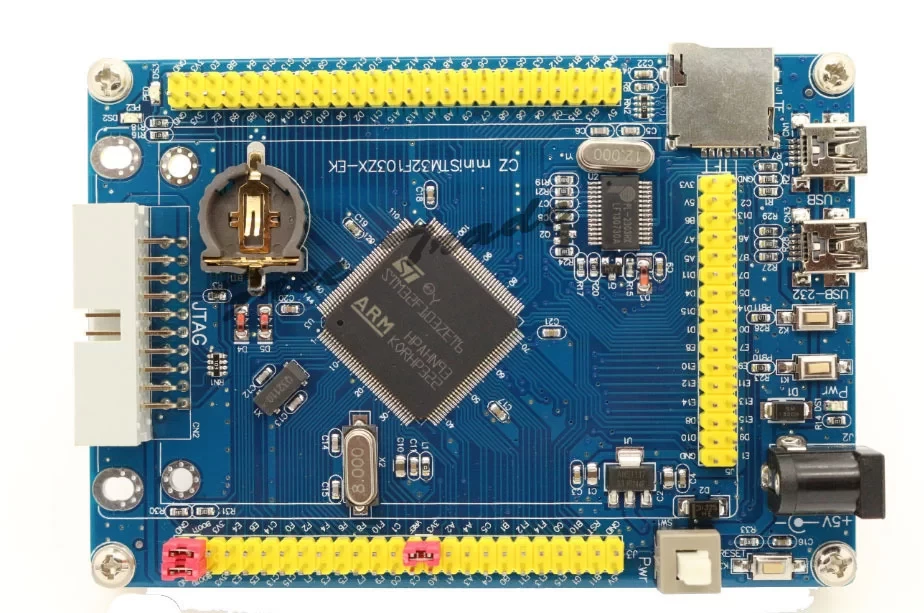
How to program the cz ministm32F103ZET6 ?

This is the board picture:
0693W00000JMQSBQA5.png 

I bought it from Aliexpress, I tried to connect it to Arduino IDE but didn't connect.

There are two boot pins, how to use them ? What should I do exactly ?

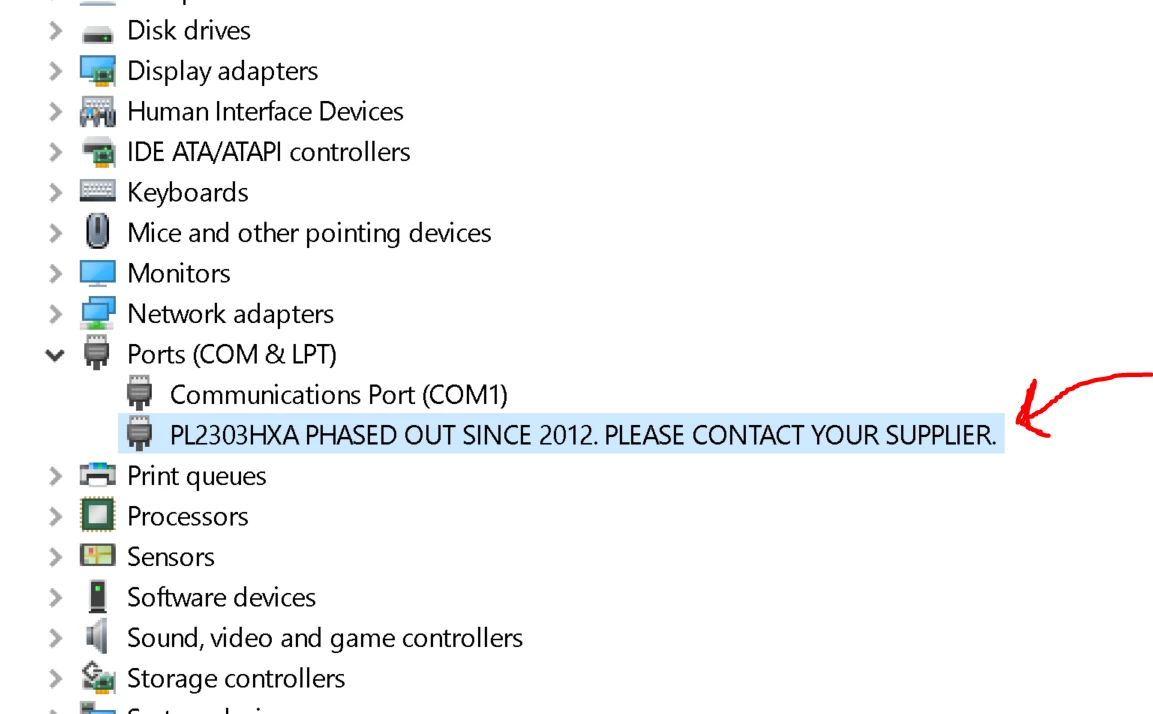
On the device manager, it displays this message:
0693W00000JMQSLQA5.png

This topic has been closed for replies.
Tesla DeLorean
Tesla DeLoreanBest answer
Guru
January 19, 2022

On the F1 with BOOT0=1, BOOT1=0 you should be able to get a USB device on the primary USB connection. For there USB/DFU mode on STM32 Cube Programmer

Tips, Buy me a coffee, or three.. PayPal Venmo (See Profile) Up vote any posts that you find helpful, it shows what's working..

11 replies

Tesla DeLorean
Guru
January 19, 2022

With BOOT0 low you should be able to connect​ and program via STM32 Cube Programmer in COM port UART mode.

​

A​lternatively get an ST-LINK and connect via the 20-pin JTAG connector.

Tips, Buy me a coffee, or three.. PayPal Venmo (See Profile) Up vote any posts that you find helpful, it shows what's working..
AAlzh.1
AAlzh.1Author
Associate II
January 19, 2022

I tried but I couldn't, I pulled boot0 to GND.

I get this message:

0693W00000JMYQ3QAP.png 

I don't have ST-LINK. I really would like to use it normally with the USB cable.

There's already an example LED BLINK of PE0 and PE1 code running when I connect the board through USB-232 to the USB cable.

Tesla DeLorean
Guru
January 19, 2022

Right you DON'T have an ST-LINK, you're not going to be able to interactively do debugging and downloading from the IDE without one, or another JTAG/SWD pod

You'd need to use STM32 Cube Programmer in UART/COM Mode with the serial connection, if your other USB connector (the one not connected to the Prolific chip) connects directly to the STM32, it might come up in the system loader and report as a "STM32 BOOT LOADER" type USB device, which you can then connect in STM32 Cube Programming in USB/DFU mode.

If you want boards with built-in ST-LINK you'd need to be buying DISCO or NUCLEO boards.

Tips, Buy me a coffee, or three.. PayPal Venmo (See Profile) Up vote any posts that you find helpful, it shows what's working..
AAlzh.1
AAlzh.1Author
Associate II
January 19, 2022

Update:

I found this video which solved the driver issue.

Now the board is displayed correctly in the device manager.

AAlzh.1
AAlzh.1Author
Associate II
January 19, 2022

Also in regard to the Cube IDE, I can't use the serial connection as the methods requires external programmers.

0693W00000JMZUfQAP.png

AAlzh.1
AAlzh.1Author
Associate II
January 19, 2022

I installed the software, but I got this error, with setting boot0 to GND.

0693W00000JMaLAQA1.png

AAlzh.1
AAlzh.1Author
Associate II
January 19, 2022

I want to flash the ST32duino bin to use the board on Arduino IDE from this page:

https://github.com/rogerclarkmelbourne/STM32duino-bootloader/tree/master/binaries

But I don't know which file to download and also the board can't be connected to the PC.

AAlzh.1
AAlzh.1Author
Associate II
January 19, 2022

Setting boot1 to GND I got this:

0693W00000JMalDQAT.png

Tesla DeLorean
Tesla DeLoreanBest answer
Guru
January 19, 2022

On the F1 with BOOT0=1, BOOT1=0 you should be able to get a USB device on the primary USB connection. For there USB/DFU mode on STM32 Cube Programmer

Tips, Buy me a coffee, or three.. PayPal Venmo (See Profile) Up vote any posts that you find helpful, it shows what's working..
AAlzh.1
AAlzh.1Author
Associate II
January 20, 2022

Hi,

I solved the problem and I programmed it on Arduino IDE.

  1. I used Flash loader demonstrator
  2. Uploaded a bin file from github
  3. Used RS-232 usb port
  4. As you mentioned set BOOT0=1, BOOT1=0

In Arduino IDE:

1. Choose the board type as "Generic STM32F103Z series"

2. In variant option select "STM32F103ZE"

3. Upload method, select "Serial"

4. CPU speed ""72MHz"

5. Optimized "Smallest"

6. Select the required COM port

7. Keep boot1 set to GND

8. Reset the board

9. Then program blink example

But what if I want to program it with Cube IDE, is that possible now ? I think I have to change the bootloader, am I right ?

