


SHugh.2
Associate III
July 26, 2021
Solved

How to do a detailed comparison of parts.

Due to the current shortages I'm trying to make a circuit I'm designing as flexible as possible when it comes to final choice of processor.

Is there a tool out there that can highlight where several STM32s differ? I'm not just talking memory and peripherals, I'm talking pin assignments and even locations. I've been doing it manually with a spreadsheet and referencing the datasheets, but that is so time consuming and prone to error. There are also so many minor differences between parts that makes it very tricky to map peripherals to pins successfully.

There must be a better way to do this! I tried the MCU finder but that doesn't even let you filter by RAM and ROM, never mind do a detailed compare.
    This topic has been closed for replies.
    Imen.DBest answer
    ST Technical Moderator
    July 26, 2021

    Hello @SHugh.2​ ,

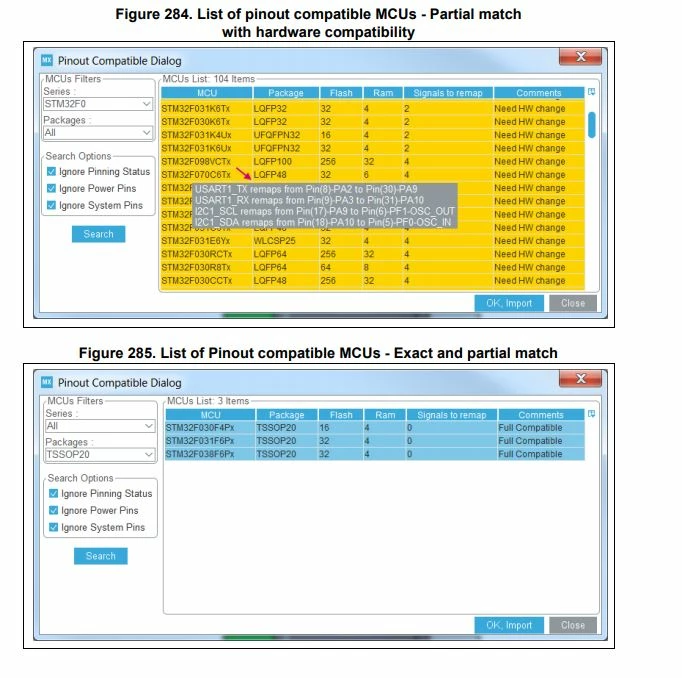
    You can use the feature "List pinout compatible MCUs" within STM32CubeMX tool, it shows the pinout compatibility (which signals can be assigned to the exact same pin location)

    For more details, please refer to the Tutorial 5: Exporting current project configuration to a compatible MCU section, in the UM1718.

    0693W00000D0c72QAB.jpgWhen your question is answered, please close this topic by choosing Select as Best. This will help other users find that answer faster.

    Imen

    In order to give better visibility on the answered topics, please click on 'Best answer' on the reply which solved your issue or answered your question. Thanks

    1 reply

    Imen.DBest answer
    ST Technical Moderator
    July 26, 2021

    Hello @SHugh.2​ ,

    You can use the feature "List pinout compatible MCUs" within STM32CubeMX tool, it shows the pinout compatibility (which signals can be assigned to the exact same pin location)

    For more details, please refer to the Tutorial 5: Exporting current project configuration to a compatible MCU section, in the UM1718.

    0693W00000D0c72QAB.jpgWhen your question is answered, please close this topic by choosing Select as Best. This will help other users find that answer faster.

    Imen

    In order to give better visibility on the answered topics, please click on 'Best answer' on the reply which solved your issue or answered your question. Thanks