

paul0208
Associate III
December 22, 2019
Solved

GPIO control fail on STM32F401 board.
  • December 22, 2019
  • 5 replies
  • 1612 views

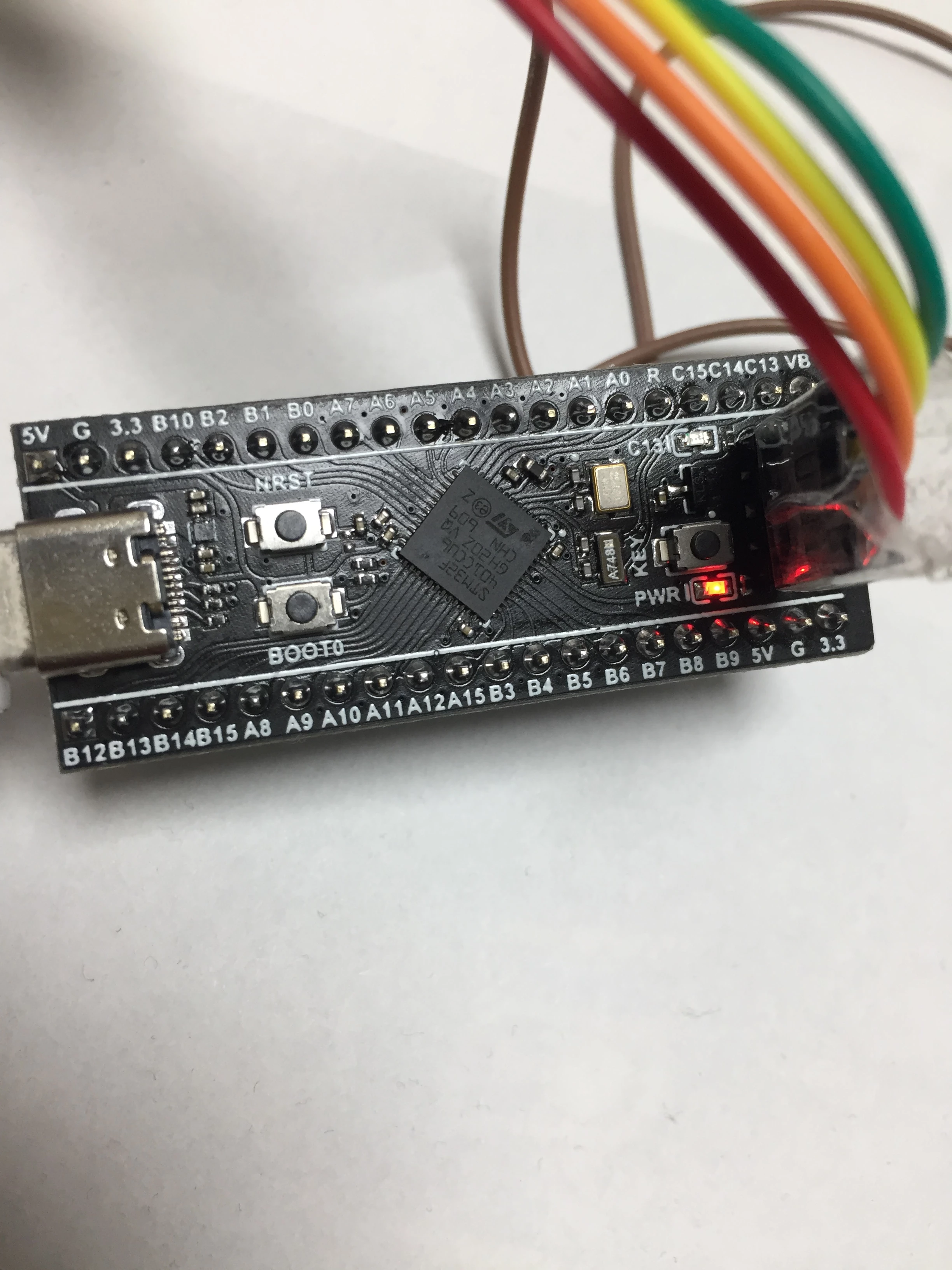
0690X00000ButgcQAB.jpgHi,

I bought the stm32f401 board from aliexpress.

"WeAct" print is on the back.

Seller's site do recommend the DFU method to program the board.

But, I want to use ST-Link, so I made a simple program to control gpio port. Fusing by ST-Link seems to be good, but, the gpio is not controlled.

I am familiar with STM32F10X. I did several projects using STM32F10X.

I though gpio control is simple, but not.

I am using newest SW4STM32 and ST-Link Utility.

My program is as follow:

So simple.

void main(void)

{

 /* GPIOG Peripheral clock enable */

 RCC_AHB1PeriphClockCmd(RCC_AHB1Periph_GPIOA, ENABLE);

 GPIO_InitTypeDef GPIO_InitStructure;

 /* Configure PG6 and PG8 in output pushpull mode */

 GPIO_InitStructure.GPIO_Pin = GPIO_Pin_2;

 GPIO_InitStructure.GPIO_Mode = GPIO_Mode_OUT;

 GPIO_InitStructure.GPIO_OType = GPIO_OType_PP;

 GPIO_InitStructure.GPIO_Speed = GPIO_Speed_100MHz;

 GPIO_InitStructure.GPIO_PuPd = GPIO_PuPd_NOPULL;

 GPIO_Init(GPIOA, &GPIO_InitStructure);

 GPIO_ResetBits (GPIOA, GPIO_Pin_2);

for (;;)

{

}

}

I am fusing and running program while BOOT0 pin is low.

This topic has been closed for replies.
Best answer by paul0208

Hi,

I do upack CubeF4 and compile is success!

My mistake is in ld file

estack value in ld file

My board has 64KB RAM but estack was 96KB's

Working well!!!

BR

Paul

5 replies

paul0208
paul0208Author
Associate III
December 22, 2019

Program seems to be stocked in

Default_Handler:

Infinite_Loop:

  b Infinite_Loop

But, I do not enable any Interrupt.

Any interrupt is enabled in system file?

paul0208
paul0208Author
Associate III
December 22, 2019

HardFault_Handler is occured

Tesla DeLorean
Guru
December 22, 2019

Probably some incorrect settings/assumptions in SystemInit() with respect to clock, PLL or Flash wait states.​

Tips, Buy me a coffee, or three.. PayPal VenmoUp vote any posts that you find helpful, it shows what's working..
berendi
Principal
December 22, 2019

Make sure that you are using the right headers and libraries for the F4, not some old ones for the F1. They are not compatible at register level.

Then make sure that the memory sizes and initial stack pointer value in the linker script (file with *.ld extension) are valid for the onboard MCU.

paul0208
paul0208Author
Associate III
December 23, 2019

Can I get a sample ld file working well?

BR

Paul

Tesla DeLorean
Guru
December 23, 2019

Unpack CubeF4, or pull from repository

STM32Cube_FW_F4_V1.24.1\Projects\STM32F401RE-Nucleo\Templates\SW4STM32\STM32F4xx-Nucleo\STM32F401VEHx_FLASH.ld  

Tips, Buy me a coffee, or three.. PayPal VenmoUp vote any posts that you find helpful, it shows what's working..
paul0208
paul0208AuthorBest answer
Associate III
December 23, 2019

Hi,

I do upack CubeF4 and compile is success!

My mistake is in ld file

estack value in ld file

My board has 64KB RAM but estack was 96KB's

Working well!!!

BR

Paul