VPerr.1
Associate
March 4, 2021
Solved

Fully compatible migration from STM32F745VG to STM32F765VI ?

  • March 4, 2021
  • 3 replies
  • 1374 views

Hello,

For a project I am running code on STM32F745VG. I would like to migrate and replace this MCU with a STM32F765VI with more Flash memory (2MB instead of 1MB).

I saw that these two MCUs are pin to pin compatible, but do I need to modify my hardware (change resistors or capacitors for example...) ?

What are the main differencies that could block the same code from running into the 2 MCUs?

Thank you for your time.

Regards

This topic has been closed for replies.
Best answer by Imen.D

Hello @VPerr.1​ ,

There is no need to modify in hardware.

You have to check the peripherals you need, whether supported or not

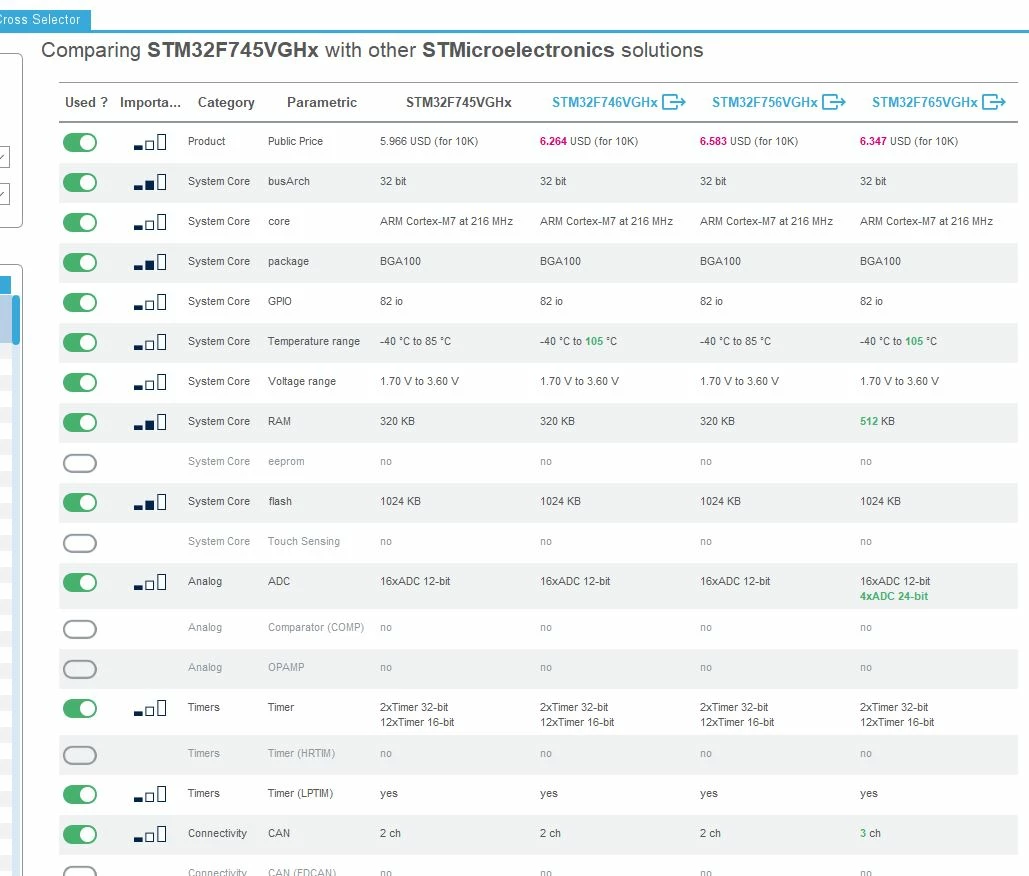
You can use STM32CubeMX, which offers the feature to compare the characteristics of two or more MCUs through the "Cross Selector" tab.
0693W000008w554QAA.jpg 

In addition, STM32CubeMX allows easily migrate from one device to another, this allows you to optimize the time needed:

click Pinout & Configuration tab > Pinout dropdown > List Pinout compatible MCUs

For more details, refer to the UM1718, "Tutorial 5: Exporting current project configuration to a compatible MCU" which shows how to display the list of compatible MCUs and export your current project configuration to a compatible MCU.

Please mark my answer as best by clicking on the "Select as Best" button if it fully solved your issue.  This will help other users find this solution more quickly.

Imen

3 replies

Imen.DBest answer
ST Technical Moderator
March 4, 2021

Hello @VPerr.1​ ,

There is no need to modify in hardware.

You have to check the peripherals you need, whether supported or not

You can use STM32CubeMX, which offers the feature to compare the characteristics of two or more MCUs through the "Cross Selector" tab.

0693W000008w554QAA.jpg 

In addition, STM32CubeMX allows easily migrate from one device to another, this allows you to optimize the time needed:

click Pinout & Configuration tab > Pinout dropdown > List Pinout compatible MCUs

For more details, refer to the UM1718, "Tutorial 5: Exporting current project configuration to a compatible MCU" which shows how to display the list of compatible MCUs and export your current project configuration to a compatible MCU.

Please mark my answer as best by clicking on the "Select as Best" button if it fully solved your issue.  This will help other users find this solution more quickly.

Imen

In order to give better visibility on the answered topics, please click on 'Best answer' on the reply which solved your issue or answered your question. Thanks

Tesla DeLorean
Guru
March 4, 2021

>>What are the main differences that could block the same code from running into the 2 MCUs?

Assumptions about the DTCMRAM size.

Flash update IAP/OTA. Banking end-to-end or side-to-side.

Tips, Buy me a coffee, or three.. PayPal Venmo (See Profile) Up vote any posts that you find helpful, it shows what's working..
VPerr.1
VPerr.1Author
Associate
March 5, 2021

Thank you @Imen DAHMEN​ and @Community member​ for your answers. I will go deeper in comparing the caracteristics of these 2 MCUs (including DTCMRAM size) using STM32CubeMX.

Have a nice day!