


Hasan Oz
Associate
Jul 8, 2018 12:19 PM UTC
Question

Folders with header files not visible in project explorer Atollic

Posted on July 08, 2018 at 14:19

Hi, 

I am evaluating the atollic IDE, and i am annoyed by the fact that the project explorer does not show the folders with the header files.

This is my setup:

         Windows 10 64bit

         Atollic TrueSTUDIO for STM32 9.0.1

         MotorControl Workbench

         Motor Profiler 5.1.1

         Hardware i am working with NUCLEO-F303RE

So i generated a project using 

MotorControl Workbench and a project using cubeMX.

In the project created by cubeMX everythink is fine, but project created by MotorControl Workbench i do not see the ''Inc'' folder in the IDE.
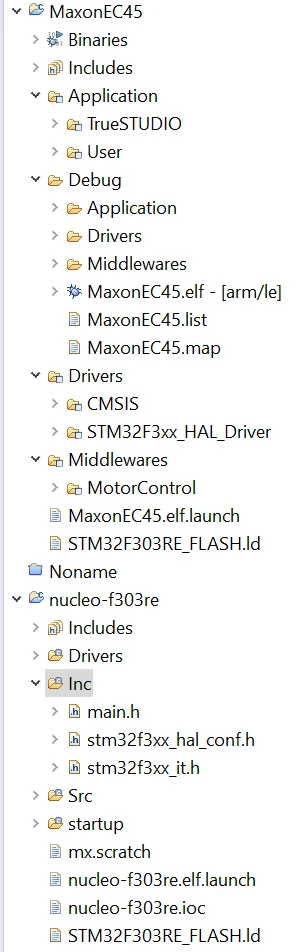
0690X0000060Lh3QAE.png

I see that the project created with motorworkbech has some square icons next to the folders.

My Question is how can i generate a project where i see the include folder, or what setting i have to change in the ide to make it visible?

Regards,

HOS

    This topic has been closed for replies.

    2 replies

    Tesla DeLorean
    Guru
    Jul 8, 2018 12:51 PM UTC
    Posted on July 08, 2018 at 14:51

    Don't the Include files pull from the 'Include Paths' rather than be explicitly enumerated in the project tree.

    Tips, Buy me a coffee, or three.. PayPal Venmo (See Profile) Up vote any posts that you find helpful, it shows what's working..
    Hasan Oz
    Hasan OzAuthor
    Associate
    Jul 8, 2018 5:26 PM UTC
    Posted on July 08, 2018 at 19:26

    Yes they do, but the indexer does not find it there.

    e.g. when i open the source file i should be able to switch to the header file by pressing CTRL+TAB, so i can look into the definitions in the header.

    Searching for files while eclipse has already a mechanism that does that causes a significant productivity loss.