sseveelavanan9
Associate II
January 9, 2017
Solved

flashing another stm32 device via stm32f0-discovery with keil uvision?

  • January 9, 2017
  • 4 replies
  • 1388 views
Posted on January 09, 2017 at 15:00

I have a custom board I have designed and want to develop on, and want to use the my 'stm32f0-discovery' board to program this custom board.

using the SWD pins on CN4 of my stm32f0-discovery board, i can use 'STM32 Link Utility' to flash this custom board i am working on. All seems well. its just its not convenient having to use 

'STM32 Link Utility' every time i want to flash the board when developing. 

how do i setup Keil uVision so that i can flash/debug using this setup?

many thanks

    This topic has been closed for replies.
    Best answer by Khouloud GARSI
    Posted on January 09, 2017 at 17:12

    Hi chendy,

    Please make sure to have the following settings on keil uVision:

    • Project -> Options for Target -> Debug -> Use : ST-Link Debugger
    • Project -> Options for Target -> Debug -> Use : ST-Link Debugger -> Settings -> Debug -> Port : SW
    • Project -> Options for Target -> Utilities -> Use Debud Driver : checked.

    On window:

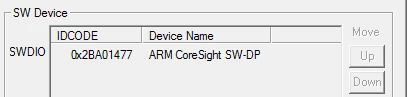
    • Project -> Options for Target -> Debug -> Use : ST-Link Debugger -> Settings -> Debug -> SW Device -> SWDIO

    You should find an ID similar to:

    0690X00000605yWQAQ.png

    Caution

    : Be sure that the ST-Link utility tool is disconnected from your device.

    Khouloud.

    4 replies

    Khouloud GARSI
    Khouloud GARSIBest answer
    ST Employee
    January 9, 2017
    Posted on January 09, 2017 at 17:12

    Hi chendy,

    Please make sure to have the following settings on keil uVision:

    • Project -> Options for Target -> Debug -> Use : ST-Link Debugger
    • Project -> Options for Target -> Debug -> Use : ST-Link Debugger -> Settings -> Debug -> Port : SW
    • Project -> Options for Target -> Utilities -> Use Debud Driver : checked.

    On window:

    • Project -> Options for Target -> Debug -> Use : ST-Link Debugger -> Settings -> Debug -> SW Device -> SWDIO

    You should find an ID similar to:

    0690X00000605yWQAQ.png

    Caution

    : Be sure that the ST-Link utility tool is disconnected from your device.

    Khouloud.

    Tesla DeLorean
    Guru
    January 9, 2017
    Posted on January 09, 2017 at 17:38

    The same way you'd program it if it were just the DISCO board, go into the options for your project and select the ''ST-Link'' in SWD mode for the Debugger/Utilities Pane, and in the Settings for the debugger picking the STM32F0 Flash Algorithm

    0690X000006060uQAA.png

    I'm sure Keil also has documentation and app notes if you care to review

    Tips, Buy me a coffee, or three.. PayPal Venmo (See Profile) Up vote any posts that you find helpful, it shows what's working..
    sseveelavanan9
    Associate II
    January 17, 2017
    Posted on January 17, 2017 at 15:29

    Caution

    : Be sure that the ST-Link utility tool is disconnected from your device.

    Yep was just this, sorry everybody. Works fine when St-Link utility is not running ofc!

    Nimit Vachhani
    Associate III
    September 18, 2017
    Posted on September 18, 2017 at 07:10

    @

    Seveelavanan.Ravicha

    : How did you connect your target STM32 to F0 Discovery ? I have also made my custom board for STM32F030R8T6 and connected to STM32 F0 Discovery board on CN3. I have removed jumpers on CN2, but still i cannot program my target device. It says ST Link USB Error.