Kim.Andy
Associate II
January 26, 2016
Question

FLASH Erase Time

  • January 26, 2016
  • 3 replies
  • 2616 views
Posted on January 26, 2016 at 14:15

Hello..

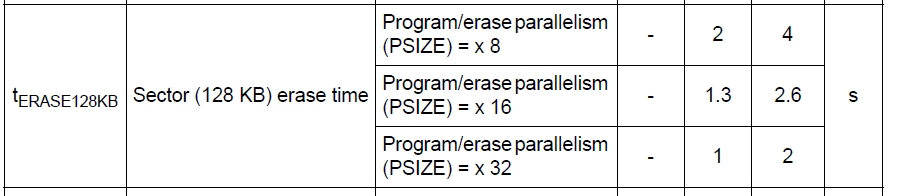
I want to erase flash memory in STM32F207 by sector.

But the Erase time is 1sec typically like following table(datasheet).

(3.3V VPP, 120MHz)

 0690X00000605IZQAY.png  

I want to reduce the erase time into about 100ms ~ 300ms.

How can I do it?..

Thanks.
    This topic has been closed for replies.

    3 replies

    Tesla DeLorean
    Guru
    January 26, 2016
    Posted on January 26, 2016 at 15:47

    How can I do it?..

    Bend time and space?

    Journal writes so you don't do continuous erase/write sequences.

    Tips, Buy me a coffee, or three.. PayPal VenmoUp vote any posts that you find helpful, it shows what's working..
    Kim.Andy
    Kim.AndyAuthor
    Associate II
    January 27, 2016
    Posted on January 27, 2016 at 01:00

    Hello!!

    The flash erase time may be about below 100ms on the code of My predecessor.

    But the erase time of my code is over 2sec like the above table.

    I think that there may be any setting to reduce the erase time.

    My predecessor and I use the same code to erase the flash like below.

    --------------------------------------------------------------------------------

    int8_t FLASH_If_Erase(uint32_t StartSector)

    {

      uint32_t FlashAddress;


      FlashAddress = StartSector;

      /* Device voltage range supposed to be [2.7V to 3.6V], the operation will

         be done by word */ 


      if (FlashAddress <= (uint32_t) USER_FLASH_LAST_PAGE_ADDRESS)

      {

    #ifndef USE_GES_MEM_CONFIG

        //FLASH_EraseSector(FLASH_Sector_4, VoltageRange_3); /* 64 Kbyte */

        //FLASH_EraseSector(FLASH_Sector_5, VoltageRange_3); /* 128 Kbyte */

        FLASH_EraseSector(FLASH_Sector_6, VoltageRange_3); /* 128 Kbyte */

        FLASH_EraseSector(FLASH_Sector_7, VoltageRange_3); /* 128 Kbyte */

        //FLASH_EraseSector(FLASH_Sector_8, VoltageRange_3); /* 128 Kbyte */

        //FLASH_EraseSector(FLASH_Sector_9, VoltageRange_3); /* 128 Kbyte */

        //FLASH_EraseSector(FLASH_Sector_10, VoltageRange_3); /* 128 Kbyte */

        //FLASH_EraseSector(FLASH_Sector_11, VoltageRange_3); /* 128 Kbyte */

    #else

        FLASH_EraseSector(FLASH_Sector_6, VoltageRange_3); /* 128 Kbyte */

        FLASH_EraseSector(FLASH_Sector_7, VoltageRange_3); /* 128 Kbyte */

    #endif

      }

      else

      {

        return (1);

      }

    --------------------------------------------------------------------------------

    How can I reduce the erase time?

    Is there any setting to do that?

    Thanks.

    Tesla DeLorean
    Guru
    January 27, 2016
    Posted on January 27, 2016 at 02:19

    What can you change in your system? Can you increase VPP?

    The Data Sheet is based on the physics at work, you really can't wave a magic wand and change that.

    We put our configuration data in the 16KB sectors, because they are quicker. Any reason you've picked the biggest and slowest ones?

    Tips, Buy me a coffee, or three.. PayPal VenmoUp vote any posts that you find helpful, it shows what's working..