


Bruno Sena
Associate II
December 21, 2017
Solved

External MCU programming STM32

  • December 21, 2017
  • 11 replies
  • 2472 views
Posted on December 21, 2017 at 13:25

I've an Nucleo-f091rc, and i need using this board to programming an external STM32F070, using SWDIO, I've connected SWDIO, SWDCLK, NRST and GND. My external MCU have external 3.3V. When I try to connect I receive the mesage No target connected.
    This topic has been closed for replies.
    Best answer by Bruno Sena
    Posted on December 22, 2017 at 12:41

    0690X00000609IIQAY.png

    Sorry All.

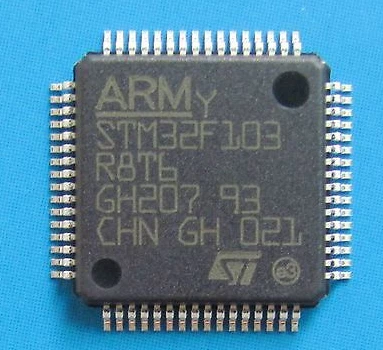
    I'm using the wrong pins to connect the MCU to my pcb board.

    Pin 1 is the smaller, concave mark in the lower-left, and I'm using the pin 1 on 

    larger mark in the upper-right.

    Anyway my external MCU works  fine now.

    Thank you All.

    11 replies

    AvaTar
    Senior III
    December 21, 2017
    Posted on December 21, 2017 at 13:42

    I've connected SWDIO, SWDCLK, NRST and GND.

    Have you verified your wiring with an ohm-meter (or something similar) down to the pin of your target ?

    Aren't you wires too long ?

    I've an Nucleo-f091rc, and i need using this board to programming an external STM32F070, ...

    The Nucleo user manuals use to have a section about debugging external targets, did you follow it ?

    Bruno Sena
    Associate II
    December 21, 2017
    Posted on December 21, 2017 at 13:51

    Hello AvaTar,

    I'm working with this 2 days. I have read a lot of simililar issues like my.

    ''The Nucleo user manuals use to have a section about debugging external targets, did you follow it ?''

    Yes, I did.

    0690X00000609HoQAI.png

    the boot0 pin have a 10k with the GND.

    All VDD and VDDA have a 100nF 

    VSS and VSS is plug on GND

    I'm try using Keil to debug

    0690X00000609HtQAI.png

    Have you verified your wiring with an ohm-meter (or something similar) down to the pin of your target ?

    Aren't you wires too long ?

    Yes, i resold the MCU and Try using Another MCU and still with the same Error.

    Thanks.

    Tesla DeLorean
    Guru
    December 21, 2017
    Posted on December 21, 2017 at 13:57

    Then it is more likely something to do with the design. Show portion of schematic with STM32 connectivity.

    Try also USART1 connectivity via System Loader when BOOT0 pulled HIGH at reset.

    Tips, Buy me a coffee, or three.. PayPal Venmo (See Profile) Up vote any posts that you find helpful, it shows what's working..
    Tesla DeLorean
    Guru
    December 21, 2017
    Posted on December 21, 2017 at 13:44

    If you have removed the jumpers on the Nucleo then the next most probable cause is the target isn't correctly powered.

    Check VDDA connection 

    Check part orientation 

    Check NRST state 

    Tips, Buy me a coffee, or three.. PayPal Venmo (See Profile) Up vote any posts that you find helpful, it shows what's working..
    Bruno Sena
    Associate II
    December 21, 2017
    Posted on December 21, 2017 at 13:56

    VDDA has 10nF with the GND.

    NRST is plug with the Reset of nucleo Board.

    I have removed CN2 jumpers.

    Tesla DeLorean
    Guru
    December 21, 2017
    Posted on December 21, 2017 at 14:31

    >>VDDA has 10nF with the GND. NRST is plug with the Reset of nucleo Board.

    Ok, but what are observed voltages on pins? ie with scope or multimeter

    Tips, Buy me a coffee, or three.. PayPal Venmo (See Profile) Up vote any posts that you find helpful, it shows what's working..
    Bruno Sena
    Bruno SenaAuthorBest answer
    Associate II
    December 22, 2017
    Posted on December 22, 2017 at 12:41

    0690X00000609IIQAY.png

    Sorry All.

    I'm using the wrong pins to connect the MCU to my pcb board.

    Pin 1 is the smaller, concave mark in the lower-left, and I'm using the pin 1 on 

    larger mark in the upper-right.

    Anyway my external MCU works  fine now.

    Thank you All.