

Associate
February 24, 2025
Solved

Error in initializing ST-LINK device. Reason: No device found on target.

  • February 24, 2025
  • 9 replies
  • 2458 views


Hi everyone,


I'm having trouble writing my program to my microcontroller, and I'm hoping someone can help.

When I tried to write my program in STM32CUBEIDE, I received the following message:

STMicroelectronics ST-LINK GDB server. Version 7.8.0
Copyright (c) 2024, STMicroelectronics. All rights reserved.

Starting server with the following options:
 Persistent Mode : Disabled
 LogFile Name : C:\Users\markt\STM32CubeIDE\workspace_1.16.1\PCB_Test\Debug\st-link_gdbserver_log.txt
 Logging Level : 31
 Listen Port Number : 61234
 Status Refresh Delay : 15s
 Verbose Mode : Enabled
 SWD Debug : Enabled
 InitWhile : Enabled

COM frequency = 4000 kHz
Target connection mode: Under reset
Target connection failed
COM frequency = 1800 kHz
Target connection mode: Under reset
Target connection failed
COM frequency = 950 kHz
Target connection mode: Under reset
Target connection failed
COM frequency = 480 kHz
Target connection mode: Under reset
Target connection failed
COM frequency = 240 kHz
Target connection mode: Under reset
Target connection failed
COM frequency = 125 kHz
Target connection mode: Under reset
Target connection failed
COM frequency = 100 kHz
Target connection mode: Under reset
Target connection failed
COM frequency = 50 kHz
Target connection mode: Under reset
Target connection failed
COM frequency = 25 kHz
Target connection mode: Under reset
Target connection failed
COM frequency = 5 kHz
Target connection mode: Under reset
Target connection failed
Target no device found

Error in initializing ST-LINK device.
Reason: No device found on target.


Additionally, when I tried connecting using STM32CUBEProgrammer, I received this message:

 19:58:54 : UR connection mode is defined with the HWrst reset mode
 19:58:54 : ST-LINK SN : B55B5A1A000000006053F001
 19:58:54 : ST-LINK FW : V2J45S7
 19:58:54 : Board : --
 19:58:54 : Voltage : 3.30V
 19:58:54 : Error: Unable to get core ID
 19:58:54 : Error: No STM32 target found! If your product embeds Debug Authentication, please perform a discovery using Debug Authentication


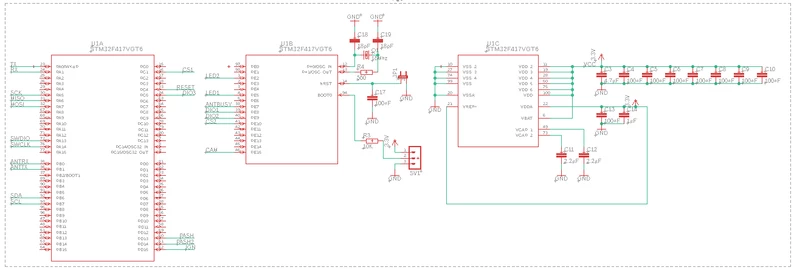
I'm using an ST-Link V2 connected to a custom board via SWD. This is my first custom STM32 design, and here is the schematic:
MarktenKlooster_0-1740424090086.png


I have no idea where the issue might be. Any help would be greatly appreciated!

Thank you in advance for your assistance!


This topic has been closed for replies.
Best answer by MarktenKlooster

Hi everyone,

I have managed to fix the issue. There was probably something wrong with the ST-Link debugger. I have used another one, and now it's working!


Thank you all for your help!

9 replies

TDK
February 24, 2025

Schematic looks okay.

  • Verify part orientation. When text is oriented normally from left to right, pin 1 is on bottom left.
  • Verify VCAP voltages. Should be 1.2V.
  • Verify other power pins.
  • Verify SWD connections.

If you're using a knock-off programmer, note that it might just not work, especially with STM32CubeIDE. Use STM32CubeProgrammer until you can "connect" successfully--it is typically more robust.

"If you feel a post has answered your question, please click ""Accept as Solution""."
AScha.3
Super User
February 24, 2025

Hi,

...and if your st-link is a stick (= clone), set connect : software reset (the "stick" has no reset output!)

AScha3_0-1740427147550.png

And try with CubeProgrammer first (more tolerant with clones...).

If you feel a post has answered your question, please click on " Best Answer ".
Associate
February 24, 2025

This is the st-link that I am using and how it is wired:

MarktenKlooster_0-1740429325306.jpeg

I'm unable to find the setting you mentioned.

Could you please provide more details?


AScha.3
Super User
February 24, 2025

in Cubeprogrammer:

AScha3_0-1740430723560.png

reset mode -> software

+

in IDE -> debug configuration -> same...

AScha3_1-1740430824423.png


If you feel a post has answered your question, please click on " Best Answer ".
MarktenKloosterAuthorBest answer
Associate
February 27, 2025

Hi everyone,

I have managed to fix the issue. There was probably something wrong with the ST-Link debugger. I have used another one, and now it's working!


Thank you all for your help!

Andrew Neil
Super User
February 27, 2025

@MarktenKlooster wrote:

There was probably something wrong with the ST-Link 


It was not a genuine ST-Link:

https://community.st.com/t5/stm32-mcus/how-to-recognize-a-genuine-st-link-v2-versus-a-cloned-one/tac-p/703663/highlight/true#M965 

A complex system that works is invariably found to have evolved from a simple system that worked.A complex system designed from scratch never works and cannot be patched up to make it work.