

Associate
June 21, 2024
Solved

Encoder mode using CHN instead of CH

  • June 21, 2024
  • 3 replies
  • 2520 views

Currently, I try to use an quadrature encoder connected on pins PC12, PC11 and PC10. All these pins have in common that they all can use Timer 8, for channels CHN1, CHN2 and CHN3. When I try to configure Timer 8 in Encoder mode; I can't select the CHN channels. Is there a way to use these pins as input for the encoder?
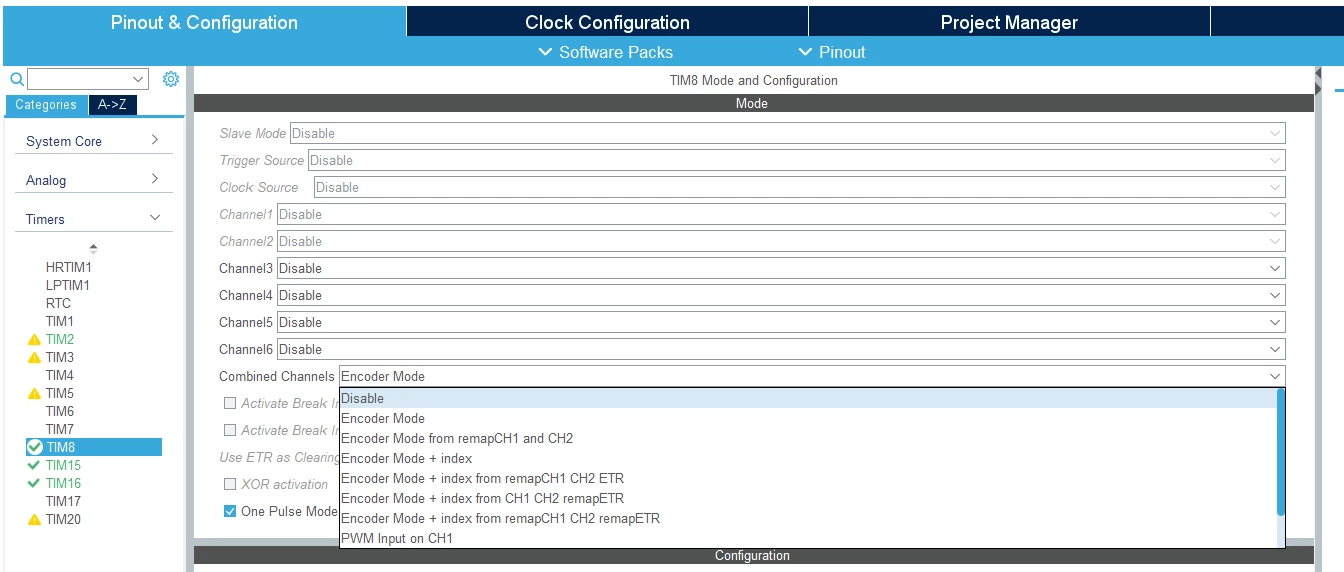
 

kmce_0-1718955733833.png


This topic has been closed for replies.
Best answer by Sarra.S

Hello @kmce, sorry for the delayed answer, 

The encoder mode typically uses two channels (CHN1 and CHN2) for quadrature signals

For Timer 8, the typical channels used for encoder mode are CH1 and CH2. In your case, you are trying to use PC12, PC11, and PC10, which correspond to CHN1, CHN2, and CHN3 respectively. However, CHN3 (PC10) is not typically used for encoder mode.

3 replies

Sarra.SBest answer
ST Employee
August 1, 2024

Hello @kmce, sorry for the delayed answer, 

The encoder mode typically uses two channels (CHN1 and CHN2) for quadrature signals

For Timer 8, the typical channels used for encoder mode are CH1 and CH2. In your case, you are trying to use PC12, PC11, and PC10, which correspond to CHN1, CHN2, and CHN3 respectively. However, CHN3 (PC10) is not typically used for encoder mode.

To give better visibility on the answered topics, please click on Accept as Solution on the reply which solved your issue or answered your question.
waclawek.jan
Super User
August 1, 2024

To put more bluntly the same thing @Sarra.S said above: TIMx_CHxN pins cannot be used as inputs, only as outputs.

JW

kmceAuthor
Associate
August 6, 2024

Thanks for your short and clear answer!