DYann.1
Senior II
November 9, 2023
Solved

DMA with SAI

  • November 9, 2023
  • 30 replies
  • 10654 views

Hello,

I would like to use DMA with SAI but I am having difficulty writing the code. Can you check if my code is correct and why I cannot retrieve the RX values ?


 /* USER CODE BEGIN 2 */

 HAL_SAI_RegisterCallback(&hsai_BlockA1, HAL_SAI_RX_HALFCOMPLETE_CB_ID, HAL_SAI_RxHalfCpltCallback);
 HAL_SAI_RegisterCallback(&hsai_BlockA1, HAL_SAI_RX_COMPLETE_CB_ID, HAL_SAI_RxCpltCallback);
 fresult= HAL_SAI_Init(&hsai_BlockA1);
 if (fresult != HAL_OK)
 	{
 	return HAL_ERROR;
 	}
 fresult = HAL_SAI_Receive_DMA(&hsai_BlockA1, (uint8_t *)playbuf_RX, (sizeof(playbuf_RX))/4);

 HAL_SAI_RegisterCallback(&hsai_BlockB1, HAL_SAI_TX_HALFCOMPLETE_CB_ID, HAL_SAI_TxHalfCpltCallback);
 HAL_SAI_RegisterCallback(&hsai_BlockB1, HAL_SAI_TX_COMPLETE_CB_ID, HAL_SAI_TxCpltCallback);
 fresult= HAL_SAI_Init(&hsai_BlockB1);
 if (fresult != HAL_OK)
	{
 	return HAL_ERROR;
	}

 fresult = HAL_SAI_Transmit_DMA(&hsai_BlockB1, (uint8_t *)playbuf , (sizeof(playbuf))/4);


With CubeMX I have configured 2 DMAs.
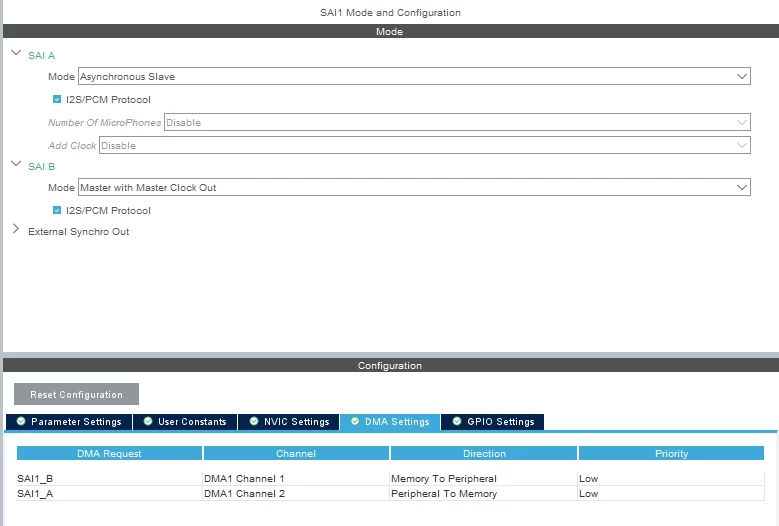
DYann1_0-1699536737285.png

One to send the data and the other to read the data again.
I think I'm missing something for the callback but I don't know how to use it to retrieve the values.

Thank you for your helps. 

Regards.
This topic has been closed for replies.
Best answer by DYann.1

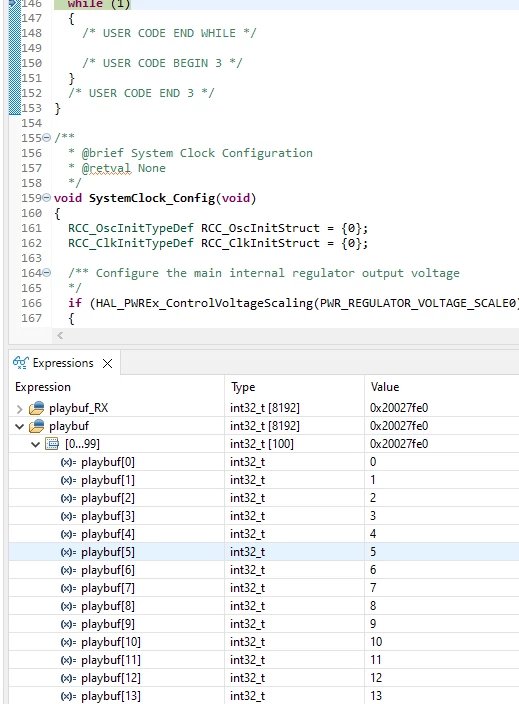
Now it's ok

DYann1_2-1699975477522.png

DYann1_3-1699975686560.png

I just to change the configuration and I configure the SAI in DMA only for transmission but not for reception.

30 replies

LCE
Principal II
November 14, 2023

Maybe you should forget about audio for some time and work on the basics.

Make an LED blink.
Then turn it on / off if some GPIO input is high or low.
Then use that GPIO with an interrupt, and so on.

Start simple, and understand that first.

DYann.1
DYann.1Author
Senior II
November 14, 2023

@LCE wrote:

Maybe you should forget about audio for some time and work on the basics.

Make an LED blink.
Then turn it on / off if some GPIO input is high or low.
Then use that GPIO with an interrupt, and so on.

Start simple, and understand that first.


I'm a beginner but I've already done all this.

DYann.1
DYann.1AuthorBest answer
Senior II
November 14, 2023

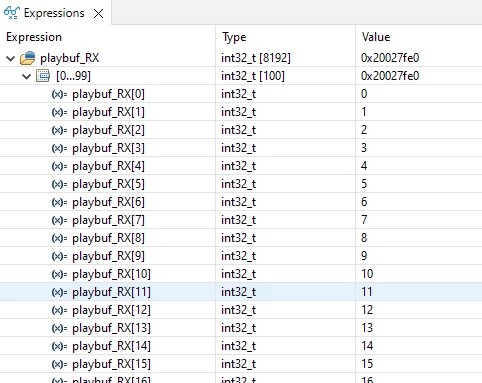
Now it's ok

DYann1_2-1699975477522.png

DYann1_3-1699975686560.png

I just to change the configuration and I configure the SAI in DMA only for transmission but not for reception.

LCE
Principal II
November 14, 2023

Congratulations!

But how did you configure the SAI in RX?

You are mostly showing not so useful pictures, easier to read would be parts of the code with the (initially hidden) </> code insert button.
So it would be interesting to see the SAI inits, and the part where you start TX / RX.

But good that it's working now.


DYann.1
DYann.1Author
Senior II
November 20, 2023

@LCE wrote:

Congratulations!

But how did you configure the SAI in RX?


I configure SAI_RX via CubeMX and nothing else and the code is :

 HAL_SAI_RegisterCallback(&hsai_BlockA1, HAL_SAI_RX_HALFCOMPLETE_CB_ID, HAL_SAI_RxHalfCpltCallback);
 HAL_SAI_RegisterCallback(&hsai_BlockA1, HAL_SAI_RX_COMPLETE_CB_ID, HAL_SAI_RxCpltCallback);
 fresult= HAL_SAI_Init(&hsai_BlockA1);
 if (fresult != HAL_OK)
 	{
 	return HAL_ERROR;
 	}

The SAI inits is too big to show here but the code is generated from CubeMX.


@LCE wrote:

and the part where you start TX / RX.


Before I delete my RX array (for example all at 0) and I use this code to retrieve the values :

for (i=0;i<8192;i++)
 {playbuf_RX[i]=0;}

 for (i=0;i<8192;i++)
 {playbuf[i]=i;}
 HAL_SAI_RegisterCallback(&hsai_BlockA1, HAL_SAI_RX_HALFCOMPLETE_CB_ID, HAL_SAI_RxHalfCpltCallback);
 HAL_SAI_RegisterCallback(&hsai_BlockA1, HAL_SAI_RX_COMPLETE_CB_ID, HAL_SAI_RxCpltCallback);
 fresult= HAL_SAI_Init(&hsai_BlockA1);
 if (fresult != HAL_OK)
 	{
 	return HAL_ERROR;
 	}

 HAL_SAI_RegisterCallback(&hsai_BlockB1, HAL_SAI_TX_HALFCOMPLETE_CB_ID, HAL_SAI_TxHalfCpltCallback);
 HAL_SAI_RegisterCallback(&hsai_BlockB1, HAL_SAI_TX_COMPLETE_CB_ID, HAL_SAI_TxCpltCallback);
 fresult= HAL_SAI_Init(&hsai_BlockB1);
 if (fresult != HAL_OK)
	{
 	return HAL_ERROR;
	}
 fresult = HAL_SAI_Receive_DMA(&hsai_BlockA1, (uint8_t *)playbuf_RX, (sizeof(playbuf_RX))/4);
 if (fresult != HAL_OK)
 	{
 	return HAL_ERROR;
 	}
 fresult = HAL_SAI_Transmit_DMA(&hsai_BlockB1, (uint8_t *)playbuf , (sizeof(playbuf))/4);
 if (fresult != HAL_OK)
 	{
 	return HAL_ERROR;
 	}

Just after HAL_SAI_Transmit_DMA you'll have your data in the RX array which comes from the TX array.