
Associate
October 18, 2023
Question

connection failure st link v2

  • October 18, 2023
  • 6 replies
  • 4019 views

hi, 

Please provide solution for the following issue.

while i was trying to run a program on STM 32 F103C using ST link V2 on STM32cube 1.13.2 ide, getting an error "read version failed".

following is the error message.
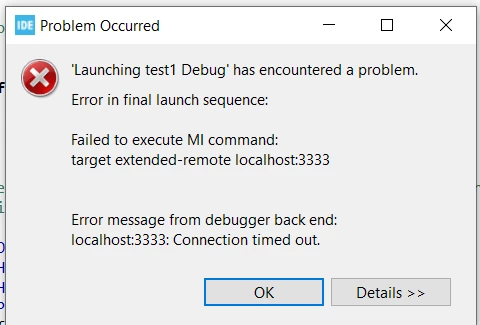
STM32 error message.PNG


Unable to solve this error.

This topic has been closed for replies.

6 replies

Peter BENSCH
ST Technical Moderator
October 18, 2023

Welcome @Pal_555to the community!

Please upload a photo of your ST-LINK.

Regards
/Peter

In order to give better visibility on the answered topics, please click on Accept as Solution on the reply which solved your issue or answered your question.
Pal_555Author
Associate
October 19, 2023

this is the St link I am using.20231019_115558.jpg

Tesla DeLorean
Guru
October 19, 2023

Well that's definitely a third-party product and not an authentic ST-LINK

Tips, Buy me a coffee, or three.. PayPal Venmo (See Profile) Up vote any posts that you find helpful, it shows what's working..
Tesla DeLorean
Guru
October 18, 2023

You might have counterfeit pods or chips. ST provides no support for those devices.

Check if the ST-LINK/V2 is viable directly under STM32 Cube Programmer. If it is then you need to check the settings of how the GDB Server is brought up and local/remote settings there.

Tips, Buy me a coffee, or three.. PayPal Venmo (See Profile) Up vote any posts that you find helpful, it shows what's working..
Peter BENSCH
ST Technical Moderator
October 19, 2023

@Pal_555 You have saved money in the wrong place and should buy an original ST-LINK (if you buy cheap, you buy twice).

However, there are even ways to save money: if you buy a cheap NUCLEO-64, you can use the ST-LINK that is also included. Either break it off or disconnect the respective target MCU by removing the ST-LINK jumper. A NUCLEO-144 can also be used, but it is more expensive than a NUCLEO-64.

Good luck!
/Peter

In order to give better visibility on the answered topics, please click on Accept as Solution on the reply which solved your issue or answered your question.
Pal_555Author
Associate
October 19, 2023

thanks for the solution.
