
Harsha kadlaskar
Associate
March 21, 2018
Solved

commands to automate Dfuse3.0.5 on STM32

  • March 21, 2018
  • 2 replies
  • 1931 views
Posted on March 21, 2018 at 07:24

Need commands to automate Dfuse3.0.5

    This topic has been closed for replies.
    Best answer by David SIORPAES
    Posted on March 21, 2018 at 11:02

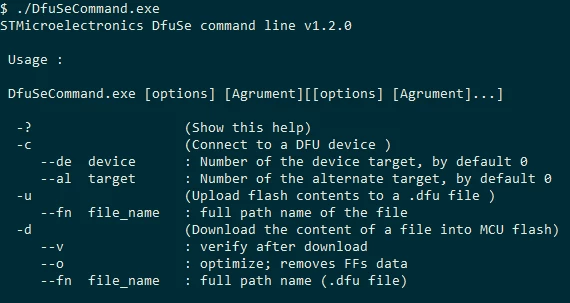
    You can use DfuSe command line version as follows:

    DfuSeCommand.exe -c -d --fn image.dfu

    All options are:
    0690X0000060ABIQA2.png

    2 replies

    David SIORPAES
    David SIORPAESBest answer
    ST Employee
    March 21, 2018
    Posted on March 21, 2018 at 11:02

    You can use DfuSe command line version as follows:

    DfuSeCommand.exe -c -d --fn image.dfu

    All options are:

    0690X0000060ABIQA2.png
    Harsha kadlaskar
    Associate
    March 21, 2018
    Posted on March 21, 2018 at 11:19

    Hi David,

    Thank you for quick reply..

    But i have already tried with commands which are generating errors like below:

    0690X00000604UdQAI.jpg
    Harsha kadlaskar
    Associate
    March 21, 2018
    Posted on March 21, 2018 at 11:31

    h0690X00000604RpQAI.jpg

    Harsha kadlaskar
    Associate
    March 21, 2018
    Posted on March 21, 2018 at 11:32

    where should the image.dfu file should be stored ,because i have save it in another directory D:\ and calling from there.

    Its popping like File does not exist.
